


 Front End Development
  Back End Development
  CMS / ECommerce Development
  Mobile Apps Development
  Cloud Services
  Fullstack Services
  Solution


How to Develop a Diet and Nutrition App: Features, Cost, and Process Explained
Building a diet and nutrition app means creating a platform that helps people track meals, understand their nutritional intake, manage weight, and work toward personal health goals. To develop one, you need to define your target user, choose the right feature set, pick a solid tech stack, handle health data compliance, and work with a development team that understands both mobile app architecture and the health domain. The cost typically starts around $25,000 for a basic MVP and can exceed $120,000 for a full-featured platform. The timeline runs from 3 months for a simple launch to over a year for complex builds.
Why Businesses Are Investing in Diet and Nutrition App Development Right Now
The numbers behind this market are hard to ignore.
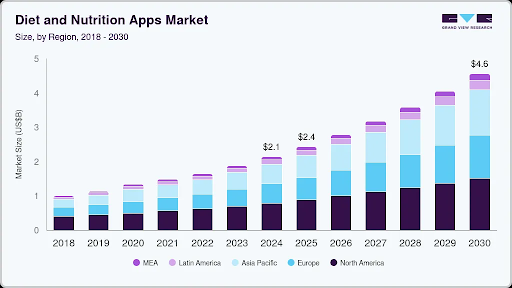
According to Grand View Research, the global diet and nutrition apps market was valued at USD 2.14 billion in 2024 and is projected to reach USD 4.56 billion by 2030, growing at a CAGR of 13.4%. iOS holds the largest platform share at 52.5%, and paid in-app purchase services lead the revenue breakdown at 52.2%.
Beyond the numbers, the behavior shift is real. People are not just downloading fitness apps out of curiosity. Chronic conditions like obesity, type 2 diabetes, and hypertension have made dietary management a daily priority for millions. Gym chains, healthcare providers, dietitian clinics, and wellness startups are all looking for digital tools that go beyond a basic calorie counter.
Wearable devices have added another layer. When a user's Apple Watch or Fitbit is already tracking steps and heart rate, they want an app that connects to that data and builds a fuller picture of their health. That expectation alone has raised the bar for what a nutrition app needs to do.
According to industry data, approximately 48% of consumers already use or are open to using AI-driven nutrition advice, and around 40% of nutrition apps are expected to include conversational AI coaches or virtual dietitians by the end of 2026. If your app does not have some form of personalization built in, users will find one that does.
Types of Diet and Nutrition Apps You Can Build
Not every diet and nutrition app serves the same purpose, and trying to build something for everyone usually results in a product that works well for no one.
Calorie and macro tracking apps are the most common. Users log meals manually, scan barcodes, or use photo-based food recognition to record what they eat. The app calculates calories, proteins, carbohydrates, and fats. MyFitnessPal and Cronometer are the well-known examples in this category.
Meal planning and recipe apps go one step further. Rather than just logging, users get structured meal plans weekly or monthly based on their goals. Recipe databases, shopping list generation, and step-by-step cooking instructions are standard here.
AI-powered personalized diet coach apps use machine learning to adapt recommendations based on user behavior, preferences, and progress over time. Instead of a static meal plan, the app evolves with the user. This category has seen the most product investment in recent years.
Condition-specific apps are built for users managing a diagnosed health condition diabetic diet management, PCOS nutrition, bariatric post-surgery meal plans, or kidney disease dietary restrictions. These apps often integrate with healthcare providers and require stricter compliance standards.
Corporate wellness nutrition apps are sold B2B to employers who want to offer nutrition tools as part of employee health programs. The feature set leans toward group challenges, aggregate reporting, and integration with existing HR platforms.
Diet apps for fitness trainers and coaches serve professionals who create and manage nutrition plans for multiple clients. The core need is a backend where coaches can build templates, monitor client progress, and communicate rather than just personal tracking.
Telehealth-connected dietitian apps bridge the gap between app-based tracking and professional guidance. Users log their food, and a registered dietitian reviews the data and provides advice through video calls or in-app messaging.
Knowing which type you are building determines almost every downstream decision features, tech stack, compliance requirements, and monetization model.
Must-Have Features in a Diet and Nutrition App
Features fall into three buckets: what users interact with daily, what differentiates your app from a generic tracker, and what the backend needs to support operations at scale.
Core User Features
User onboarding with a detailed health profile is where everything starts. Age, weight, height, activity level, dietary restrictions, allergies, and health goals all need to be captured at the beginning. This data drives every recommendation the app makes, so getting it right during onboarding matters more than most teams initially expect.
Meal logging is the backbone of any diet app. The most useful implementations combine three input methods: manual search from a food database, barcode scanning for packaged products, and photo-based recognition for home-cooked or restaurant meals. The food database quality is critical and inaccurate nutritional data destroys user trust quickly.
Calorie and macronutrient tracking gives users a running total of their daily intake across proteins, carbohydrates, fats, and fiber. Micronutrient tracking (vitamins, minerals, sodium) is increasingly expected in mid-tier and premium apps.
Water intake tracking is a small but high-engagement feature. It adds daily interaction points and keeps users opening the app even on days when they do not log full meals.
Personalized meal plans based on user goals weight loss, muscle gain, maintenance, or condition management give the app a reason to exist beyond passive logging.
Progress tracking with visual dashboards helps users see their journey over time. Weight trends, calorie averages, macro balance, and streak tracking all contribute to the sense of progress that keeps users coming back.
Push notifications and reminders for meal logging, hydration, and weekly check-ins are basic retention mechanics that should not be skipped.
Wearable device sync with Apple HealthKit and Google Fit lets the app pull activity data and adjust calorie targets accordingly, making the nutrition experience feel connected rather than isolated.
Advanced Features That Differentiate Your App
AI-powered food recognition through photo capture lets users point their camera at a plate and have the app identify the meal and estimate nutritional content. The accuracy is still imperfect, but it removes friction dramatically, especially for users who find manual logging tedious.
A conversational AI nutrition coach answers user questions, suggests meals, and keeps users motivated through natural language interaction. This is the feature category growing fastest right now.
A grocery list generator that pulls from selected meal plans and groups items by category is a practical feature that drives real daily utility and a natural place to introduce affiliate partnerships with grocery delivery services.
Restaurant meal lookup with nutritional data for popular chains helps users make informed decisions when eating out, which is often where diet tracking breaks down.
Integration with lab reports or health records allows condition-specific apps to personalize recommendations based on actual health metrics blood glucose levels, HbA1c, cholesterol rather than self-reported data.
Community features like group challenges, leaderboards, and peer support have consistently shown to improve long-term retention. They are particularly effective in corporate wellness and weight loss app categories.
A dietitian consultation booking module, connected to video calling or in-app chat, is the bridge between a self-service app and professional-grade guidance. It also opens a revenue stream through appointment fees.
Admin Panel Features
Behind the user-facing app, your team needs a dashboard to manage users, review content, run push notification campaigns, and analyze engagement data. Subscription and billing management, recipe and meal plan content management, and role-based access for internal teams are all standard requirements that need to be scoped into the build from the start.
Step-by-Step Diet and Nutrition App Development Process
Step 1: Define Your App's Purpose and Target User
Before writing a line of code, the product owner needs to answer two questions: who is this for, and what one problem does it solve better than anything else available? A weight loss app for women over 40 has completely different design and feature priorities than a sports nutrition tracker for competitive athletes. The sharper this definition, the better every subsequent decision becomes.
Step 2: Market and Competitor Research
Apps like MyFitnessPal, Noom, Cronometer, and Lifesum have been around long enough to show what works and where user frustration lives. Read app store reviews for the top competitors. The negative reviews are more valuable than the positive ones; they tell you exactly what users are missing. That gap is your product opportunity.
Step 3: Feature Scoping and MVP Planning
An MVP (minimum viable product) is not a lesser version of your app. It is the most focused version, the one that delivers clear value to your core user without the overhead of every feature you eventually want to build. Decide what goes in V1 and what goes in V2. This decision affects your budget, your timeline, and your ability to get real user feedback before over-investing in features nobody ends up using.
Step 4: UI/UX Design
Diet apps live or die by their onboarding and daily logging experience. If logging a meal takes more than 30 seconds, users stop doing it. The UX should optimize for speed, quick-add recent meals, smart suggestions based on time of day, and minimal taps to complete a log entry. The visual design needs to make progress feel visible and motivating rather than clinical. A good UI/UX design process for a health app typically includes user journey mapping, wireframing, prototype testing, and accessibility review before a single line of frontend code is written.
Step 5: Technology Stack Selection
The right stack for a nutrition app depends on your target platforms, the AI features you plan to include, and your expected user volume. This is covered in detail in the next section.
Step 6: Backend and Database Development
The backend needs to handle user profiles, food databases with millions of entries, meal log records, personalization logic, and if you are building a social layer community interactions. Food databases can be built from third-party APIs like Nutritionix or USDA FoodData Central, or assembled from scratch for niche dietary categories. The architecture decisions here affect how quickly the app can scale when user numbers grow.
Step 7: Third-Party API Integrations
A nutrition app rarely operates in isolation. Nutrition data APIs, wearable SDKs, payment gateways for subscriptions, and potentially telehealth video platforms all need to be integrated and tested. Each integration adds complexity to the build timeline and needs to be accounted for in the project scope.
Step 8: Testing
Testing a health app involves more layers than a typical mobile app. Functional testing confirms features work as expected. Performance testing checks how the app handles concurrent users logging meals at the same time. Security testing identifies vulnerabilities in how health data is stored and transmitted. Compliance testing ensures the app meets HIPAA or GDPR requirements before it handles real user data. Cutting corners on testing in a health app is particularly costly; a data breach or inaccurate nutritional data can destroy the product's reputation instantly.
Step 9: App Store Submission and Launch
Apple's App Store and Google Play both have specific guidelines for health and medical apps that go beyond their standard review process. Health data declarations, privacy policy requirements, and content accuracy standards are reviewed carefully. Building in extra time for app store review particularly for anything that touches user health metrics is a practical necessity.
Step 10: Post-Launch Maintenance and Iteration
The launch is not the endpoint. User behavior data from the first 90 days will tell you more about what your app actually needs than any pre-launch planning did. Bug fixes, feature updates based on feedback, database updates to the food library, and OS compatibility updates are all ongoing costs that should be budgeted from the start.
Lessons Learned From Building Health and Wellness Apps
Over the years, we have seen that the success of a health and wellness app depends on much more than feature lists and technology choices. User behavior, data accuracy, and long-term engagement often have a greater impact on product success than businesses initially expect.
Simplicity Drives User Retention
Many app owners want to include every possible feature in the first release. In practice, users are more likely to stay engaged with apps that make daily actions simple and fast. Features such as meal logging, progress tracking, and personalized recommendations should require minimal effort from the user.
Accurate Data Builds Trust
Users rely on nutrition apps to make health-related decisions. Even small inaccuracies in calorie counts, nutritional values, or meal recommendations can reduce confidence in the product. Reliable food databases and regular data validation are essential for maintaining user trust.
Personalization Matters More Than Generic Recommendations
Users expect recommendations that match their goals, dietary preferences, allergies, activity levels, and lifestyle habits. Generic meal plans often result in lower engagement, while personalized experiences encourage long-term app usage.
Onboarding Has a Direct Impact on Retention
The first few minutes inside the app often determine whether a user continues using it. A clear onboarding experience that collects only the most important information while quickly delivering value tends to achieve better retention rates than lengthy registration processes.
Wearable Integrations Increase User Engagement
Users increasingly expect nutrition apps to work alongside fitness trackers and health monitoring devices. Integrations with Apple Health, Google Fit, Fitbit, and similar platforms help create a connected experience and reduce manual data entry.
Security and Privacy Cannot Be an Afterthought
Health-related applications handle sensitive personal information. Security requirements, user consent management, and data protection measures should be considered from the planning stage rather than added later in development.
Continuous Improvement Is Essential
Successful nutrition apps evolve based on user feedback and usage data. Monitoring user behavior, identifying drop-off points, and regularly improving features helps maintain engagement and improve overall product performance over time.
The Biggest Lesson
The most successful health and wellness apps are not always the ones with the largest number of features. They are the ones that make healthy habits easier to follow, provide reliable information, and deliver a consistent user experience every day.
Tech Stack for Building a Diet and Nutrition App
The technology choices here matter because they affect development speed, long-term scalability, and how easily new features can be added later.
For mobile development, Flutter and React Native are the most practical cross-platform choices for diet apps. Flutter produces visually consistent interfaces across iOS and Android and performs particularly well for apps with complex animations or real-time data displays. React Native has a larger ecosystem and integrates more easily with certain third-party health SDKs. Both are significantly faster and more cost-effective to build than separate native apps for each platform, which matters when budgets are a consideration. Our Flutter app development and React Native development teams work regularly on health and wellness apps and can advise on which fits your specific product requirements.
For the backend, Node.js is a solid choice for apps that need real-time features like live coaching, instant notifications, community interactions. Python with Django or Flask is preferred when the app involves significant machine learning components, such as food recognition or adaptive meal recommendations. Laravel (PHP) is a dependable option for straightforward CRUD-heavy applications where database operations are more important than real-time behavior. Our Node.js development, Python development, and Laravel development teams handle backend builds across all three regularly.
For databases, PostgreSQL handles structured relational data well user records, meal logs, subscription plans. MongoDB is useful when data structures are more flexible, such as varied food item schemas across different databases and categories.
For food and nutrition data APIs, Nutritionix provides one of the largest restaurant and branded food databases. Edamam is strong for recipe nutritional analysis. USDA Food Data Central is a free, authoritative source particularly useful for building condition-specific or clinical-grade applications.
For the AI layer, TensorFlow Lite enables on-device machine learning for food recognition meaning the model runs on the user's phone rather than calling a server, which improves speed and privacy. Cloud-based ML services from AWS or Google Cloud are used for more computationally intensive personalization models.
For cloud infrastructure, AWS and Google Cloud are both mature choices with good healthcare compliance toolkits and scaling capabilities.
For wearable connectivity, Apple HealthKit, Google Fit API, and the Fitbit API cover the majority of the wearable market. Each has its own integration process and data access requirements.
Diet and Nutrition App Architecture Overview
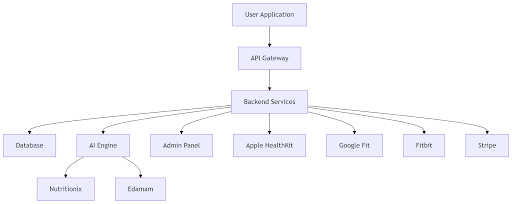
A typical diet and nutrition app consists of several interconnected layers that work together to deliver personalized recommendations, track user activity, and manage health data securely.
Data Compliance and Security in Nutrition App Development
This is the section most development discussions leave out or mention in passing. But for anyone building a health app seriously, compliance is not an optional layer you add at the end. It needs to be built into the architecture from day one.
HIPAA (Health Insurance Portability and Accountability Act) applies to apps that handle Protected Health Information (PHI) in the US. If your app stores or processes data that can be linked to an individual's health conditions, medical history, or treatment, HIPAA applies. The practical implications include encrypted data storage, access controls, audit logs, business associate agreements with any third-party vendors that handle user data, and a breach notification process.
GDPR (General Data Protection Regulation) applies to any app with users in the European Union, regardless of where the company is based. Key requirements include explicit user consent for data collection, the right for users to request deletion of their data, clear privacy policies in plain language, and data minimization only collecting what you actually need.
Beyond regulatory requirements, good security practice means encrypting all data at rest and in transit, using OAuth 2.0 for authentication, implementing role-based access controls in the admin panel, and having a defined process for third-party vendor due diligence.
Apple and Google both have their own health data policies that apps must follow on their respective platforms separate from government regulations. Violating these can result in app removal, which is a business-ending event for a consumer health product.
Condition-specific apps that connect with healthcare providers face the most rigorous compliance requirements but also tend to attract more loyal, paying users and healthcare system partnerships.
How Much Does It Cost to Develop a Diet and Nutrition App?
Cost depends on what you are building, how complex the features are, how many platforms you are targeting, and where your development team is based. Here are honest estimates based on typical project scopes.
A basic MVP meal logging, calorie tracker, food database integration, user profiles, and simple progress charts typically run between $4,000 and $5,000. This gets you to market with enough functionality to validate demand and collect real user feedback.
A mid-range app that adds AI-powered features, wearable integration, personalized meal plans, push notifications, and a solid admin panel typically costs between $5,000 and $15,000. This is the range where most serious consumer or B2B products sit.
A full-featured platform with food recognition, conversational AI coaching, telehealth consultation modules, community features, multi-platform support (iOS, Android, and web), and enterprise-grade security runs $15,000 and above.
The factors that push cost upward: building for both iOS and Android natively rather than cross-platform, custom food database creation rather than third-party APIs, HIPAA compliance architecture, complex AI model training, and multiple third-party integrations. The factors that keep it manageable: starting with an MVP, using cross-platform frameworks, leveraging existing nutrition APIs, and working with a team that has prior HealthTech experience and does not need to learn the domain from scratch.
Offshore development teams in India typically offer rates between $25 and $50 per hour, compared to $100 to $200 per hour for US-based teams. The total cost difference on a mid-range project can be $40,000 to $80,000, which is why many product owners choose to work with experienced offshore teams with a strong track record in health app development.
Monetization Models for Diet and Nutrition Apps
Building a good app is one challenge. Building one that generates sustainable revenue is another.
The freemium model is the most common. A free tier with basic logging and calorie tracking, and a premium subscription that unlocks meal planning, AI coaching, detailed analytics, and advanced features. The conversion goal is to make the free experience genuinely useful but leave users clearly aware of what they are missing.
Monthly and annual subscription tiers give users a lower barrier to entry with monthly billing, while an annual plan encourages longer-term commitment, typically offered at a 20 to 30 percent discount. Annual subscribers churn at significantly lower rates.
In-app purchases work well for one-time specialty content a 30-day ketogenic meal plan, a post-pregnancy nutrition program, or a competition prep diet for athletes. These can be tested without affecting the core subscription offering.
Corporate wellness B2B licensing is an often-overlooked revenue stream for consumer nutrition apps that have accumulated engagement data. Employers pay per-seat or flat annual fees to offer the app as part of employee benefits packages. The contract sizes are much larger than individual subscriptions and the churn rate is very low.
White-label licensing to gyms, dietitian clinics, and healthcare providers is a similar B2B path. The buyer gets a branded version of your app infrastructure without building their own.
Affiliate partnerships with supplement brands, organic grocery services, and meal kit delivery companies are a natural extension of the food and nutrition context as long as the recommendations remain genuinely useful and not commercially driven first.
Common Mistakes to Avoid When Building a Nutrition App
Most of these mistakes are avoidable if you know to look for them before development starts rather than after launch.
Building too many features in the first version is the most common and most costly mistake. Scope creep extends timelines, inflates budgets, and often results in a product that is average at everything and excellent at nothing. A focused V1 with five features that work flawlessly will outperform a bloated V1 with fifteen features that feel unfinished.
Ignoring food database accuracy early on is a trust problem that compounds over time. If users enter a meal and get a calorie count that is clearly wrong, they stop trusting the app. Either integrate a verified third-party food database from the start or invest in manual curation for your core food categories.
Skipping compliance until after launch is expensive to fix retroactively. Rebuilding data architecture to meet HIPAA standards after a product is already live with real user data is a far more complicated and costly project than designing for it from the beginning.
Designing only for your ideal user and ignoring edge cases leads to poor retention. A vegan user trying to log a plant-based meal in an app that defaults to meat-centric macro targets will abandon it quickly. Dietary diversity should be a first-class design consideration, not a setting buried in preferences.
Underinvesting in the onboarding experience is a pattern seen repeatedly in nutrition app user data. Most user churn happens in the first session. If the onboarding is long, confusing, or asks for too much before delivering any value, users leave and do not come back.
No offline functionality for users with inconsistent internet connectivity means they cannot log meals on an airplane, in a remote area, or during network downtime. Even basic offline caching for recent meals and food lookups significantly reduces this friction.
Neglecting post-launch analytics means repeating the same mistakes in V2. Knowing where users drop off, which features get used most, and what the average session length looks like gives the product team data to make better decisions. Building analytics instrumentation into the app from the start costs far less than trying to retrofit it later.
How Long Does It Take to Develop a Diet and Nutrition App?
Timeline depends on scope, team size, and how much decision-making happens quickly versus slowly.
A basic MVP with core logging, calorie tracking, a food database, and user profiles typically takes 1 to 3 months from kick-off to app store approval.
A mid-range app with AI personalization, wearable integration, meal planning, and an admin panel typically takes 3 to 5 months.
A full-featured platform with food recognition, telehealth modules, community features, and enterprise compliance architecture typically runs 5 to 10 months.
The factors that extend timelines the most: unclear requirements at the start of development (which causes rework mid-build), long feedback cycles during design review, app store rejection and resubmission, and third-party API integration delays particularly with wearable platforms that have their own review processes.
Starting with a well-scoped MVP is consistently the fastest path to getting a real product in front of real users. Getting that first honest feedback is almost always more valuable than spending another three months building features based on assumptions.
For teams that are also building web-based admin tools or companion web portals alongside their mobile app, working with a team experienced in custom software development ensures the web and mobile layers are architecturally consistent from the beginning.
What to Look for in a Diet and Nutrition App Development Partner
Not every mobile app development company is equipped to handle the specific demands of a health app. Here is what actually matters when evaluating development partners for this type of project.
Prior HealthTech experience is the first filter. A team that has previously built apps handling health data, medical records, or wearable integrations will already understand the compliance landscape, the edge cases in food database integration, and the UX patterns that work in wellness contexts. Building that knowledge from scratch on your project is expensive.
Understanding of food database architecture is more specialized than it sounds. Managing millions of food items, handling user-contributed entries, keeping nutritional data accurate, and reconciling data from multiple sources (USDA, branded products, restaurant chains) requires specific backend design thinking.
HIPAA and GDPR knowledge at the architecture level not just the policy level matters. Some teams understand the regulations as a compliance checklist. Better teams understand how those requirements translate into database encryption choices, access control design, and third-party vendor agreements.
Cross-platform mobile development capability means being able to build for both iOS and Android without doubling the development effort. Teams with strong Flutter or React Native expertise can deliver well on this.
Post-launch support and iteration capacity is worth asking about explicitly. Many development agencies are excellent at building V1 but hand off and move on. Health apps require ongoing maintenance, OS updates, food database refreshes, and feature iteration based on real user data. A long-term partnership structure is more valuable than a one-time delivery contract.
Transparent communication and project management sounds obvious but is the most common source of project failure. Weekly status updates, shared project tracking, clear escalation paths, and honest conversations about timeline risks are signs of a team that is actually accountable.
Building Your Diet and Nutrition App the Right Way
A diet and nutrition app is not just a mobile app with a food database. It is a product that people interact with multiple times every day, that handles sensitive personal health data, and that needs to deliver genuinely useful, accurate information to earn long-term user trust.
The development process from defining your audience and scoping features, to choosing the right stack, handling compliance, and planning for post-launch iteration requires careful thinking at every stage. The teams that get it right are the ones who understand both the technical requirements and the human behavior patterns behind why people use (or stop using) health apps.
If you are planning a build in the health and wellness space, looking at what an experienced development team has already built in this domain is a better starting point than a feature list. You can explore our work in nutrition app development and our broader fitness app development and health monitoring app development projects to understand how we approach HealthTech builds.
At Nyusoft, we have helped startups, wellness brands, and healthcare-adjacent businesses plan, design, and build mobile health applications from initial product scoping through post-launch iteration. If you are working through the planning phase for a diet and nutrition app, we are happy to talk through your requirements and help you figure out what your first version should actually include.
FAQs
Q1. What is the difference between a diet app and a nutrition app?
A diet app is primarily focused on helping users follow a specific eating pattern weight loss plans, calorie deficits, or structured meal schedules. A nutrition app is broader. It tracks what users eat across calories, macros, and micronutrients, and gives them a detailed picture of their nutritional intake without necessarily prescribing a diet. In practice, most modern products combine both, but the core design intent is different. A diet app motivates behavior change. A nutrition app provides data visibility. Understanding which one your audience actually needs shapes every feature and UX decision in the build.
Q2. Do I need a registered dietitian involved in building a nutrition app?
Not legally required in most cases, but practically very valuable. Nutritional logic macro calculations, meal plan templates, calorie targets for different health conditions needs to be medically accurate. An app that gives incorrect nutritional guidance to someone managing diabetes or recovering from surgery carries real risk. Involving a registered dietitian during the product design phase to review calculation logic, flag harmful edge cases, and validate condition-specific content is a step many first-time health app builders skip and later regret. For clinical-grade platforms, dietitian involvement is effectively non-negotiable.
Q3. What food databases do nutrition apps typically use?
The three most commonly used are the USDA Food Data Central (free, government-maintained, strong on whole foods), Nutritionix (large branded and restaurant food database, paid API), and Edamam (strong for recipe nutritional analysis, paid API). Many apps use more than one source to cover different food categories. The accuracy and coverage of your food database directly affects user trust if someone scans a product barcode and gets a clearly wrong calorie count, they stop trusting the app entirely. Choosing and integrating the right data source is a foundational technical decision, not an afterthought.
Q4. How do nutrition apps calculate personalized calorie targets?
Most apps use established formulas like the Mifflin-St Jeor equation or the Harris-Benedict equation to calculate Basal Metabolic Rate (BMR) based on the user's age, weight, height, and biological sex. That BMR is then multiplied by an activity factor (sedentary, lightly active, moderately active, very active) to estimate Total Daily Energy Expenditure (TDEE). The app then adjusts the calorie target up or down based on the user's stated goal weight loss, maintenance, or muscle gain. More advanced apps layer in real-time data from wearables to adjust targets dynamically rather than relying on static activity level selections.
Q5. Can a nutrition app work without an internet connection?
It depends on how the app is built. A well-built nutrition app should support basic offline functionality, logging recently used meals, accessing saved meal plans, and viewing the day's progress without requiring a live internet connection. Data then syncs when connectivity resumes. Many budget builds skip this, which causes frustration for users in areas with poor connectivity, on flights, or in gym environments with weak signals. Building offline-first architecture from the start is more cost-effective than retrofitting it after launch.
Q6. What is the difference between building an MVP and a full nutrition app?
An MVP (minimum viable product) for a nutrition app includes the core functionality needed to deliver value to a specific user group and validate that people will actually use and pay for the product. Typically that means food logging, calorie and macro tracking, basic goal setting, and a user profile. A full app adds personalized meal plans, AI recommendations, wearable sync, community features, coaching dashboards, and deeper analytics. The MVP approach is not about releasing a low-quality product it is about reaching real users faster with a focused product, gathering data, and building subsequent versions based on what users actually do rather than what was assumed during planning.
Q7. What role does AI play in a diet and nutrition app?
AI contributes at several levels in a modern nutrition app. Food recognition through photo capture lets users log meals by taking a picture rather than manually searching. Recommendation engines analyze a user's logged data and eating patterns to suggest meals, flag nutritional gaps, and adapt plans over time. Conversational AI coaches respond to user questions in natural language helping with substitutions, meal ideas, and motivation. Predictive analytics can identify behavior patterns that typically precede goal abandonment and trigger proactive nudges. None of these replace human dietitian guidance in clinical contexts, but they significantly improve engagement and personalization for self-directed users at scale.
Q8. What is the biggest reason nutrition apps fail to retain users?
The most consistent pattern in nutrition app churn data points to friction in the daily logging experience. If logging a meal takes more than a few taps, users stop doing it. Once the logging habit breaks typically within the first two weeks engagement drops sharply and rarely recovers. Poor onboarding that does not deliver immediate value in the first session is a close second. Users who do not see a clear reason to come back after the first use almost never do. Apps that focus intensely on reducing logging friction and designing a compelling first session retain users at significantly higher rates than apps built around feature volume.
Q9. How is a B2B nutrition app different from a B2C one in terms of development?
A B2C nutrition app is built for individual end users downloading from an app store. The design prioritizes personal motivation, habit tracking, and consumer-grade UX. A B2B nutrition app sold to employers, hospital systems, or healthcare networks needs multi-role architecture from the start. Administrators manage programs and users, coaches or dietitians manage individual clients, and end users interact with their own data. Reporting, compliance documentation, role-based access controls, and integration with existing enterprise systems are requirements that simply do not exist in a consumer build. The two product types share some feature logic but require different architecture thinking from the first design decision.
Q10. Can a diet and nutrition app be white-labeled for other brands?
Yes, and it is a legitimate business model. A white-label nutrition app is built once with a flexible, rebrandable architecture logo, color scheme, app name, and sometimes feature configuration and then deployed under different brand identities for different clients. Gyms, supplement companies, insurance providers, and corporate wellness programs often prefer to offer a branded nutrition tool rather than build one from scratch or recommend a third-party consumer app. The key technical requirement for a successful white-label build is that the multi-tenant architecture is designed into the product from the start, not bolted on later. Retrofitting white-label capability into a single-tenant consumer app is rarely straightforward.