


 Front End Development
  Back End Development
  CMS / ECommerce Development
  Mobile Apps Development
  Cloud Services
  Fullstack Services
  Solution


Doctor Appointment App Development: Features, Process, Cost & Tech Stack
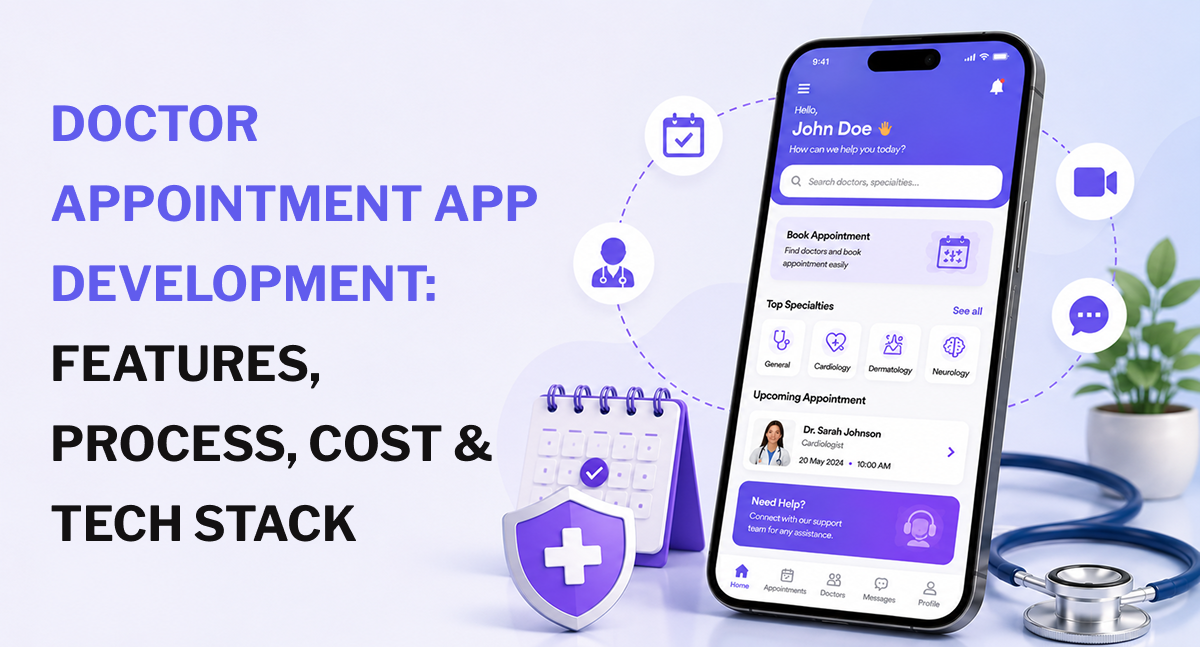
Phone-based appointment scheduling is one of healthcare's most stubborn inefficiencies. Patients call during limited hours, wait on hold, and sometimes never get through at all. Front desk staff spend a significant chunk of their day managing calendars, chasing no-shows, and manually entering the same information into multiple systems. The result is predictable missed appointments, lost revenue, and patients who simply give up.
That's the problem a well-built doctor appointment app solves. Not just for convenience, but for clinic revenue, patient retention, and the operational efficiency that lets healthcare providers actually focus on care.
The direct answer on how to approach doctor appointment app development: you need to get four layers right, simultaneously booking logic, patient-provider communication, scheduling infrastructure with real EHR integration, and HIPAA-compliant data handling from the first moment a patient enters their name. Get these right, and you reduce no-shows, cut administrative overhead, and build something clinics actively recommend to patients. Get them wrong, and you've built a digital phone call with a worse user experience.
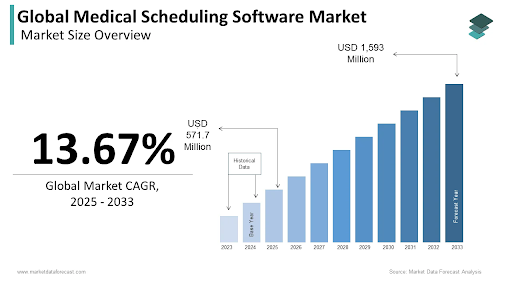
The global medical scheduling software market is expected to grow from $571.7 million in 2025 to $1,593 million by 2033 at a CAGR of 13.67% (Source: Market Data Forecast). That growth is demand-driven, not speculation 75% of patients now prefer digital booking over phone calls, and that preference continues to accelerate.
Why Clinics and Healthcare Startups Are Investing in Appointment Apps Right Now
Before the technical case, the business case. The ROI on a well-built scheduling app is measurable and specific.
No-Shows Are a Measurable Revenue Problem
The global average hospital no-show rate sits at 23.5%, with each missed appointment carrying an average cost of $200 or more. A 50-patient-per-day clinic with a 19% no-show rate that achieves even a 30% reduction through better scheduling and reminders recovers roughly $136,800 annually. That number alone justifies most development investments before counting a single efficiency gain elsewhere.
Research makes the channel difference clear. Online bookings recorded a 1.8% no-show rate compared to 5.9% for offline bookings. The booking channel itself changes patient behavior people who self-schedule are more committed to attending.
Administrative Overhead That Can't Scale
Practices still managing scheduling by phone report 60–80% of front desk call volume consists of appointment-related tasks that software handles automatically. Manual scheduling creates inconsistent data across systems, double bookings, and missed insurance eligibility checks that surface as billing problems weeks later.
Clinics using scheduling apps consistently report reduced administrative overhead, higher appointment fill rates, and more time available for actual patient-facing work.
Patient Expectations Have Already Shifted
75% of patients now prefer digital booking. This isn't a preference limited to younger demographics it spans age groups. Patients who can self-schedule at midnight, reschedule with one tap from a reminder message, and receive automated follow-up care for missed visits show measurably higher adherence than those navigating phone trees.
The competitive pressure is real. Practices that don't offer digital scheduling are actively losing patients to those that do.
Types of Doctor Appointment Apps — Choose Your Model First
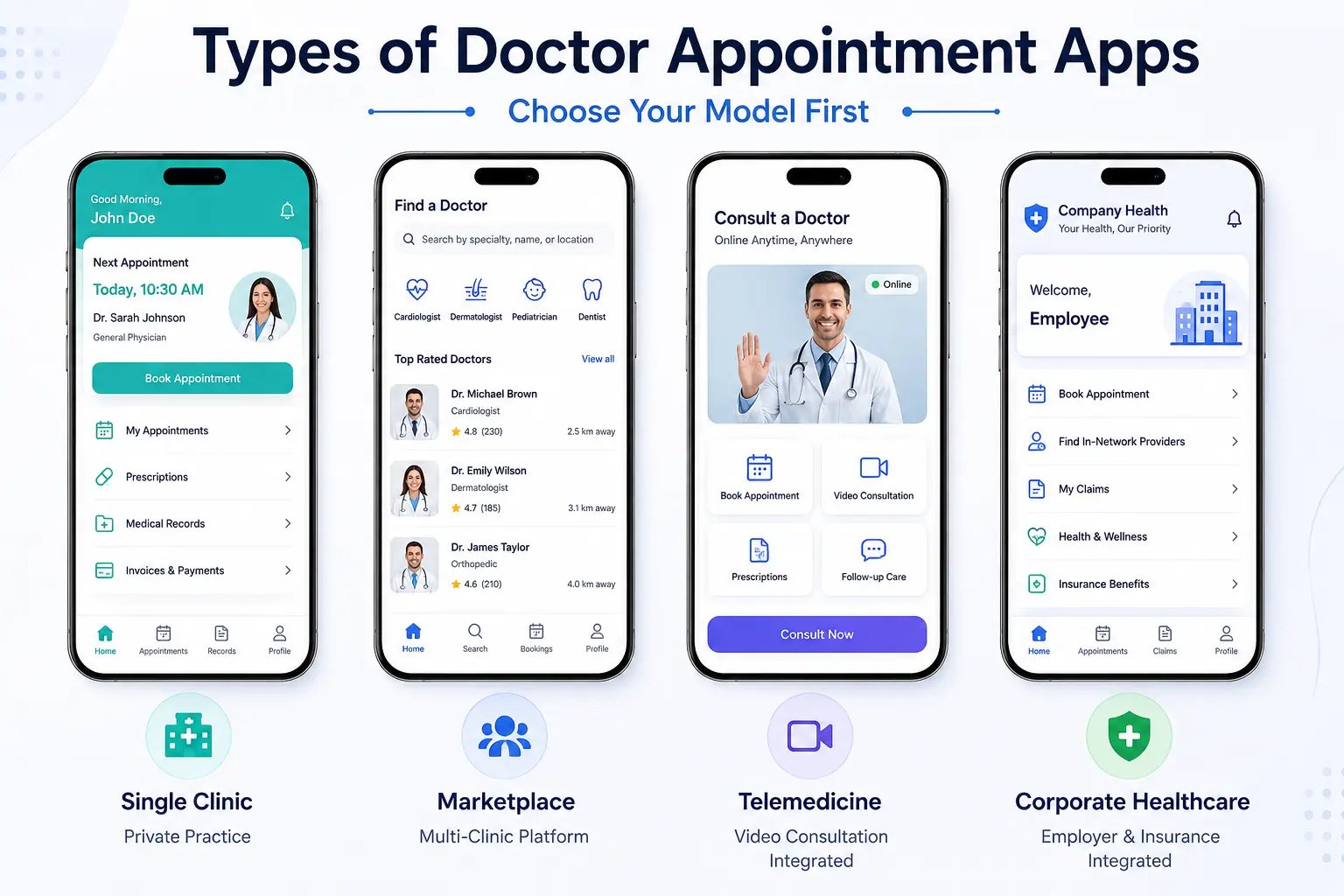
This decision shapes everything: compliance requirements, database architecture, team size, integration scope, and budget. Teams that skip it often discover halfway through development that the product they're building doesn't match the business model they planned for.
Single-Clinic Appointment Apps
Built for one private practice, specialty clinic, or independent provider. Patients book with a specific doctor or care team. Scheduling logic is relatively contained in one location, a known provider set, and predictable appointment types.
This is the fastest and least expensive starting point. It still requires HIPAA compliance if patient health data is collected at booking, but the architecture is simpler than multi-clinic or marketplace builds. A dermatology practice building its own branded booking experience, or an orthopedic surgeon's office replacing manual phone scheduling, would start here.
Multi-Clinic Marketplace Apps
Aggregated platforms that connect multiple clinics, hospitals, or independent practitioners. Patients search by specialty, location, insurance acceptance, availability, and rating. Think Zocdoc or Practo as the model.
The scheduling logic is significantly more complex: multi-provider availability management, cross-location coordination, centralized calendar management, and a separate doctor-side onboarding and profile system. Revenue typically comes from provider subscription fees, per-booking commission, or tiered listing plans.
Telemedicine-Integrated Apps
Combines scheduling with in-app video consultation. The booking flow connects directly to a consultation session, with prescription management and secure post-visit messaging built into the same product.
This category adds video infrastructure, higher HIPAA compliance obligations (the consultation data, not just the booking data), and more complex provider licensing considerations. The telemedicine market is projected to reach $150–190 billion globally in 2026. The demand for integrated scheduling and consultation is real and growing. For the live communication layer, a production-grade video conferencing solution is the foundation on which these platforms are built.
Corporate and Insurance-Integrated Apps
Built for employer groups, insurance networks, or managed care organizations. Connects employees or plan members with in-network providers, handles insurance eligibility verification at booking, and supports pre-authorization checks before the appointment is confirmed.
Complex integration requirements with insurance APIs and employer HR systems make this the most technically demanding category. But the monetization path is cleaner than direct-to-consumer B2B contracts, with employers and payers providing stable recurring revenue. The payment infrastructure logic in these apps has meaningful overlap with the kind of financial product architecture that fintech app development expertise covers.
Core Features: The Patient Side
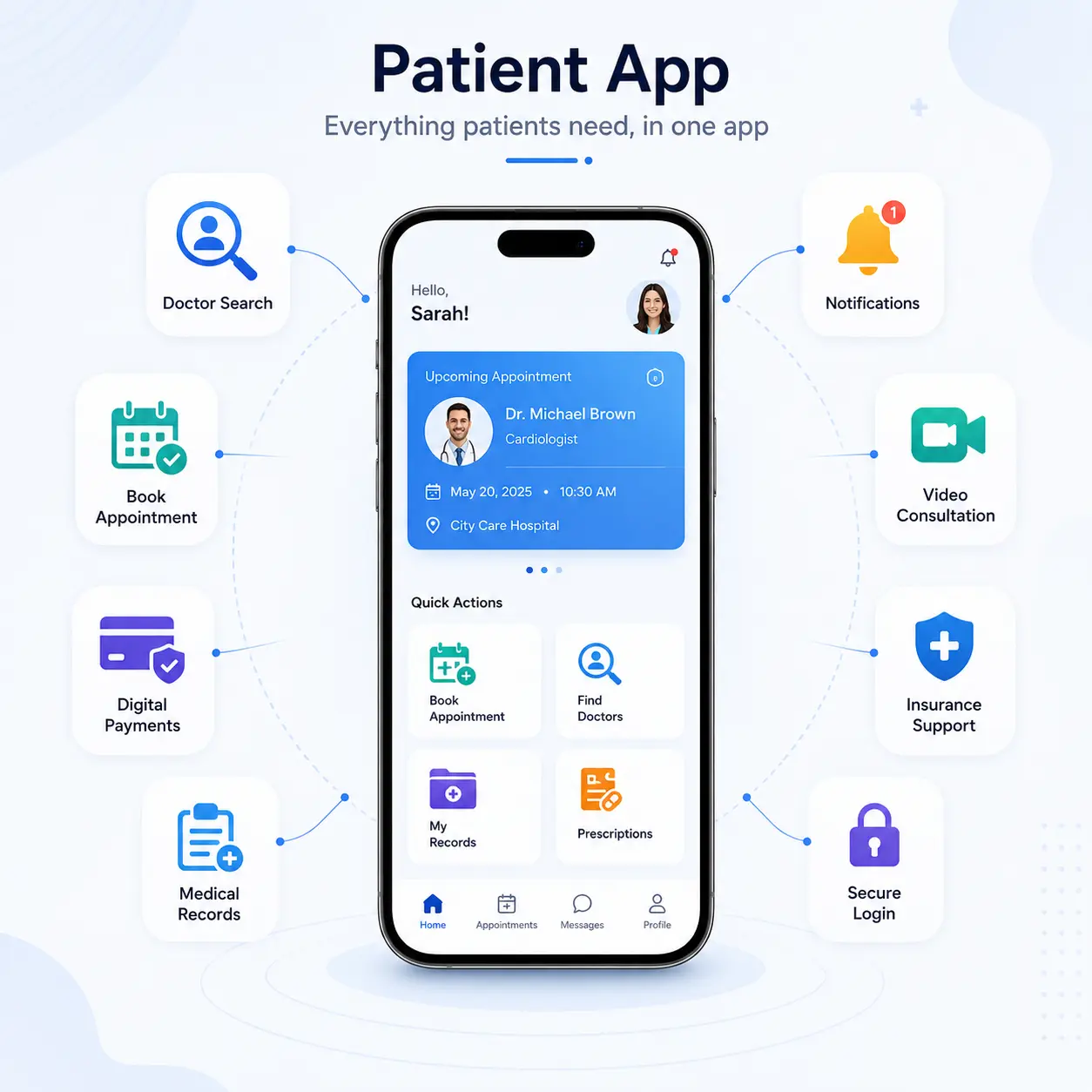
The patient-facing experience determines whether people actually use the app or call the clinic anyway. Both outcomes are possible, and which one you get depends entirely on how well these features are designed.
Doctor Search and Discovery
Filters for specialty, location, language, insurance acceptance, available dates, and patient ratings. Doctor profile pages showing credentials, experience, and available appointment types. Location-based search with distance mapping.
An increasingly common addition: AI-powered specialist routing that recommends the right type of provider based on described symptoms. This reduces the frustrating experience of booking with the wrong specialist and realizing it only after arriving. Research shows 11% of outpatient appointments are missed because patients were scheduled for the wrong type of visit, a problem this feature directly addresses.
The UX rule: if a patient can't find the right doctor within 60 seconds, they open a browser instead.
Real-Time Availability and Self-Scheduling
Live calendar sync with provider schedules, not static availability blocks that go stale between updates. Appointment type selection at booking: new patient, follow-up, procedure, or telehealth visit. Slot duration rules that respect appointment type, because a new patient's physical and a 10-minute prescription renewal are not interchangeable calendar slots.
Instant booking confirmation works for most practices. Staff-review booking, where a team member approves before confirming, works better for high-demand specialists or complex appointment types that require pre-screening. Both models are valid; the choice depends on practice workflow, not software preference.
Appointment Reminders That Actually Reduce No-Shows
Multi-channel reminder delivery: SMS, email, push notification, and in-app. A configurable cadence: 48-hour, 24-hour, and 2-hour pre-appointment messages. Two-way reminders that allow patients to confirm, reschedule, or cancel directly from the notification without opening the app or calling the office.
This detail matters more than most teams realize. Interactive two-way reminders increase appointment confirmation rates by 45% compared to one-way messages. The difference between "appointment tomorrow at 2 PM" and "appointment tomorrow at 2 PM, reply YES to confirm or NO to reschedule" is significant in both confirmation rates and the downstream workload for front desk staff.
Late-night reminder suppression is worth including. A push notification at 11 PM doesn't improve attendance. It creates frustration.
Pre-Visit Digital Intake
Digital forms completed before the appointment are not in the waiting room on a clipboard. Insurance information upload and real-time verification. Medical history and symptom intake that syncs to the provider's system before the visit starts.
This feature is underappreciated at the planning stage. Providers who arrive at a consultation having already reviewed patient history, pre-appointment vitals, and intake responses can run significantly shorter appointments without sacrificing quality. Clinics that implement full digital intake automation reduce intake-related claim denials by 10.6%.
In-App Payments and Insurance Billing
Co-pay collection at booking or before the visit. Insurance claims support with out-of-pocket cost estimates shown to patients before they confirm. Multiple payment methods: card, digital wallet, HSA, and FSA. Payment receipts and billing history are accessible in-app.
Showing patients their expected cost before booking, not in a billing statement three weeks later, reduces post-visit disputes and improves patient satisfaction scores in a measurable way.
Patient History and Medical Records Access
Secure access to past appointment history, test results, and prescriptions. Document upload for insurance cards, referrals, and prior medical records. Integration with EHR systems to pull existing patient data automatically when a returning patient books.
HIPAA-compliant storage for all uploaded health documents is not optional; this data is PHI from the moment it's collected.
Core Features: The Doctor and Admin Side
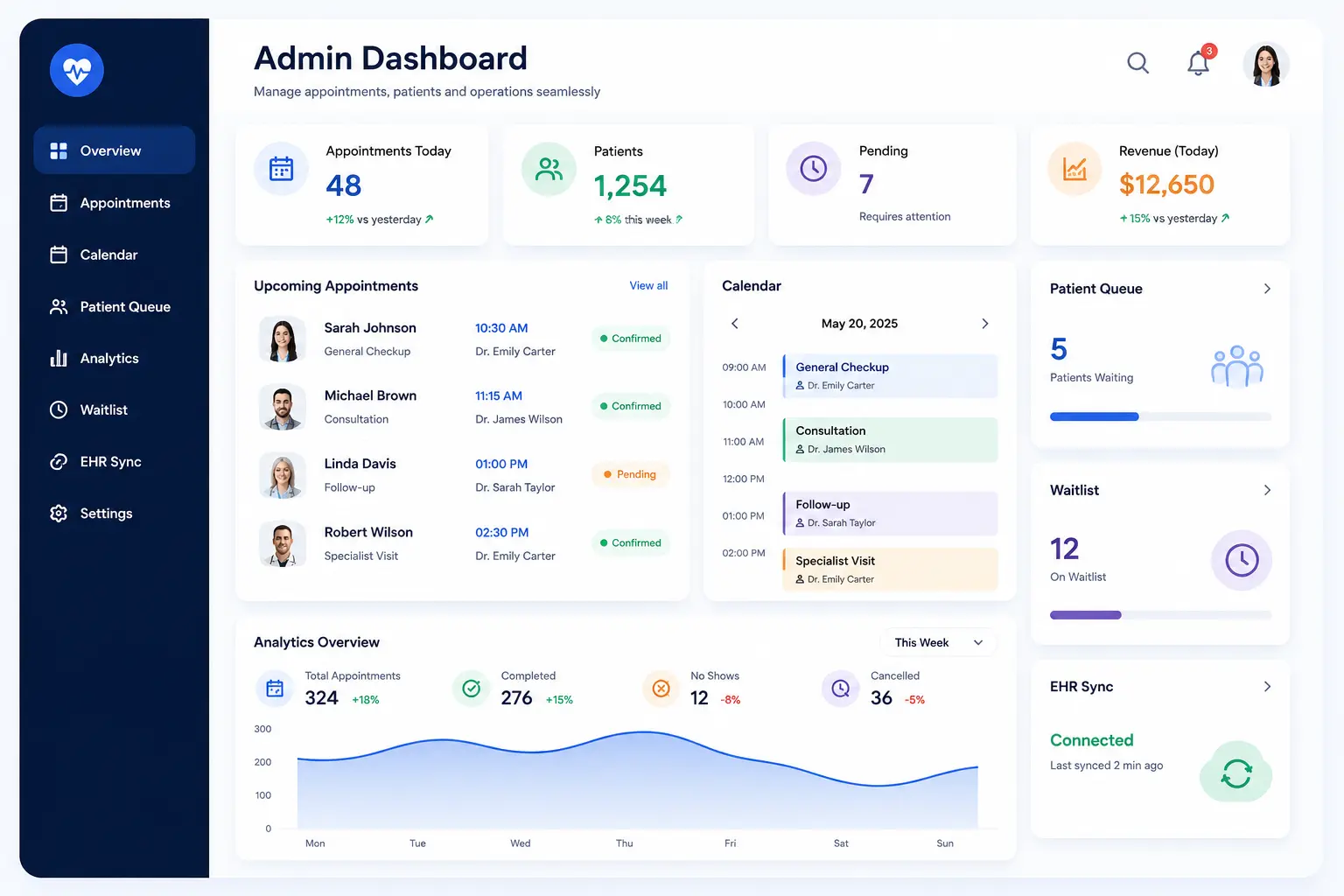
This is where most patient-facing apps are underbuilt. A polished booking flow that feeds into a confusing provider dashboard creates clinic staff who actively tell patients to call instead of using the app. The provider experience deserves equal investment.
Provider Schedule Management
Availability configuration by appointment type, duration, and day of week. Block-out periods for vacations, surgeries, and continuing education. Multi-location scheduling for doctors practicing across more than one clinic. Appointment buffer configuration between visits mandatory for providers who need transition time. Overbooking controls tied to the waitlist.
Admin Dashboard and Clinic Management
Daily and weekly appointment views are filterable by provider, location, and appointment type. Real-time no-show tracking with automatic follow-up triggers. Staff assignment for confirmation tasks. Capacity utilization reporting. Cancellation and rescheduling analytics over time so practices can identify scheduling patterns that predict problems.
EHR Integration — The Most Important Technical Decision in the Entire Project
This is not a feature to plan for later. It is the architectural foundation on which everything else depends on.
Bidirectional EHR integration means the scheduling app reads available slots from the EHR and writes confirmed appointments back to the EHR automatically. Every booking appears in the clinic's system of record without manual entry. Cancellations and reschedules update both systems simultaneously.
The alternative, one-way sync or manual EHR entry after booking, creates exactly the administrative burden the app was built to eliminate. Staff ends up managing two calendars instead of one.
HL7 FHIR is the interoperability standard that makes this work reliably across systems: Epic, Cerner, Athenahealth, eClinicalWorks, Allscripts, NextGen. The FHIR standard defines appointment, schedule, and slot resources. Specifically design your data model around these from day one, not after the core product is built.
For practices that also collect wearable device data before appointments, pre-visit vitals from connected health devices, the IoT development and integration layer connects this data stream to the scheduling and clinical workflow.
Waitlist Management and Slot Backfill
When a patient cancels, the system automatically notifies waitlisted patients and offers the slot. Priority rules based on urgency, referral status, or booking date determine the order. The slot fills without anyone making a phone call.
This feature pays for itself quickly. Every cancelled slot that gets automatically backfilled is revenue that would otherwise be lost. It also reduces the manual workload of the front desk team, who would otherwise need to work through a paper waitlist.
Secure Provider Communication Tools
Appointment summaries are delivered to the doctor's device before each consultation, no hunting through the EHR for basic booking information. Automated alerts for new bookings, cancellations, and no-shows. Secure in-app messaging between clinical staff. After-hours booking notifications are queued for morning review.
Advanced Features Worth Planning For in the Architecture
These are not MVP features for most projects. But they should be designed into the architecture so they can be added later without rebuilding the data model.
AI-Powered No-Show Prediction
Machine learning models that flag appointments at high risk of no-show using historical patterns: appointment type, lead time between booking and visit, time of day, patient demographics, and prior no-show history. High-risk appointments get more aggressive reminder sequences. Low-risk appointments get standard cadence.
AI-driven scheduling reduces no-shows by approximately 30% within 60 days when properly implemented. That improvement compounds over time as the model trains on more practice-specific data.
The AI layer for prediction models is built in Python development, where the ML ecosystem is most mature for healthcare-specific prediction tasks.
Symptom-Guided Specialist Routing
Patients describe symptoms in natural language; AI recommends the appropriate specialty or appointment type. This reduces costly misroutes, patients who see the wrong specialist and need to start the referral process over.
The downstream benefit for clinics: appointments that better match patient needs run more efficiently, generate fewer no-shows, and produce higher satisfaction scores.
Wearable Device Pre-Appointment Vitals
Apple Watch, Fitbit, and connected glucose monitors are sending pre-appointment vitals directly to the provider's dashboard before the visit. Doctors arrive at consultations having already reviewed trends in blood pressure, heart rate, sleep quality, and physical activity. Appointments run shorter and produce more useful clinical outcomes.
For teams integrating this data layer, the AI-powered health monitoring pipeline handles the data ingestion, normalization, and provider-facing display that makes wearable vitals clinically useful rather than just collected.
Post-Consultation Care Coordination
After a completed visit, automated follow-up triggers: prescription reminders, next appointment scheduling prompts, and lab result notifications. AI-assisted workflows that route patients to appropriate next steps based on the consultation outcome. For the automation layer that handles multi-step post-visit workflows, agentic AI solutions cover the orchestration logic that connects scheduling, clinical notes, and patient communication into a single automated flow.
Compliance and Data Security
Doctor appointment apps handle PHI from the moment a patient enters their name and date of birth to search for a doctor. Compliance requirements begin at that first data collection point not at the consultation.
What HIPAA Requires for Scheduling Data
Patient name, contact details, appointment history, insurance information, and medical intake responses are all Protected Health Information. The technical requirements:
- AES-256 encryption for all stored data at rest and in transit (TLS 1.3 minimum)
- Role-based access controls receptionists, nurses, and physicians should not have identical access to the same patient records
- Comprehensive audit logs for all data access and modification events
- Signed Business Associate Agreements with every third-party vendor in the tech stack: payment processors, notification providers, analytics tools, cloud infrastructure
- Breach notification within 60 days if an incident affects more than 500 individuals
The "it's just a scheduling app" reasoning doesn't work. Scheduling data is PHI. Every team that treats HIPAA compliance as a final step pays more to fix it than they would have paid to build it correctly from the start.
Insurance Eligibility Verification
Real-time eligibility checks at the time of booking, not 24 hours before the appointment, and definitely not after the patient has already arrived. Insurance coverage status is displayed to patients before they confirm and pay. Pre-authorization prompts for appointment types that require insurer approval.
This single feature reduces post-visit billing disputes significantly. Patients who know their coverage status before booking don't dispute the bill after receiving it.
GDPR for International Deployments
Explicit consent for data collection at booking. Right to erasure and data portability. Data residency controls for international deployments where local regulations require patient data to remain within specific geographic boundaries. If the app serves EU users, these requirements apply regardless of where the development company is based.
Tech Stack for Doctor Appointment App Development
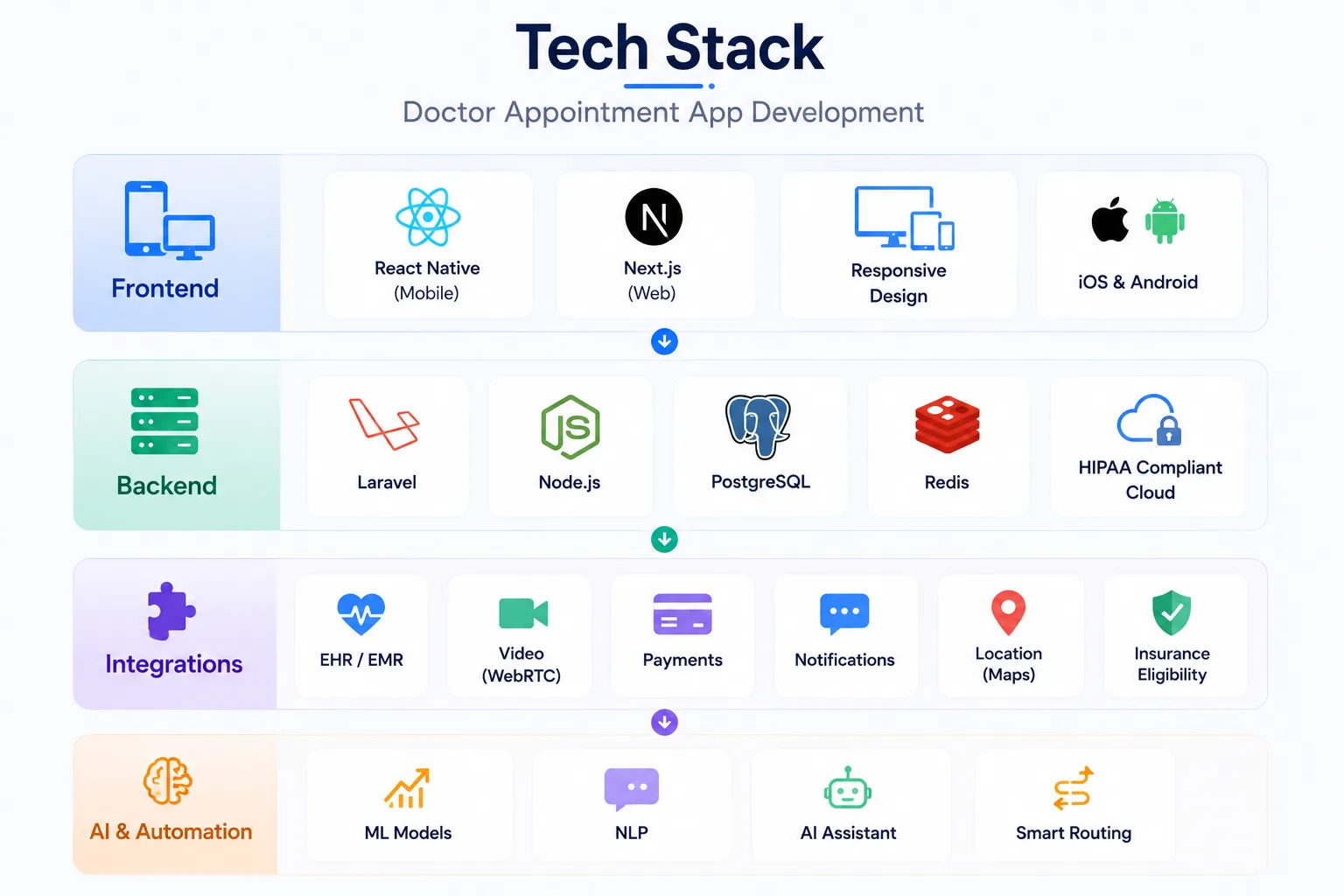
Mobile and Web Frontend
React Native development for cross-platform mobile, a single codebase for iOS and Android, which matters for reaching both patient demographics without doubling development effort.
For web-based booking portals in marketplace-model apps, Next.js development adds server-side rendering that meaningfully improves SEO on public-facing doctor search and listing pages. Patients discovering a clinic through Google land directly on bookable provider profiles, which is a direct booking conversion improvement.
Responsive design is non-negotiable. Patients book on phones. Clinic admins manage schedules on a desktop. Both need to work well without separate builds.
Backend Architecture
Laravel development is well-suited to the complex scheduling rule logic at the core of these systems appointment type configurations, slot duration rules, buffer management, multi-provider availability, and the structured relational data model that HIPAA audit requirements demand.
Node.js handles real-time features: live slot availability updates as patients browse, instant booking confirmation, and real-time notification delivery across channels simultaneously.
PostgreSQL for the appointment data layer is relational, ACID-compliant, and auditable. Redis for session management and real-time availability caching under load. HIPAA-compliant cloud hosting with a signed Business Associate Agreement: AWS Healthcare, Azure Government, or Google Cloud Healthcare API.
Key Integrations
The integration list is where scope expands quickly. Plan these before development starts:
- EHR/EMR: Epic FHIR API, Cerner Smart on FHIR, Athenahealth, eClinicalWorks bidirectional, not read-only
- Video: WebRTC-based infrastructure for in-app consultations if telemedicine is in scope
- Payments: Stripe or Braintree with HSA/FSA card support and insurance billing hooks
- Notifications: Twilio for SMS, Firebase Cloud Messaging for push, SendGrid for email
- Location: Google Maps API for provider search and clinic directions
- Insurance eligibility: Availity, Change Healthcare, or direct payer API connections
AI and Automation Layer
Machine learning models for no-show prediction, specialist routing, and scheduling optimization run on Python backends. Natural language processing for voice booking interfaces and symptom description inputs. The generative AI development capability behind conversational booking flows and AI-assisted triage routing is increasingly expected in competitive products built in 2026.
The Development Process, Step by Step
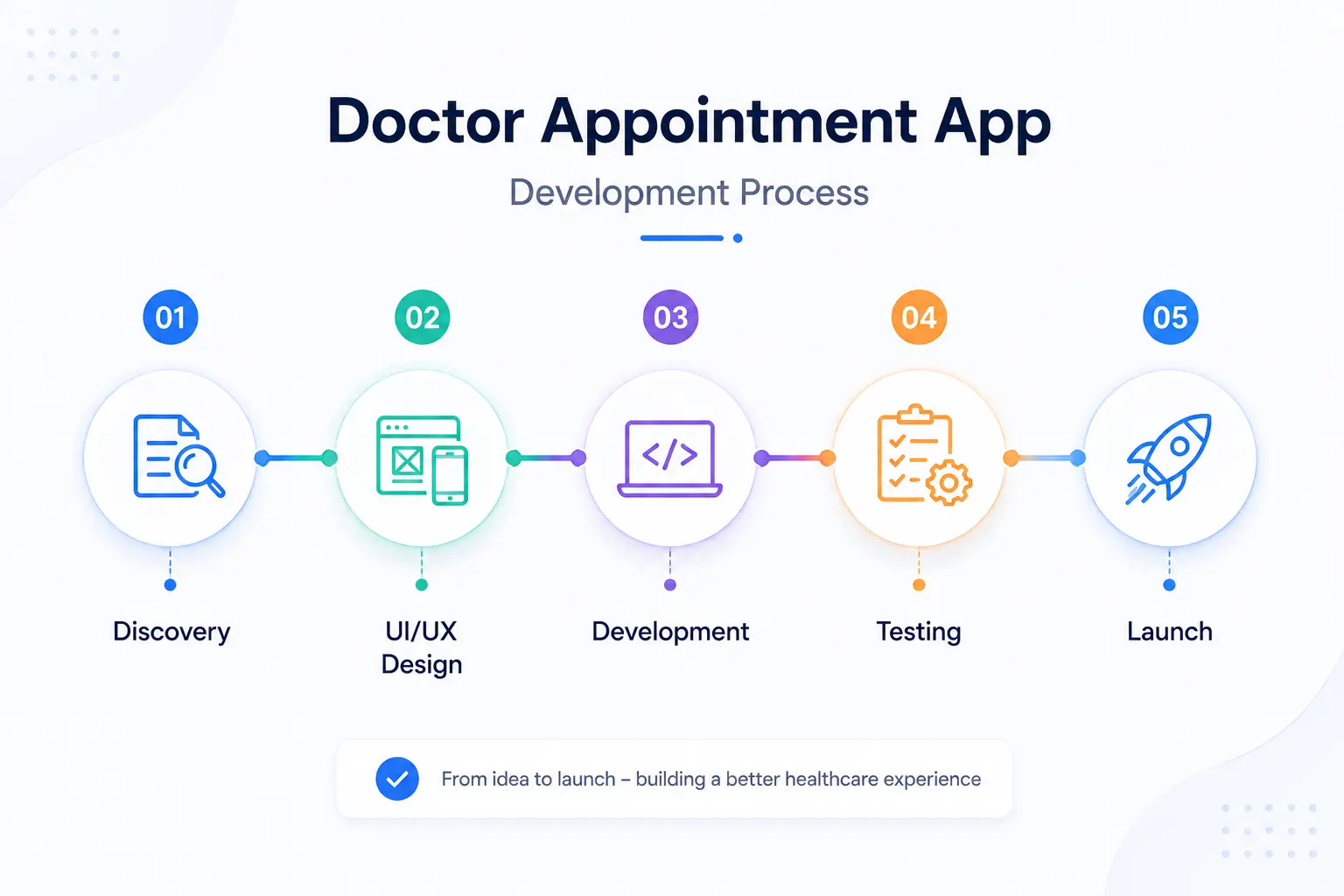
Phase 1 — Discovery and System Mapping (Weeks 1–3)
Map every scheduling workflow that currently happens manually: phone booking, staff calendar management, reminder calls, no-show follow-up, waitlist management. Understand each step before designing a replacement for it.
Identify all systems the app must integrate with. The EHR discovery alone versions, API access, and integration model often take a full week for multi-clinic builds.
Define every user type in the system: patient, doctor, nurse, receptionist, clinic admin, and billing coordinator. Each has a different interface and different data access requirements. Conflating them at the design stage creates problems that are expensive to untangle later.
The custom software development discovery process for healthcare apps is where these decisions get documented properly before they become architecture assumptions nobody can trace.
Phase 2 — UI/UX Design (Weeks 3–6)
Design the booking flow from the patient's perspective first. It should take fewer than four taps from opening the app to a confirmed appointment. Every additional step is friction that costs bookings.
The provider dashboard and admin interface are separate design problems. They need their own research and their own design logic what works for a patient booking an appointment is not what works for a clinic manager reviewing next week's capacity.
Accessibility matters for the patient audience. Older demographics are significant healthcare users and frequent digital booking users. The UI/UX design services approach for healthcare apps treats accessibility as a core design requirement, not a compliance checkbox added after the main design is done.
Phase 3 — Core Development (Months 2–5)
Build the scheduling engine first. Slot availability logic, booking rules, appointment type configuration, and buffer management are the foundation on which everything else runs. EHR integration development should run in parallel, not as a final step.
HIPAA-compliant data architecture before any patient-facing features are built. This means the encryption layer, access controls, and audit logging infrastructure exist before the first booking flow is wired up.
MVP scope for most projects: patient search and self-booking, appointment reminders across channels, provider availability dashboard, basic patient intake, and payment collection.
For products targeting employer groups or multi-clinic networks, a SaaS product development architecture handles multi-tenant deployment efficiently, so each clinic or employer gets their own data environment within the same platform.
Phase 4 — Integration and Compliance Testing (Weeks 18–22)
EHR bidirectional write-back testing is the most critical testing phase. Run 30–50 test bookings through the app and verify each one appears correctly in the EHR, right provider, right appointment type, right duration, right patient record. Find discrepancies here, not in production.
HIPAA penetration testing and security audit. Load testing for concurrent users, particularly for marketplace apps that face spike scenarios on Monday mornings and after public holidays. Reminder delivery testing across SMS carriers, email providers, and device types. Delivery failure rates vary significantly and should be measured before launch.
Phase 5 — Launch and Post-Launch
Soft launch with one clinic or provider group before broad release. Track the no-show rate as the primary success metric in the first 60 days. The number tells you whether the reminder and self-scheduling systems are working as designed.
App Store and Google Play both apply specific review standards to medical and scheduling apps. Budget extra review time.
Post-launch maintenance runs 15–20% of the initial build cost annually. EHR vendors update their APIs on their own schedules; maintaining bidirectional integration requires ongoing development attention, not a one-time integration effort.
How Much Does It Cost to Develop a Doctor Appointment App?
| App Type | MVP Cost | Full-Featured Platform |
| Single-clinic booking app | $4K – $6K | $8K – $15K |
| Multi-clinic marketplace | $7K – $12K | $20K – $35K |
| Telemedicine-integrated app | $8K – $13K | $20K – $40K |
| Corporate / insurance-integrated | $9K – $15K | $25K – $45K |
Regulatory compliance, HIPAA architecture, and GDPR for international builds add 30–40% to development cost when built properly from the start.
AI features (no-show prediction, symptom routing) add meaningful cost at the model training and data pipeline level. Multi-language support and insurance eligibility API connections each add scope.
Annual maintenance: 15–25% of initial build cost. This is not optional for healthcare apps. EHR API versioning, security patches, and regulatory changes all require ongoing development attention.
The $1,000 appointment app on a freelancer marketplace doesn't include EHR integration, HIPAA compliance architecture, security testing, or reminder infrastructure. It's a prototype with a calendar. These are categorically different products.
Monetization Models for Appointment Apps
Worth understanding before starting development, because the business model directly influences feature prioritization:
- Per-booking commission — 5–15% per confirmed appointment (marketplace model, Zocdoc-style)
- Provider subscription — monthly or annual fee for listed providers, tiered by features and visibility
- SaaS licensing to clinics — per-seat or per-location pricing for enterprise health systems
- Pay-per-consultation — patient pays per virtual visit (telemedicine model)
- Freemium for providers — free basic profile listing; premium tier for analytics and priority placement
- White-label licensing — license the platform to hospital groups or insurers to deploy under their own brand
The monetization model affects architecture decisions. Per-booking commission requires payment infrastructure and booking tracking from day one. White-label licensing requires multi-tenant architecture and brand configuration tooling.
Mistakes That Delay or Kill These Projects
Treating EHR integration as phase two. The EHR is the source of truth for provider schedules. Building the scheduling engine without it means rebuilding the data model when integration is eventually added. Plan it from day one.
Building one-way EHR sync. Reading slot availability from the EHR but not writing confirmed appointments back means staff are manually entering every booking into two systems. This is the most common integration failure in appointment apps and the one that causes clinics to abandon the product.
Underinvesting in the provider dashboard. A slick patient booking flow that feeds into a confusing admin interface creates clinic staff who tell patients to call instead. The provider side deserves equal design attention.
Launching without tested reminder sequences. An appointment app without working, tested, multi-channel reminders is just a calendar with a nicer UI. The reminder system is where no-show reduction actually happens. Test it before launch, not after.
Misjudging compliance scope. Scheduling data is PHI. It has been PHI since the moment a patient's name and date of birth appeared in a booking form. Teams that treat HIPAA as a telemedicine-only problem discover this during their first enterprise healthcare client sales cycle.
Where the Real Market Opportunity Is
The doctor appointment app market is not dominated by one winner. It's fragmented by specialty, geography, practice size, and EHR ecosystem. There are specific segments that remain genuinely underserved:
A single-specialty clinic marketplace for physical therapy practices. A white-label scheduling platform for independent mental health providers. An AI-powered scheduling layer built on top of a specific EHR for a regional health system. A corporate wellness booking tool for employer-sponsored care networks.
Each of these is a real product with a real market and customers who aren't well-served by generic scheduling tools.
The teams that win are the ones who pick a specific scheduling problem in a specific segment, build the integration layer that actually solves it, and measure the no-show rate reduction as proof that the product works.
If you're building in this space and want a development partner who brings real experience across healthcare software development, EHR integrations, mobile platforms, and AI-powered health tech, Nyusoft Solutions has the depth across frontend, backend, AI, and compliance to take a doctor appointment app from architecture planning through to a production-grade launch.
The scheduling problem in healthcare is large, specific, and worth solving properly. Build it that way.
FAQs
1. What is a doctor appointment app?
A doctor appointment app enables patients to search for healthcare providers, book appointments, receive reminders, make payments, attend virtual consultations, and manage their healthcare from a mobile device.
2. What are the essential features of a doctor appointment app?
Key features include doctor search, appointment scheduling, calendar management, reminders, secure messaging, telemedicine support, digital payments, patient records, and an admin dashboard.
3. Can a doctor appointment app integrate with EHR and EMR systems?
Yes. Modern appointment apps integrate with EHR and EMR platforms using standards such as HL7 FHIR to synchronize appointments, patient records, and provider schedules in real time.
4. How do doctor appointment apps reduce missed appointments?
Automated reminders, digital check-ins, waitlist management, AI-powered scheduling, and instant rescheduling options help reduce no-shows and improve clinic efficiency.
5. Can doctor appointment apps support telemedicine?
Yes. Many appointment apps integrate secure video consultations, online prescriptions, post-visit follow-ups, and virtual care management into a single platform.
6. What monetization models work best for doctor appointment apps?
Popular models include provider subscriptions, booking commissions, teleconsultation fees, SaaS licensing for hospitals, premium listings, and white-label software solutions.
7. Is insurance verification available in doctor appointment apps?
Yes. Advanced appointment apps can verify insurance eligibility, estimate patient costs, support digital claims, and simplify healthcare billing before appointments are confirmed.
8. Which healthcare providers can benefit from appointment apps?
Doctor appointment apps are suitable for hospitals, private clinics, diagnostic centers, dental clinics, mental health practices, physiotherapy centers, and multi-specialty healthcare networks.
9. What should you consider before building a doctor appointment app?
Before development, define your target audience, business model, compliance requirements, EHR integrations, scheduling workflow, monetization strategy, and future scalability requirements.
10. Why choose Nyusoft for doctor appointment app development?
Nyusoft develops feature-rich doctor appointment applications with real-time scheduling, EHR integration, telemedicine capabilities, AI-powered automation, secure payment systems, and healthcare compliance to help providers improve patient experiences and operational efficiency.
Ready to Build a Smarter Doctor Appointment App?
Whether you're creating a clinic booking app, a multi-provider marketplace, or a telemedicine platform, the right technology can simplify scheduling, reduce no-shows, and improve patient experiences. Nyusoft builds secure, scalable, and HIPAA-ready doctor appointment apps with real-time scheduling, EHR integration, AI-powered features, and seamless user experiences tailored to your healthcare business.