


 Front End Development
  Back End Development
  CMS / ECommerce Development
  Mobile Apps Development
  Cloud Services
  Fullstack Services
  Solution


Billing Software Development: Features, Cost & Complete Development Guide
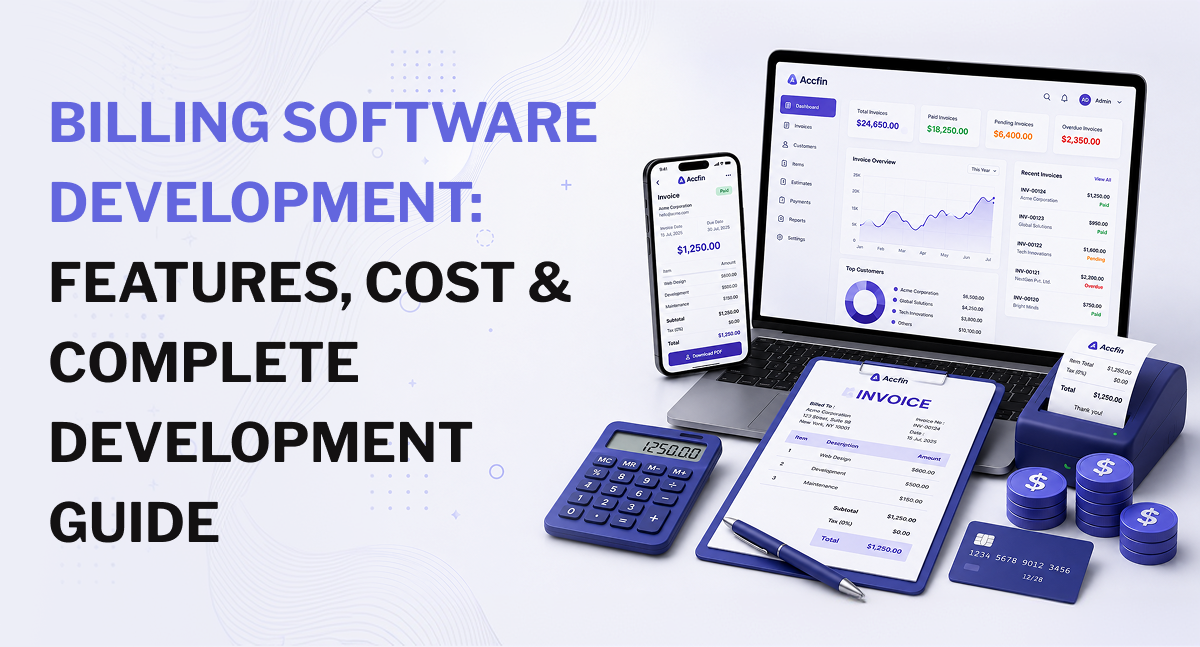
Billing software development involves building a digital system that manages invoicing, pricing, payments, recurring charges, refunds, customer billing records, reconciliation, reporting, and related financial workflows. A simple billing application may focus on invoices and payment tracking, while a larger platform can support subscriptions, usage-based pricing, multiple currencies, automated payment collection, accounting integrations, and complex billing rules. The global billing and invoicing software market is estimated at $6.11 billion in 2026 and is projected to reach $15.7 billion by 2034, according to Straits Research, reflecting growing demand for automated billing and invoicing systems.
The cost of developing billing software depends on the feature set, billing model, integrations, security requirements, number of users, supported markets, and technical complexity. A basic billing MVP may cost around $3,000-$7,000, while a more advanced custom platform can reach $25,000 or more. Enterprise systems can require a larger investment based on transaction volume, integrations, architecture, security, and compliance requirements.
For businesses operating in the USA, UK, UAE, Australia, Canada, or multiple international markets, billing software should be designed around the company's pricing, payment, tax, accounting, reporting, and operational requirements. It should solve the actual billing workflow rather than simply reproduce a standard invoice template.
What Is Billing Software?
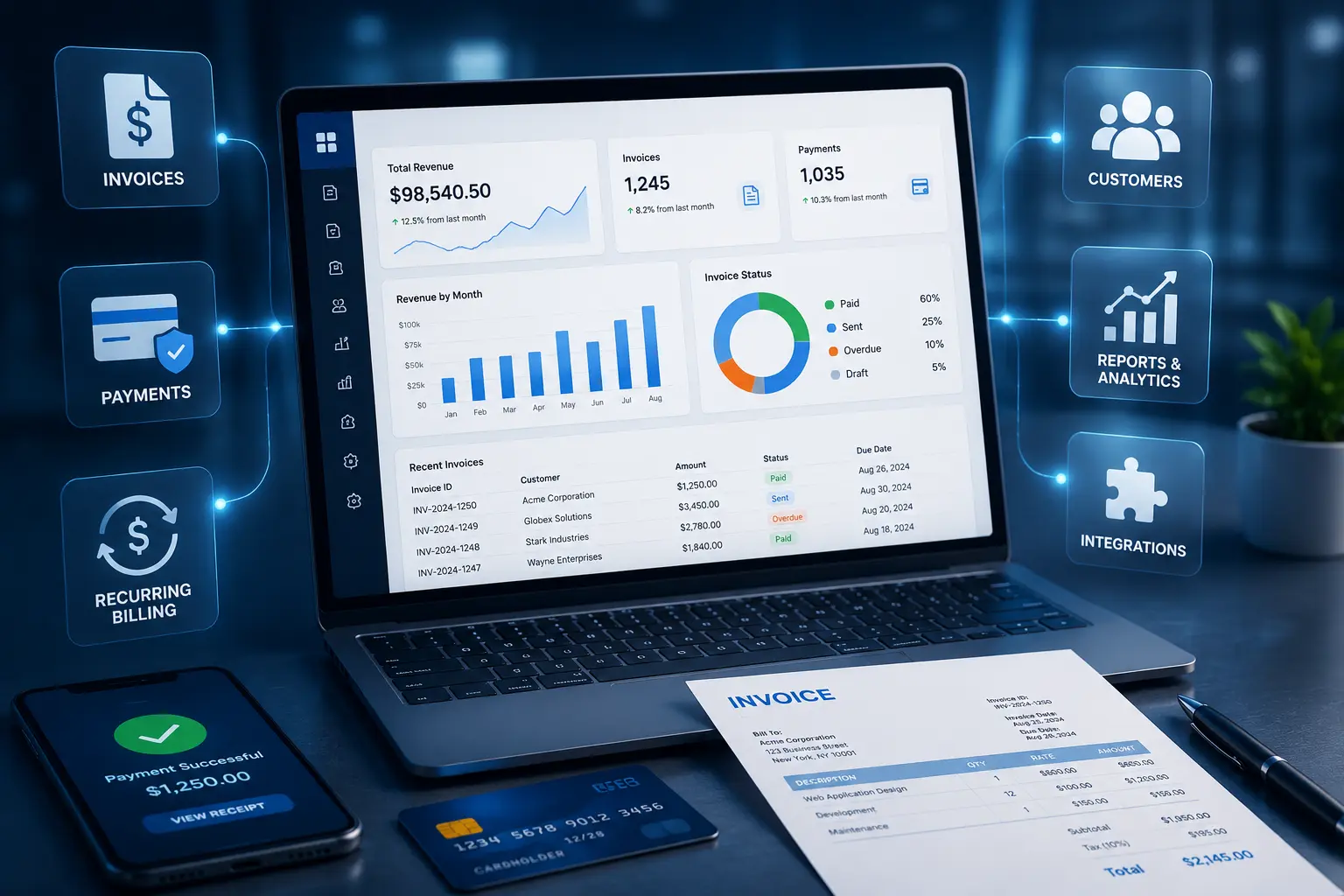
Billing software manages the financial process between a business and its customers. Depending on the product, it can create invoices, calculate charges, record payments, send reminders, manage refunds, maintain customer billing histories, and produce financial reports.
A typical billing workflow may look like this:
Customer or order → pricing calculation → invoice generation → payment collection → payment confirmation → reconciliation → accounting → reporting
For subscription businesses, the workflow can be longer:
Subscription → billing cycle → usage calculation → invoice → payment attempt → payment confirmation or failure → retry → renewal or cancellation
The exact process depends on what the business sells and how customers are charged.
A professional services company may bill according to hours worked and approved expenses. A SaaS company may charge per user, per month, or according to product usage. A marketplace may need to calculate customer charges, seller payouts, commissions, refunds, and adjustments separately.
A custom billing platform needs to represent these rules accurately in its data model and application logic. If billing is part of a larger financial product, the system may also need to integrate with other financial workflows supported by FinTech app development services.
Why Businesses Invest in Custom Billing Software
The decision to build billing software usually starts with a business problem.
A company may have outgrown spreadsheets, be using several disconnected tools, or have billing rules that do not fit an existing product. In other cases, the business may be developing a new SaaS or financial platform where billing needs to be part of the product itself.
Automating Manual Invoicing
Manual billing creates repetitive work.
Someone may need to enter customer information, calculate charges, prepare an invoice, verify totals, send it, update payment status, and enter the same information into an accounting system.
A billing platform can automate much of this process.
For example, once an approved order is recorded, the system can generate an invoice, apply the appropriate pricing rules, send the invoice to the customer, and update the payment status after the transaction is confirmed.
The value is not simply saving a few clicks. It is creating a consistent process in which the invoice, payment, customer record, and transaction remain connected.
Managing Complex Pricing Models
Pricing becomes harder when customers do not all pay the same amount.
A billing system may need to support:
- Fixed pricing
- Tiered pricing
- Per-user pricing
- Usage-based pricing
- Recurring subscriptions
- Discounts
- Credits
- Promotional pricing
- Minimum charges
- Prorated charges
- One-time fees
Consider a SaaS company with three subscription levels. A customer upgrades halfway through a billing cycle. The system may need to calculate the unused portion of the old plan, charge for the new plan, apply a credit, and generate one accurate invoice.
That calculation needs to work consistently across every account.
For businesses building a subscription-based platform, SaaS product development can be particularly relevant because subscription products often require multi-tenant architecture, API integrations, cloud infrastructure, and recurring operational support.
Connecting Billing With Existing Business Systems
Billing rarely operates alone.
A business may already use a CRM for customer management, an ERP for operations, accounting software for financial records, and payment providers for collections.
Without integration, employees may have to move information between these systems manually. That creates additional work and increases the chance of mismatched records.
A custom billing platform can connect these workflows through APIs and webhooks so customer, invoice, payment, and transaction information moves between systems according to defined rules.
Improving Financial Visibility
A billing system can give finance and management teams a single view of:
- Outstanding invoices
- Paid invoices
- Failed payments
- Refunds
- Credits
- Customer billing history
- Revenue records
- Payment activity
- Reconciliation status
This makes it easier to investigate an unpaid invoice, check whether a payment was received, or identify transactions that still need reconciliation.
Have Your Billing Workflows Become Too Complex?
If your team is still managing invoices, payments, customer records, or reconciliation across multiple tools, it may be time to consider a system built around your actual workflow.
A custom billing platform can bring these processes together while supporting the pricing rules, integrations, user roles, and reporting your business already depends on.
Want to see what a custom billing system could look like for your business?
Types of Billing Software You Can Build
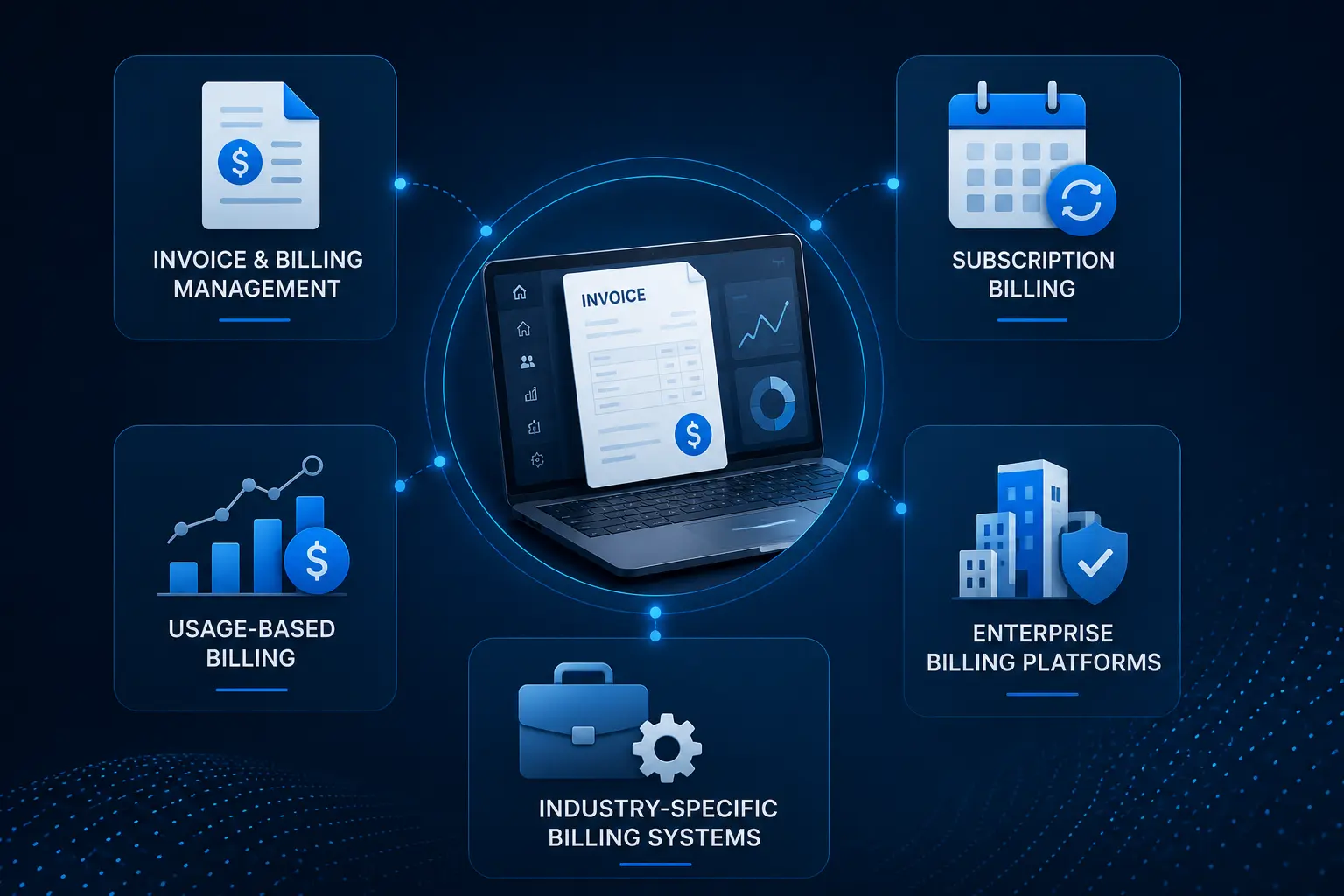
There is no single billing software model that fits every business.
The right architecture depends on how customers are charged, how transactions are processed, and which systems need to exchange financial information.
Invoice and Billing Management Software
This is the simplest type of billing platform.
It can provide:
- Customer management
- Invoice creation
- Invoice numbering
- Payment tracking
- Due-date reminders
- Invoice history
- Basic reporting
- PDF invoices
This model works well for businesses with straightforward billing requirements and limited payment complexity.
Subscription Billing Software
Subscription billing is designed for recurring revenue models.
Typical functions include:
- Subscription plans
- Monthly and annual billing
- Trial periods
- Renewals
- Upgrades
- Downgrades
- Cancellation
- Proration
- Recurring payment collection
- Failed payment handling
The billing cycle engine needs to know which plan a customer has, when the billing period starts and ends, what changes occurred during that period, and what amount should be charged.
Usage-Based Billing Software
Usage-based billing calculates charges according to consumption.
Examples include:
- API calls
- Storage usage
- Number of transactions
- Data consumption
- Messages
- Active users
- Service hours
The system generally needs to capture usage data, validate it, apply pricing rules, calculate the charge, and pass the result into the invoice process.
This type of billing becomes more complicated when usage arrives late, records need correction, customers dispute usage, or different pricing tiers apply to different consumption levels.
Enterprise Billing Platforms
Large organizations often need more than standard invoicing.
An enterprise billing system may support:
- Multiple business entities
- Multiple currencies
- Complex approval workflows
- Role-based access
- Large transaction volumes
- Multiple payment providers
- Accounting and ERP integrations
- Advanced reporting
- Detailed audit records
The architecture needs to account for users, transaction volume, data retention, integrations, security, and operational controls from the beginning.
Industry-Specific Billing Systems
Billing software can also be designed around a particular business model.
Potential applications include:
- SaaS billing
- Financial services billing
- Insurance billing
- Professional services billing
- Healthcare billing
- Utility billing
- Marketplace billing
The basic concepts may look similar, but the pricing rules, customer records, payment flows, reporting requirements, and integrations can be very different.
Essential Features of Billing Software
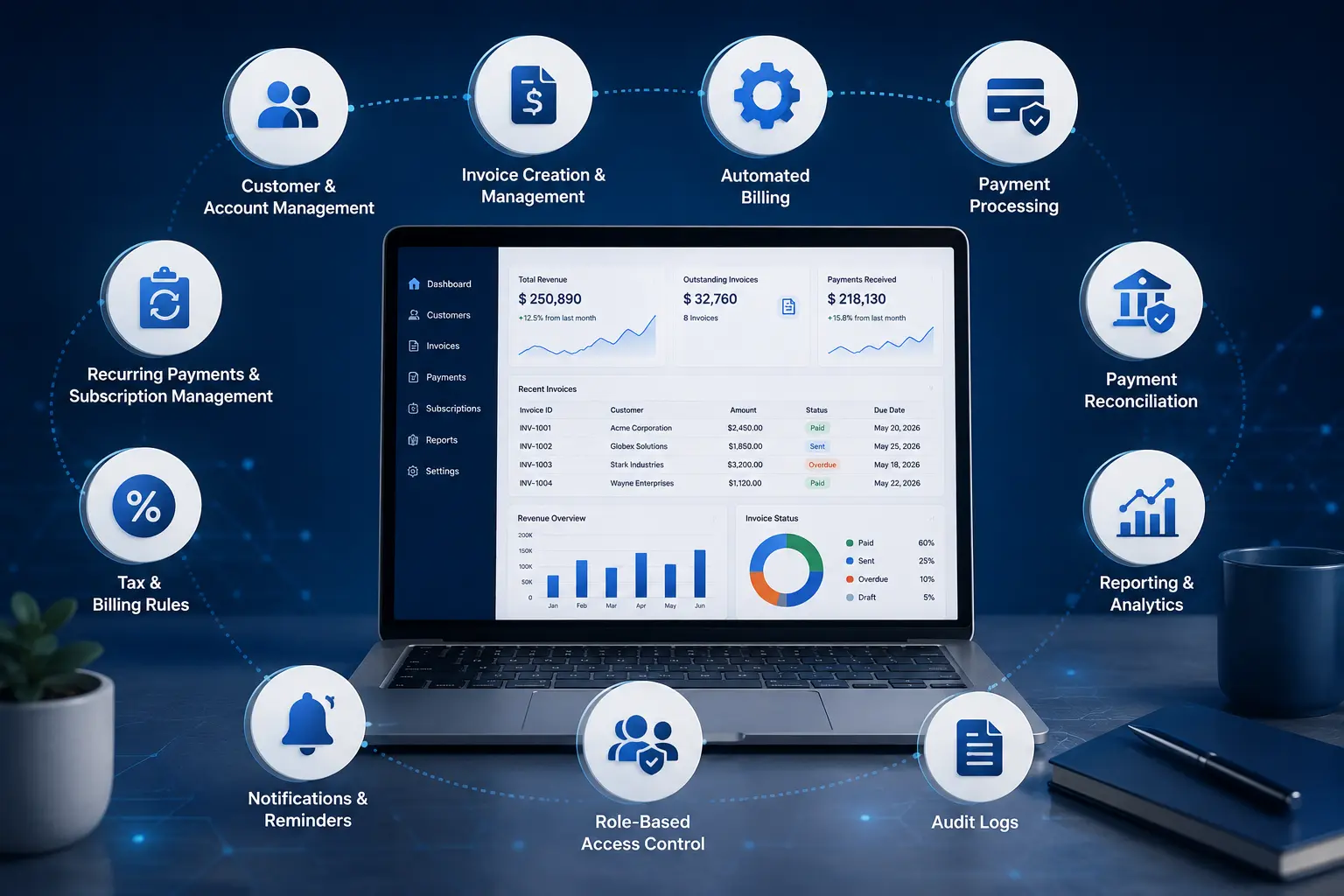
Customer and Account Management
The platform should maintain accurate customer billing records.
Common functions include:
- Customer profiles
- Billing addresses
- Contact details
- Tax information where required
- Account status
- Billing preferences
- Payment history
- Invoice history
- Credits and adjustments
B2B platforms may also need company-level accounts with multiple contacts, departments, billing locations, and permission levels.
Invoice Creation and Management
Invoice management is the foundation of most billing platforms.
A custom system can support:
- Automated invoice creation
- Custom invoice templates
- Invoice numbering
- Line items
- Discounts
- Taxes
- Due dates
- Payment terms
- Credit notes
- Invoice status
- PDF generation
- Email delivery
- Invoice history
An invoice should remain connected to the customer, order, subscription, contract, or usage record that produced it.
That connection becomes important when a finance team needs to understand where an amount came from several months after the invoice was issued.
Automated Billing
Automation can reduce repetitive finance tasks.
The system can generate invoices based on:
- Billing schedules
- Subscription renewals
- Approved orders
- Contract milestones
- Usage records
- Recurring services
Automation should also account for exceptions. A billing workflow that works only when every payment succeeds is incomplete.
Payment Processing
Billing software can integrate with payment providers to handle customer payments.
Depending on the market and business model, payment support may include cards, bank-based payment methods, wallets, and other supported methods.
The system needs to handle more than successful transactions. It should account for:
- Successful payments
- Declined transactions
- Failed payments
- Refunds
- Partial refunds
- Duplicate requests
- Payment confirmations
- Webhooks
- Transaction references
The billing record should be updated based on verified transaction events rather than assumptions made by the user interface.
Recurring Payments and Subscription Management
Recurring billing requires its own set of rules.
A subscription module can manage:
- Plan selection
- Start date
- Renewal date
- Trial period
- Billing frequency
- Upgrades
- Downgrades
- Cancellation
- Proration
- Credits
- Failed payment recovery
For example, a customer changes from a $50 monthly plan to a $100 plan halfway through the month. The system needs a defined method for calculating the difference.
That rule should remain consistent across customer accounts.
Tax and Billing Rules
Tax handling becomes more complicated when customers and businesses operate across different jurisdictions.
The system may need to support:
- Tax rates
- Tax-inclusive pricing
- Tax-exclusive pricing
- Customer tax information
- Regional tax rules
- Tax exemptions
- Invoice tax details
- Configurable tax logic
Tax rules should not be hard-coded around one market if the platform is intended for international use.
The OECD documents differences in consumption tax systems and electronic invoicing requirements across jurisdictions, which is one reason international billing platforms need configurable tax and invoicing logic.
Payment Reconciliation
Reconciliation connects billing records with actual payment activity.
For example:
Invoice #1045 → Customer A → $2,500 → Payment received → Bank transaction matched
If the payment arrives without being matched correctly, the invoice may continue to appear as outstanding.
A reconciliation module can help match transactions using identifiers, amounts, dates, customer information, and other available transaction data.
This becomes particularly useful for businesses processing a high number of payments where manual matching is no longer practical.
Reporting and Analytics
Billing reports help finance teams understand what is happening across customer accounts and transactions.
Useful reports include:
- Revenue reports
- Outstanding invoices
- Payment reports
- Failed payment reports
- Refund reports
- Customer billing reports
- Subscription reports
- Tax reports
- Transaction histories
Management dashboards may focus on totals and trends, while finance teams may need transaction-level information.
Businesses developing financial applications may also need to consider how customer data, financial records, reporting, and product features work together within the same platform. The Personal Finance App Development process provides a relevant example of how these components can be brought together in a dedicated financial application.
Notifications and Reminders
Automated notifications can be triggered by billing events.
Examples include:
- Invoice generated
- Invoice approaching due date
- Invoice overdue
- Payment received
- Payment failed
- Subscription renewal
- Refund completed
Administrators should be able to control notification rules so customers receive useful information without being overwhelmed by unnecessary messages.
Role-Based Access Control
Not every employee should have access to every billing function.
A finance administrator may be allowed to create refunds, while a customer support user may only view invoice history.
Roles can be configured for:
- Finance teams
- Administrators
- Account managers
- Support teams
- Auditors
- Operations teams
Permissions should be enforced by the backend as well as the user interface.
Audit Logs
Audit records are valuable when billing information changes.
An audit log can record:
- Who made the change
- What was changed
- When it happened
- Previous value
- New value
- Relevant account or transaction
This creates a traceable history for disputes, financial reviews, operational investigations, and security monitoring.
Need More Than Basic Invoicing?
If your billing requirements include recurring payments, complex pricing, reconciliation, multiple user roles, payment integrations, or detailed reporting, a basic invoicing tool may no longer be enough.
The right approach is to define the core billing requirements first and then build the platform around the workflows that matter most to your business.
Have a specific billing feature or workflow in mind?
Advanced Billing Software Features
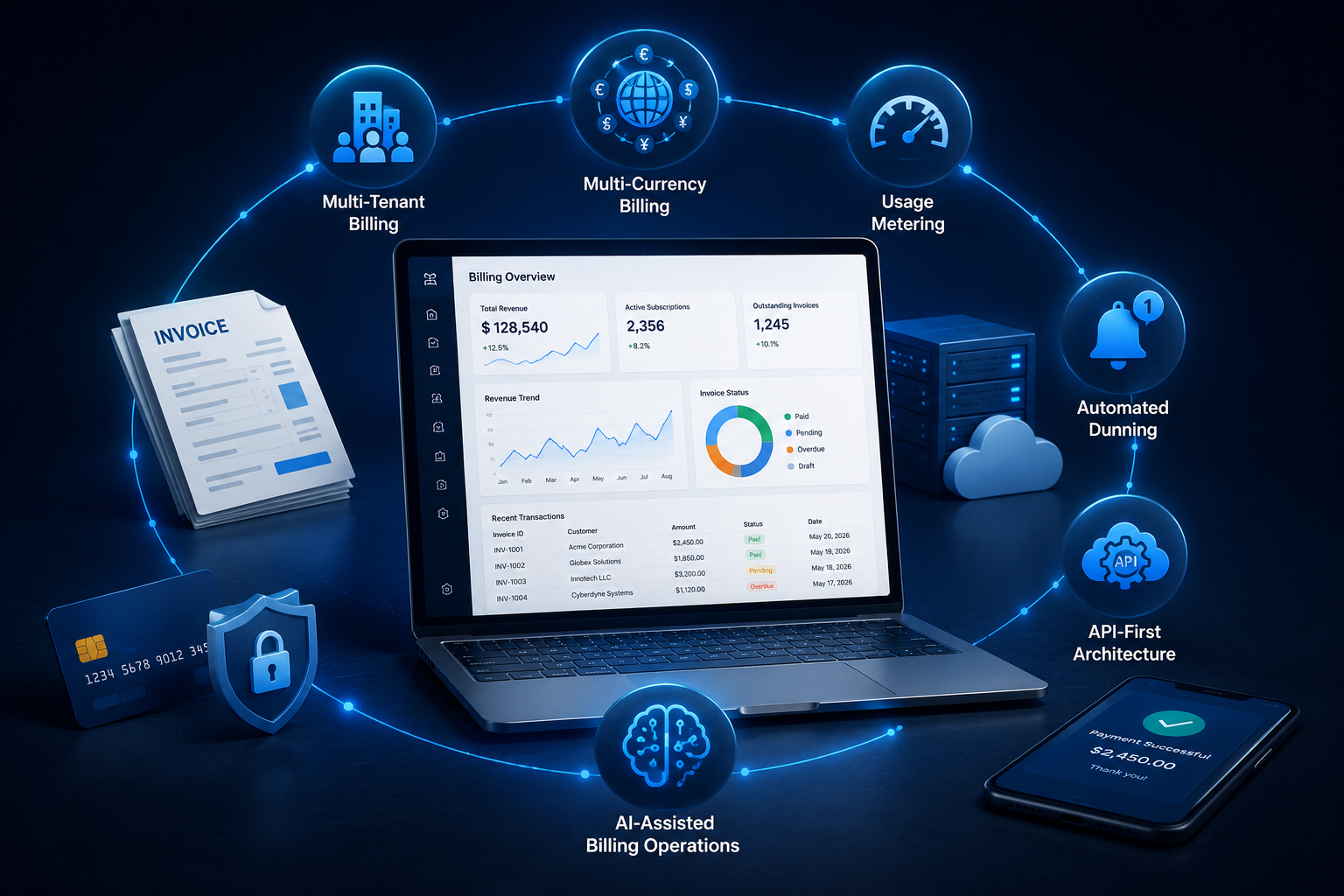
A sophisticated billing platform may require capabilities beyond standard invoicing.
Multi-Currency Billing
International businesses may need to charge customers in different currencies.
A multi-currency system can support:
- Currency-specific pricing
- Currency selection
- Exchange-rate handling
- Currency-specific invoices
- Transaction records
- Currency-aware reporting
Exchange-rate rules should be clearly defined because the rate used for an invoice, payment, or accounting record can affect the final amount.
Multi-Tenant Billing
A multi-tenant billing platform serves multiple organizations through one software environment.
Each tenant may have its own:
- Customers
- Pricing
- Billing rules
- Users
- Invoices
- Payment settings
- Reports
Data isolation is a core architectural requirement. One organization's billing information must not become accessible to another organization through application logic, APIs, reports, exports, or administrative tools.
Usage Metering
Usage metering is required when customers pay according to consumption.
A typical process is:
Capture usage → validate usage → store usage → apply pricing rule → calculate charge → generate invoice
The design should also account for late-arriving usage data, corrections, duplicate records, and customer disputes.
Automated Dunning
Failed recurring payments can create revenue leakage if they are not handled properly.
A dunning system can:
- Detect failed payments
- Schedule retries
- Send customer notifications
- Track recovery attempts
- Restrict accounts according to defined rules
- Record the outcome
Retry behavior should be based on the business model and payment provider. Repeating failed transactions without a defined strategy can create poor customer experiences and additional payment issues.
API-First Billing Architecture
APIs allow other systems to interact with the billing engine.
Common API functions include:
- Create customer
- Create invoice
- Retrieve invoice
- Record payment
- Process refund
- Create subscription
- Change subscription
- Retrieve transaction
- Retrieve account balance
Webhooks can notify connected applications when a billing event occurs.
For example, a payment provider can notify the billing platform that a transaction succeeded. The billing system can update the invoice and then pass the relevant information to the accounting system.
AI-Assisted Billing Operations
AI can support selected billing workflows where there is enough reliable data and a clear business purpose.
Possible applications include:
- Duplicate invoice detection
- Unusual billing activity detection
- Payment failure prediction
- Invoice anomaly detection
- Customer billing support
- Revenue forecasting
- Transaction classification
For companies considering AI inside a financial application, AI development services can be relevant for use cases such as anomaly detection, predictive analytics, intelligent process automation, and financial fraud detection.
AI should support established financial controls rather than replace processes that require clear rules, auditability, or human review.
Billing Software Integrations You May Need
Integrations can have a major effect on both development cost and project timeline.
Payment Gateway Integration
A payment integration may handle:
- Payment initiation
- Authorization
- Payment confirmation
- Refunds
- Payment status
- Webhooks
- Transaction references
The billing platform should also account for provider outages, delayed webhook events, duplicate notifications, and failed requests.
Accounting Software Integration
Accounting integration can synchronize:
- Customers
- Invoices
- Payments
- Refunds
- Credits
- Financial records
The data mapping needs to be defined before development begins. It should be clear which system owns each record and how updates move between systems.
CRM Integration
CRM integration can connect customer and account information with billing activity.
For example, when a new customer is created in the CRM, the billing platform may automatically create the corresponding billing account.
The reverse can also be useful. A payment or subscription event can update the customer's account information in the CRM.
ERP Integration
Enterprise businesses may need billing connected with ERP systems for:
- Orders
- Customers
- Finance
- Inventory
- Business entities
- Reporting
These integrations can become substantial development projects when systems have complex data structures or limited APIs.
Banking and Financial APIs
Depending on the product, banking integrations may support:
- Transaction feeds
- Payment verification
- Account information
- Reconciliation
- Financial transaction status
These integrations need careful handling because financial data can have strict access and security requirements.
Tax and Compliance Integrations
Businesses operating across several markets may use tax engines or electronic invoicing services to handle jurisdiction-specific requirements.
The architecture should allow these services to be replaced or expanded without requiring the entire billing engine to be rebuilt.
Security and Compliance Requirements for Billing Software

Billing software handles financial records, customer information, payment-related data, and business transactions, so security needs to be considered during architecture rather than added near launch.
The exact compliance requirements depend on where the business operates, where its customers are located, what information the platform processes, how payments are handled, and whether the software performs regulated financial activities.
Data Encryption
Sensitive information should be protected during transmission and storage.
Typical controls include:
- Encryption in transit
- Encryption at rest
- Secure credential storage
- Key management
- Database access controls
- Secure API communication
Encryption alone does not make a billing platform compliant, but it is an important technical control for protecting financial and personal information.
Authentication and Access Control
A billing platform may need:
- Multi-factor authentication
- Role-based permissions
- Secure sessions
- Password policies
- Administrative controls
- Account lockout policies
- Privileged-user controls
High-privilege actions such as refunds, payment configuration changes, pricing changes, and permission changes may require additional verification or approval.
Payment Data Protection
Payment-card information requires particular care.
The PCI Security Standards Council provides security standards for organizations and environments that handle payment account data, including technical and operational requirements for protecting payment-related information.
A sensible architecture should minimize the amount of sensitive payment information handled directly by the billing application where practical. Tokenization and established payment-provider infrastructure can reduce unnecessary exposure.
Audit Trails and Monitoring
Security monitoring should cover activities such as:
- Login attempts
- Permission changes
- Invoice modifications
- Refunds
- Payment configuration changes
- Administrative actions
- API activity
- Failed authentication attempts
Logs should be protected against unauthorized modification and retained according to the organization's requirements.
Audit trails are particularly useful when a business needs to investigate an invoice change, refund, pricing adjustment, or unusual account activity.
Key Compliance Considerations by Market
The exact requirements depend on the business model, payment flow, data handled, and jurisdiction. Common frameworks to consider include:
- USA: PCI DSS, CCPA/CPRA, applicable state privacy laws
- UK: UK GDPR, Data Protection Act 2018, PCI DSS
- UAE: UAE Personal Data Protection Law (PDPL), PCI DSS
- Australia: Privacy Act 1988, Australian Privacy Principles (APPs), PCI DSS
- Canada: PIPEDA, applicable provincial privacy laws, PCI DSS
These frameworks are not automatically applicable to every billing platform. The relevant requirements should be confirmed based on the business, services, data, and markets served.
Privacy and Personal Data Requirements
Billing platforms commonly store information such as:
- Customer names
- Business details
- Billing addresses
- Email addresses
- Transaction records
- Invoice histories
- Subscription information
- Payment references
The platform should collect only the information required for its defined purposes and establish appropriate controls for access, retention, correction, deletion, and disclosure.
For businesses operating in the UK, the UK GDPR's principles include data minimisation, accuracy, storage limitation, security, and accountability.
For Australian organizations covered by the APPs, privacy obligations similarly address collection, use, disclosure, security, access, and correction of personal information.
Electronic Invoicing and Tax Compliance
Compliance is not limited to privacy and payment security.
Depending on the target market and business model, a billing platform may also need to support:
- Tax calculation
- Tax identification numbers
- Tax-inclusive or tax-exclusive pricing
- Electronic invoicing
- Invoice retention
- Credit notes
- Regional reporting requirements
- Digital tax reporting
The requirements can differ significantly between countries. A platform intended for multiple markets should therefore use configurable tax and invoicing rules rather than embedding one jurisdiction's requirements throughout the application.
Compliance Should Be Built Into the Architecture
Compliance should influence technical decisions from the beginning.
During planning, the development team should identify:
- What personal and financial data the system stores
- Where that data is stored
- Who can access it
- How long it needs to be retained
- Which payment information is handled directly
- Which third-party services receive data
- What audit records are required
- Which jurisdictions the platform serves
- Which regulations actually apply to the business
This approach is much safer than building the entire billing platform first and trying to retrofit compliance controls before launch.
The compliance requirements for a billing application should ultimately be confirmed with qualified legal, privacy, tax, or compliance professionals for the relevant markets. Software architecture can support those requirements, but it cannot determine legal applicability by itself.
Billing Software Development Process
[caption id="attachment_19031" align="alignnone" width="1536"]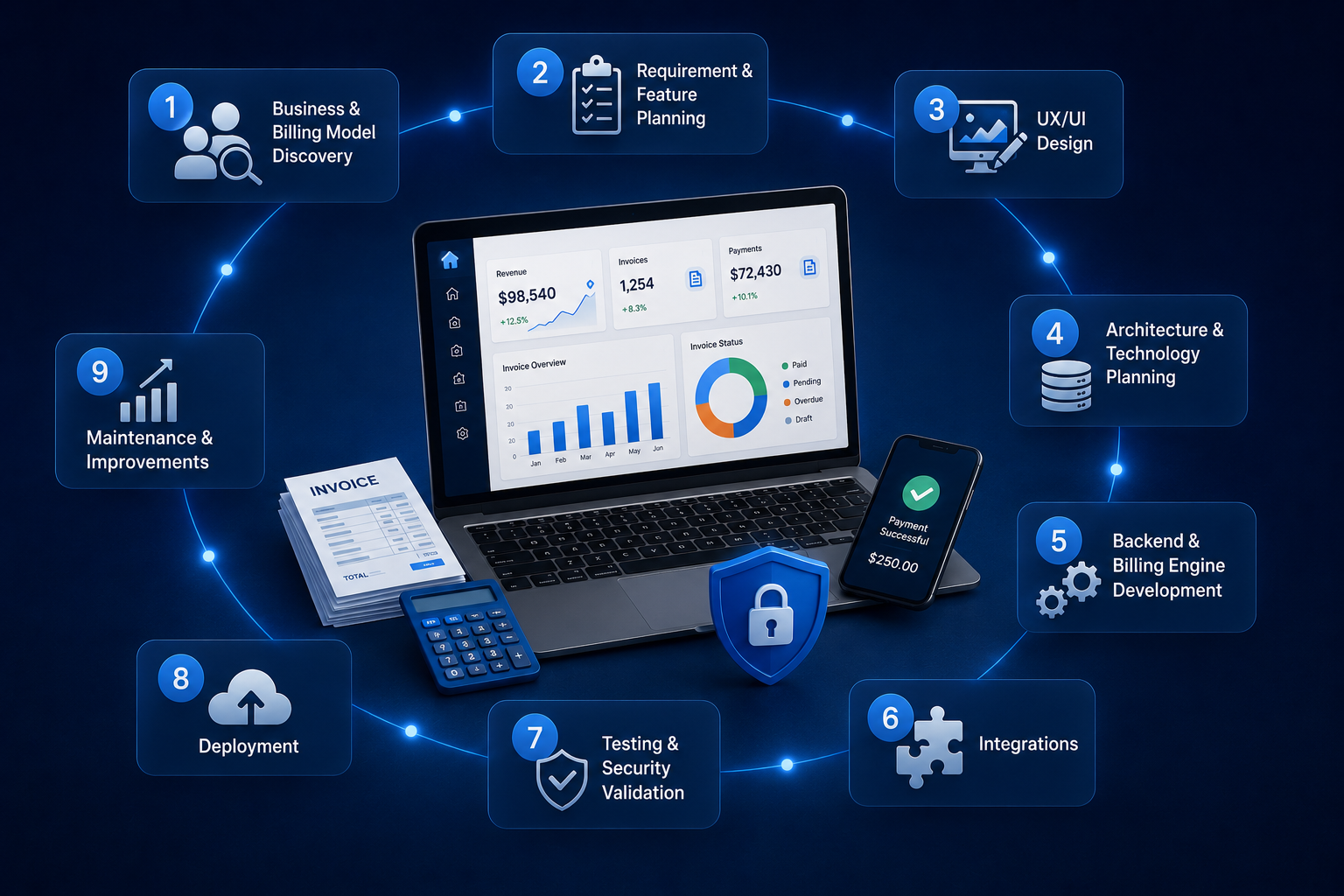 Billing Software Development Process[/caption]
A successful billing project starts with the billing rules, not the user interface.
1. Business and Billing Model Discovery
First define how money moves through the business.
This includes:
- Who pays
- What customers pay for
- Pricing structure
- Billing frequency
- Discounts
- Taxes
- Payment methods
- Refund rules
- Cancellation rules
- Credit policies
A clear billing model makes later technical decisions easier.
2. Requirement and Feature Planning
Separate essential functions from later enhancements.
An MVP may include:
- Customer accounts
- Invoice creation
- Payment integration
- Payment tracking
- Basic reporting
- User permissions
Advanced functionality such as usage billing, multi-currency support, complex reconciliation, and AI-based analysis can be added after the core workflow has been tested.
The recent FinTech development content published by the site also covers broader app planning and development considerations, making it useful supporting reading for businesses comparing a billing platform with a larger financial application.
3. UX/UI Design
The billing interface should make financial information easy to understand.
Important screens may include:
- Billing dashboard
- Customer account
- Invoice creation
- Invoice details
- Payment history
- Subscription management
- Refund management
- Reports
- Settings
- User permissions
Finance users should be able to find an invoice, payment, or account balance without moving through several unrelated screens.
The design stage can also include UI/UX design services when a project requires dedicated user research, wireframes, prototypes, testing, and interface design.
4. Architecture and Technology Planning
The technical architecture should account for:
- Frontend
- Backend
- Database
- APIs
- Authentication
- Payment integrations
- Cloud infrastructure
- Logging
- Backup
- Monitoring
The design should also consider expected transaction volume and future integrations.
5. Backend and Billing Engine Development
The billing engine is where the core financial rules live.
It may handle:
- Pricing
- Invoice generation
- Taxes
- Recurring billing
- Credits
- Discounts
- Payment status
- Refunds
- Reconciliation
Billing calculations need predictable rules and strong test coverage. A small error in a pricing or proration rule can affect thousands of transactions once the system is operating at scale.
6. Integrations
Third-party integrations are developed and tested according to the approved architecture.
This may include:
- Payment providers
- Accounting systems
- CRM
- ERP
- Tax services
- Banking APIs
- Email services
Each integration should have defined failure and retry behavior.
7. Testing and Security Validation
Testing should cover more than the normal successful workflow.
Important scenarios include:
- Failed payment
- Duplicate payment
- Partial refund
- Full refund
- Incorrect webhook order
- Expired subscription
- Cancelled subscription
- Incorrect tax calculation
- Unauthorized access
- Duplicate invoice
- Network failure
Load testing can also be useful when the platform is expected to handle large transaction volumes.
8. Deployment
After testing, the platform can be deployed to its production environment.
Production planning may include:
- Cloud infrastructure
- Database configuration
- Monitoring
- Backups
- Error tracking
- Logging
- Access controls
- Disaster recovery procedures
For larger systems, deployment and infrastructure work may be supported by DevOps development services, particularly where automated deployment, infrastructure management, monitoring, and continuous delivery are part of the project.
9. Maintenance and Improvements
Billing software requires ongoing maintenance.
Changes may be needed because of:
- Payment provider updates
- API changes
- New pricing rules
- Security patches
- New integrations
- Compliance requirements
- Performance needs
The architecture should make these changes manageable without destabilizing the entire billing system.
Technology Stack for Billing Software Development
There is no single technology stack that is automatically correct for every billing platform.
The selection should follow transaction volume, integration requirements, security needs, development resources, and expected growth.
Frontend
Common choices include:
- React
- Vue
- Next.js
A billing dashboard needs responsive screens for invoices, customers, payments, subscriptions, and reports.
For projects using React for complex financial dashboards and API-driven interfaces, ReactJS development services can be relevant when deciding how the frontend should be structured.
Backend
Common backend technologies include:
- Node.js
- Python
- Laravel
The backend is responsible for billing calculations, APIs, authentication, integrations, data processing, and business rules.
Python can be a practical option for projects that combine financial workflows with data processing, analytics, or machine learning.
Database
Possible choices include:
- PostgreSQL
- MySQL
- MongoDB
Relational databases are often useful where customers, invoices, payments, refunds, subscriptions, and transaction relationships require strong consistency and structured querying.
Cloud and Infrastructure
Cloud infrastructure can support:
- Application hosting
- Database services
- Backups
- Monitoring
- Scaling
- Secure networking
- Deployment automation
The infrastructure should be based on transaction volume, availability requirements, security controls, recovery needs, and budget.
APIs and Third-Party Services
API architecture is particularly important for billing systems because payment, accounting, CRM, tax, and other external services may all need to communicate with the platform.
The technology stack should therefore be selected around:
Billing complexity + transaction volume + integrations + security + scalability
rather than simply choosing a programming language because it is popular.
How Much Does Billing Software Development Cost?
The cost of billing software development varies widely because "billing software" can describe anything from a basic invoice generator to a multi-tenant financial platform handling complex recurring transactions.
A practical early-stage estimate can be divided into these ranges:
| Billing Software Scope | Indicative Development Cost |
| Basic billing and invoicing MVP | $3,000-$7,000 |
| Mid-level custom billing platform | $5,000-$10,000 |
| Advanced billing platform | $8,000-$20,000+ |
| Enterprise billing ecosystem | $25,000+ |
These figures should be treated as planning ranges rather than fixed market prices. A detailed estimate should be prepared after the feature set, integrations, target markets, security requirements, and expected transaction volume are defined.
What Drives Billing Software Development Cost?
Several factors can significantly change the budget.
- Number of features
A basic invoice system requires far less work than a platform supporting subscriptions, usage billing, reconciliation, refunds, tax rules, and analytics.
- Billing complexity
Simple fixed-price invoices are relatively straightforward. Proration, tiered pricing, usage charges, credits, and multiple billing cycles require additional business logic.
- Payment integrations
Each payment provider introduces its own API, webhook behavior, error conditions, refund process, and testing requirements.
- Accounting and ERP integrations
Integration costs depend on API quality, data mapping, synchronization requirements, and the number of systems involved.
- Multi-currency support
International billing introduces additional requirements around currencies, exchange rates, reporting, and payment processing.
- Multi-tenancy
A SaaS billing product serving multiple businesses requires strong tenant isolation and tenant-specific configuration.
- Security and compliance
Security testing, access controls, audit logs, encryption, monitoring, and compliance-related requirements add development and testing work.
- Web and mobile applications
Building both web and mobile applications increases the scope compared with a web-only billing platform.
- Reporting requirements
Basic reports require less work than customizable financial dashboards, exports, scheduled reports, and transaction-level analytics.
- Third-party APIs
Every additional external service introduces integration, testing, maintenance, and failure-handling requirements.
MVP vs Full-Scale Billing Platform
A sensible MVP could focus on:
- Customer management
- Invoice generation
- Payment integration
- Payment tracking
- Basic reporting
- User permissions
A full-scale platform may later add:
- Subscription management
- Usage-based billing
- Multi-currency
- Multi-tenancy
- Advanced reconciliation
- Multiple payment providers
- Accounting integrations
- ERP integrations
- Automated dunning
- Advanced analytics
This approach lets the business validate its core billing workflow before committing to every advanced capability.
Have a Billing Software Budget in Mind?
A reliable development estimate depends on more than the number of screens or features. Billing rules, payment integrations, subscription logic, accounting systems, security requirements, supported markets, and transaction volume can all change the project scope.
If you already have an idea of what you want to build, defining these requirements early can help you understand the likely development effort before committing to the project.
Share your requirements and get a clearer view of the scope, features, and development cost.
How Long Does It Take to Build Billing Software?
Development time depends on the complexity of the billing system.
A rough planning range can look like this:
| Development Scope | Approximate Timeline |
| Basic billing MVP | 2-4 months |
| Custom billing platform | 4-7 months |
| Advanced billing system | 6-10+ months |
| Enterprise billing ecosystem | 9-12+ months |
These ranges are estimates rather than promises.
A project with two payment integrations and basic invoicing may move faster than a project with subscription billing, usage metering, accounting integration, multi-currency support, complex reporting, and strict security requirements.
The quality and availability of third-party APIs can also affect the schedule.
The broader FinTech development process can involve similar stages of discovery, planning, development, integration, testing, deployment, and maintenance, which is why businesses considering a billing platform as part of a larger financial product may benefit from reviewing the site's recent FinTech development material.
Custom Billing Software vs Off-the-Shelf Billing Software
The right choice depends on how closely existing products match the business requirements.
| Factor | Off-the-Shelf Software | Custom Software |
| Initial cost | Usually lower | Usually higher |
| Deployment | Faster | Longer |
| Customization | Limited to available options | Built around requirements |
| Integrations | Depends on provider | Designed for required systems |
| Billing rules | Product-dependent | Fully configurable |
| Ownership/control | Vendor-dependent | Greater control |
| Scalability | Depends on product | Depends on architecture |
| Maintenance | Mostly vendor-managed | Requires a development/support plan |
When Off-the-Shelf Software Makes Sense
An existing billing product may be suitable when:
- Billing requirements are standard
- Required integrations already exist
- Custom workflows are limited
- Rapid deployment matters
- The business does not need ownership of the underlying platform
There is little reason to build custom software simply for the sake of having custom software.
When Custom Billing Software Makes Sense
Custom development becomes more attractive when:
- Billing rules are unusual
- Pricing is complex
- Multiple systems need to communicate
- Existing tools create operational limitations
- The business needs complete control over billing workflows
- Enterprise reporting is required
- A company is building billing capabilities into its own SaaS or financial product
The decision should be based on the cost of adapting the business to an existing product versus the cost and value of building the required system.
Common Billing Software Development Mistakes
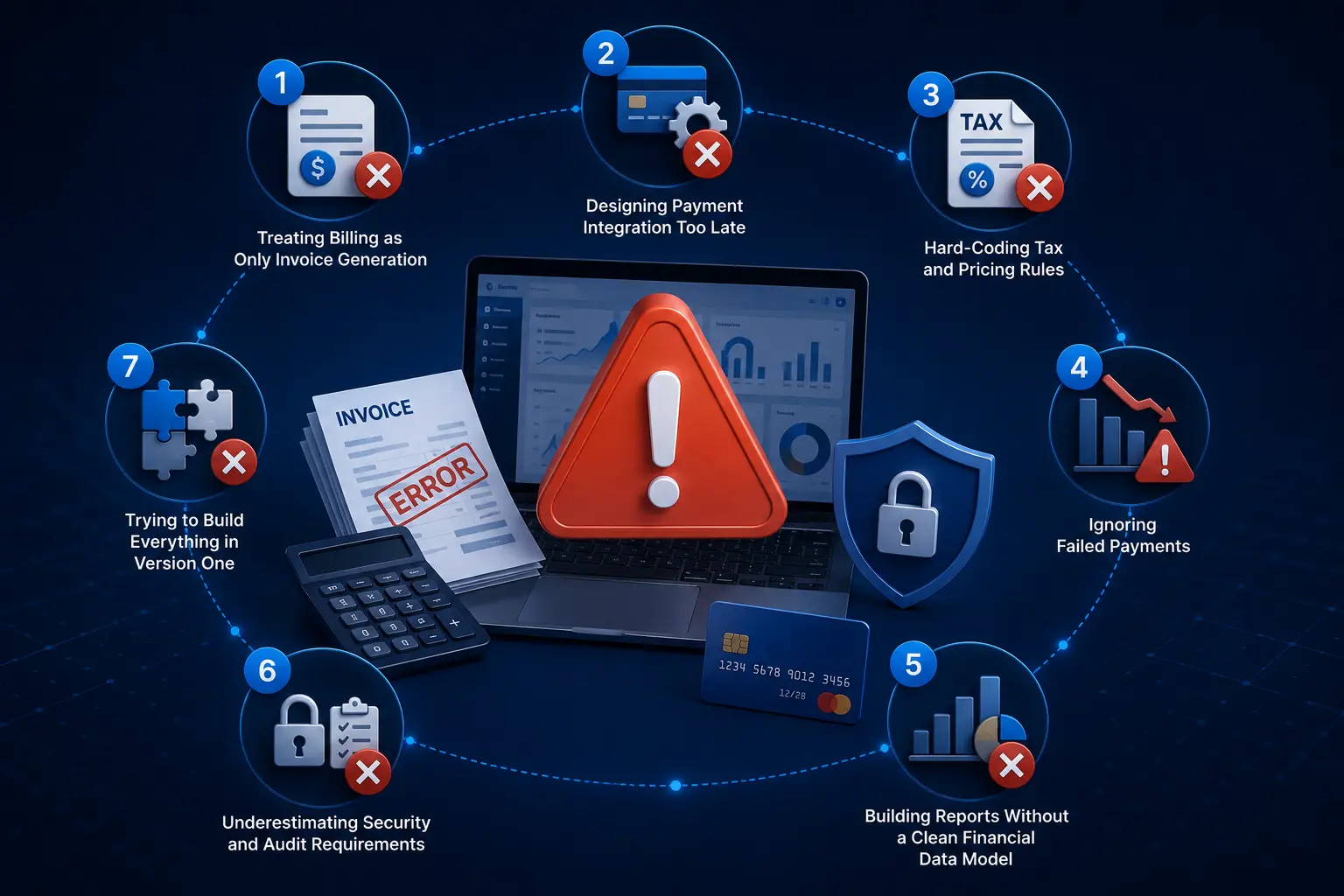
Treating Billing as Only Invoice Generation
Invoices are one part of billing.
A complete billing workflow can include:
Pricing → invoice → payment → refund → reconciliation → reporting
Ignoring the other stages can result in a system that creates invoices while finance teams still have to perform several manual tasks.
Designing Payment Integration Too Late
Payment architecture affects the database, transaction states, webhook handling, refunds, and security.
It should be considered during architecture planning rather than added at the end.
Hard-Coding Tax and Pricing Rules
Tax and pricing requirements can change.
Hard-coded rules make updates more difficult and can increase the risk of incorrect calculations.
Configurable rules are generally more practical for systems intended to operate across multiple markets.
Ignoring Failed Payments
A failed payment is a normal billing event.
The system should define what happens after:
- Card decline
- Expired payment method
- Insufficient funds
- Network failure
- Duplicate payment request
- Delayed webhook
Building Reports Without a Clean Financial Data Model
Reports are only as reliable as the underlying data.
If invoices, payments, refunds, credits, and transaction records are not connected properly, reporting becomes difficult to trust.
Underestimating Security and Audit Requirements
A billing platform needs clear controls around sensitive information and privileged actions.
Access permissions, audit records, encryption, secure APIs, monitoring, and backup procedures should be considered during architecture planning.
Trying to Build Everything in Version One
A long feature list does not automatically create a better product.
A smaller billing platform with accurate calculations, reliable payments, clear records, and solid security is more useful than a large system filled with unfinished features.
How to Choose a Billing Software Development Partner
The development partner matters because billing systems combine software engineering with financial workflows.
Look for Financial Software Experience
A development team should understand:
- Payments
- Transactions
- Billing logic
- Financial records
- APIs
- Security
- Data protection
- Compliance considerations
The team does not need to be a financial institution, but it should understand the consequences of incorrect transaction logic.
Review Relevant Case Studies
Look for projects involving automated financial workflows, secure transactions, reporting, role-based access, integrations, and financial data protection.
For example, the Digital Lending Solution case study demonstrates work involving automated financial processing, secure fund disbursement, reporting, role-based administration, financial data protection, and integrations. Those capabilities are relevant when assessing whether a development team understands financial software workflows.
Evaluate Technical Capabilities
Ask about experience with:
- Payment APIs
- Accounting integrations
- ERP integrations
- Cloud infrastructure
- Databases
- Security testing
- Webhooks
- API architecture
- Mobile and web applications
Ask About Post-Launch Support
Billing software does not stop changing after launch.
A support arrangement may be needed for:
- Bug fixes
- Security updates
- API changes
- Performance improvements
- New integrations
- Billing rule changes
- Infrastructure monitoring
Ready to Discuss Your Billing Software Project?
Whether you are replacing manual billing processes, building a subscription platform, or adding billing functionality to a larger financial product, the first step is understanding the requirements.
You can start with your billing model, required integrations, target markets, expected transaction volume, and the features you consider essential. From there, the project scope can be shaped around your actual business needs.
Have a billing software project you are planning?
What Should You Prepare Before Starting Billing Software Development?
Before contacting a development team, it helps to document the basic business requirements.
Prepare:
- Business model
- Target customers
- Billing model
- Pricing structure
- Billing cycles
- Payment methods
- Countries served
- Supported currencies
- Tax requirements
- Existing software
- Required integrations
- User roles
- Expected transaction volume
- MVP features
- Approximate budget
- Target launch date
You do not need a finished technical specification before starting the discussion.
A clear explanation of how customers are charged and how payments currently move through the business is often enough to begin the discovery process.
The more clearly the billing workflow is defined, the easier it becomes to estimate development scope, identify integration requirements, and separate MVP features from later additions.
Final Thoughts on Billing Software Development
Billing software development is about building a reliable system around the way a business charges customers and manages the resulting financial records.
A small business may need customer accounts, invoices, payments, and reminders. A SaaS company may require recurring billing, proration, usage metering, subscription management, and automated payment recovery. A larger international organization may need multi-currency support, multiple payment providers, accounting integrations, reconciliation, detailed permissions, audit logs, and market-specific billing rules.
The development cost depends on those requirements rather than on a single standard price. The same applies to development time. Defining the billing model, integrations, target markets, security requirements, and MVP scope before development begins gives the project a much more reliable foundation.
For businesses planning a custom billing platform, Nyusoft can help define the product scope, plan the architecture, develop billing workflows, integrate external systems, and build a financial software solution around specific business requirements.
FAQs
1. How much does it cost to develop billing software?
The cost typically ranges from $3,000 to $7,000 for a basic billing MVP, while a mid-level custom platform may cost $5,000 to $10,000. Advanced and enterprise billing platforms can exceed $25,000+ depending on features, integrations, security requirements, billing complexity, and transaction volume.
2. How long does it take to develop billing software?
A basic billing MVP can take around 2 to 4 months, while a custom billing platform may require 4 to 7 months. Advanced or enterprise systems can take 6 to 12 months or longer, particularly when they require multiple integrations, complex billing rules, and extensive testing.
3. What features should billing software have?
Core features typically include customer management, invoice generation, payment processing, recurring billing, refunds, payment reconciliation, reporting, notifications, role-based access, and audit logs. Advanced platforms may also include usage-based billing, multi-currency support, multi-tenancy, automated dunning, and API integrations.
4. Can billing software support recurring and subscription payments?
Yes. Custom billing software can support subscription plans, recurring payments, trial periods, renewals, upgrades, downgrades, cancellations, proration, credits, and failed-payment recovery. The billing rules can be designed around the company's specific subscription model.
5. Can billing software integrate with payment gateways and accounting systems?
Yes. Billing platforms can integrate with payment gateways, accounting software, CRM systems, ERP platforms, banking APIs, tax services, and other third-party applications. APIs and webhooks are commonly used to exchange customer, invoice, payment, and transaction information.
6. Is billing software required to be PCI DSS compliant?
Not every billing application has the same PCI DSS obligations. The requirements depend on how payment account data is stored, processed, or transmitted and how the payment architecture is designed. Using established payment providers and tokenization can reduce the amount of sensitive payment data handled directly by the application.
7. Can custom billing software support multiple currencies and countries?
Yes. A custom billing platform can support multiple currencies, country-specific pricing, exchange-rate handling, regional tax rules, international invoices, and market-specific billing requirements. The exact implementation depends on the countries and business model being supported.
8. What is the difference between custom billing software and off-the-shelf billing software?
Off-the-shelf billing software generally offers faster deployment and lower initial costs but may limit customization. Custom billing software is built around specific pricing models, workflows, integrations, reporting requirements, and business processes, making it more suitable when standard products cannot meet those requirements.
9. Can billing software support usage-based pricing?
Yes. Usage-based billing can calculate charges according to metrics such as API calls, storage, transactions, active users, messages, or service hours. The platform can capture usage, apply pricing rules, calculate charges, and generate invoices based on actual consumption.
10. How do I start a custom billing software development project?
Start by defining your billing model, pricing structure, customer types, payment methods, required integrations, supported countries and currencies, security requirements, expected transaction volume, and MVP features. These details provide a practical foundation for estimating the project scope, development timeline, and cost.
Planning a Custom Billing Software?
Whether you need subscription billing, automated invoicing, payment integration, usage-based billing, reconciliation, or a complete billing platform, the first step is defining the right scope for your business.
Share your billing requirements, existing systems, integrations, and key features with the development team. You can then get a clearer understanding of the recommended approach, project scope, and development requirements before moving forward.