


 Front End Development
  Back End Development
  CMS / ECommerce Development
  Mobile Apps Development
  Cloud Services
  Fullstack Services
  Solution


Personal Finance App Development: Features, Cost & Tech Stack
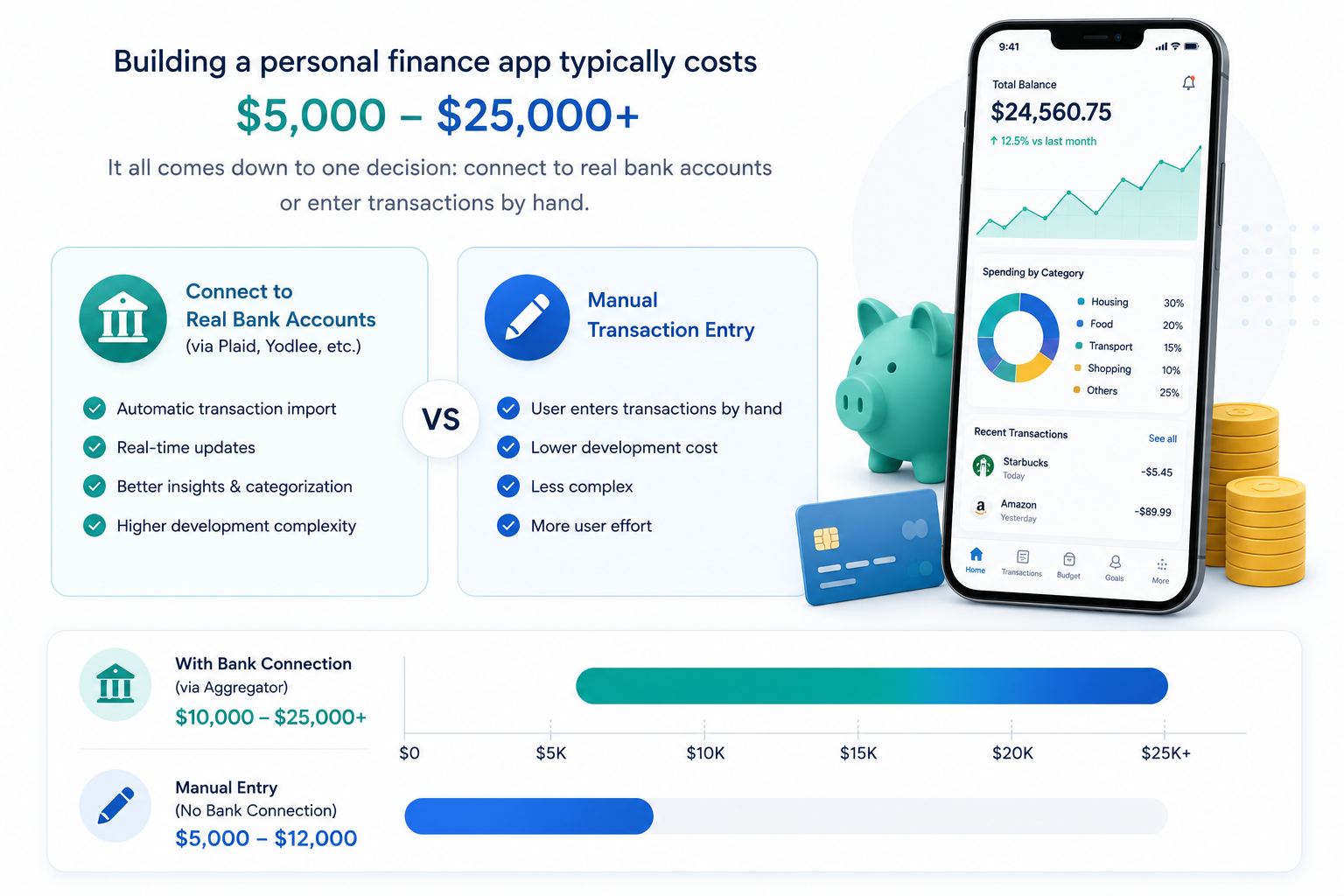
Building a personal finance app typically costs somewhere between $5,000 and $25,000 or more, depending on one decision that shapes almost everything else: whether the app connects to real bank accounts through an aggregator like Plaid or Yodlee, or asks users to enter their transactions by hand.
That single choice isn't a small technical detail. It decides your compliance burden, your monthly operating costs, your development timeline, and honestly, whether users will trust the app enough to keep using it past week two. A manual-entry budgeting app and a bank-linked net worth tracker share a category on the App Store, but they're built by different teams solving different problems.
The demand behind this category is real and still growing. Personal finance software usage has climbed steadily as more people manage money entirely from a phone, and open banking adoption in the US has reached a point where linking a bank account to a third-party app is now a normal, expected step in onboarding rather than a novelty.
This article walks through how these apps actually work, the features that separate a real product from a spreadsheet with a UI, where compliance actually kicks in, the tech stack, the real development process, and what it costs. By the end, you should be able to scope a realistic project instead of guessing at one.
How Personal Finance Apps Actually Work
Before any feature or budget conversation makes sense, it helps to understand the two basic models these apps run on, because nearly every later decision traces back to this one.
Manual entry apps ask the user to log income and expenses themselves, or import a CSV occasionally. They're cheaper to build, they carry a lighter compliance load, and they work fine for a niche audience that actually enjoys tracking every dollar by hand. Most people don't.
Aggregator-based apps connect directly to a user's bank, credit card, and investment accounts through a data provider like Plaid, Yodlee, TrueLayer, or MX. The user logs into their bank once through a secure OAuth flow, the aggregator issues a read-only token, and transactions start flowing into the app automatically from that point forward.
The categorization piece is where a lot of these apps quietly fall apart. An incoming transaction labeled "SQ *JOE'S COFFEE" needs to become "Coffee Shops" under a "Dining" budget, and that mapping is never perfect on day one. Good apps build a visible correction loop, where a user fixing one mislabeled transaction teaches the system for next time. Apps that skip this and just present raw, occasionally wrong categories as fact tend to lose user trust fast, usually within the first month.
This decision, aggregator versus manual, cascades into everything downstream: your tech stack, your compliance posture, your monthly third-party costs, and even what claims you're allowed to make in your app store listing. Decide it early, during discovery, not halfway through a sprint.
Planning to build a personal finance app?
Whether you're scoping a lean budgeting MVP or a full account-aggregation platform with AI-driven insights, getting the architecture right from day one saves real money later. Our team can help you map the right feature set, tech stack, and compliance approach for your specific build.
Talk to Our Experts
Types of Personal Finance Apps You Can Build
Budgeting and Expense Tracking Apps
The most common starting point. Category-based spending limits, envelope-style budgets, manual or auto-imported transactions, and a monthly view of where money actually went versus where it was supposed to go. This is usually the cheapest and fastest app type to bring to market, and it's a reasonable place to launch an MVP before layering on anything more ambitious.
Net Worth and Account Aggregation Apps
Pulls balances from checking, savings, credit cards, loans, and investment accounts into a single dashboard. This is the category most people picture when they hear "Mint-style app," and it's also where personal finance software development services get requested most often by fintech founders, since aggregation is the technically hardest and most expensive part of the build.
Savings and Goal-Based Apps
Round-up savings, sinking funds for specific goals like a vacation or emergency fund, and automated transfers triggered by rules the user sets. Narrower in scope than a full aggregation platform, which makes it a genuinely reasonable first product for a smaller team.
Investment and Portfolio-Adjacent Apps
Portfolio tracking is layered on top of budgeting, showing net worth including brokerage and retirement accounts. Worth flagging early: the moment an app starts recommending specific trades or asset allocations rather than just displaying data, it edges into investment advisory territory, which triggers a different regulatory conversation entirely. A team building this kind of feature set should be looking closely at a proper portfolio management system build rather than bolting advisory logic onto a budgeting app as an afterthought.
Debt Payoff and Credit Score Apps
Debt snowball and avalanche calculators, payoff timelines, and soft-pull credit score monitoring. A focused, lower-complexity build compared to full aggregation, and one that tends to have loyal, motivated users because the product is tied to a specific, emotionally significant goal.
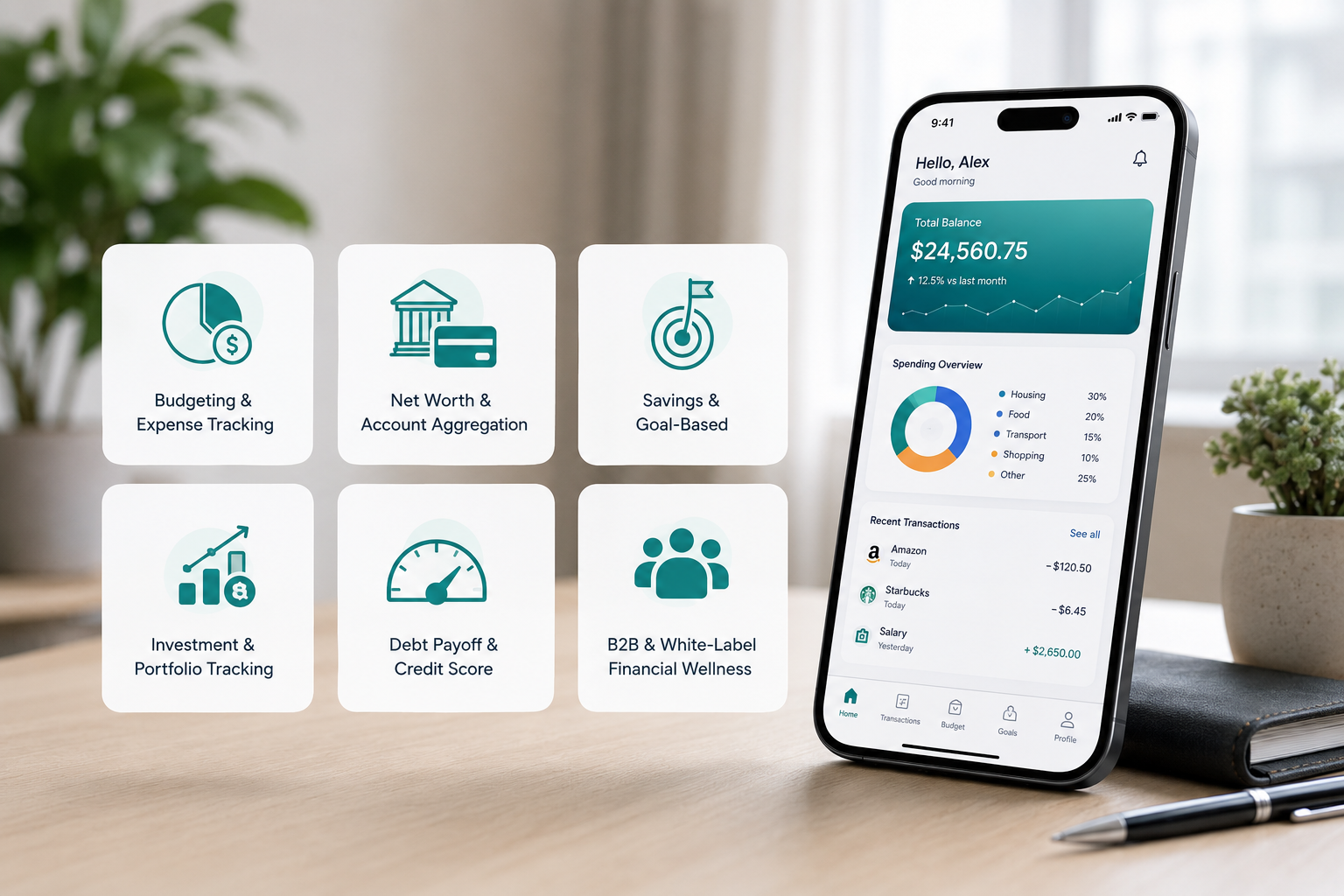
B2B and White-Label Financial Wellness Apps
Distributed through employers, banks, or credit unions as an embedded benefit rather than sold directly to consumers. This model mirrors how corporate wellness programs distribute meditation and fitness apps, and it's a strong fit for anyone searching for a personal finance app development company on behalf of a bank or HR platform rather than a solo founder building a consumer app from scratch. Revenue here comes per seat or per member, which tends to be a steadier business than chasing individual app store downloads.
Core Features Every Personal Finance App Needs
These are the table-stakes features. Skip any one of them and the app feels unfinished next to Mint's successors, YNAB, Copilot, or Monarch, which is the real bar users are comparing against even for a smaller, more focused app.
- Secure onboarding and identity verification. Lightweight KYC at signup, enough to confirm the user is who they say they are without turning onboarding into a ten-minute form.
- Bank account linking through an aggregator API. This is the backbone of any app beyond a basic manual tracker. Plaid, Yodlee, TrueLayer, and MX each have different pricing models and bank coverage, and the choice between them deserves its own research pass before committing.
- Automatic transaction categorization with a correction loop. Covered above, and worth repeating here because it's the single feature most likely to make or break early user trust.
- Budget creation and tracking. Category-based limits, rollover budgets for the month, and a clear visual of spent versus remaining.
- Spending insights and trend dashboards. Weekly and monthly views showing where money is actually going, ideally with month-over-month comparisons rather than just a single snapshot.
- Bill tracking and reminders. Detecting recurring charges automatically and reminding users before a due date, not just logging bills the user manually adds.
- Savings goals with visible progress. A single number showing how close a user is to a goal tends to drive more engagement than any chart underneath it.
- Net worth dashboard. Assets minus liabilities, pulled live from every linked account. This is the feature users check most obsessively once they have it.
- Smart alerts. Low balance warnings, unusual transaction flags, and overspending notices sent at the moment they're actually useful, not as a daily digest nobody reads.
- Data export. CSV or PDF export for tax season or for sharing with an accountant. Small feature, but it comes up constantly in support tickets when it's missing.
- Biometric login and encrypted local storage. Non-negotiable for anything touching financial data, and users notice its absence immediately given how normalized Face ID and fingerprint login have become across banking apps generally.
Getting the dashboard right without burying the user in numbers is a real design problem, not a checkbox. Our UI/UX design team has worked through this exact balance on fintech products before, where showing too much raw data makes the app feel like a spreadsheet and showing too little makes it feel shallow next to competitors.
Advanced and Differentiating Features
This is where an app stops looking like another budgeting clone and becomes something a user actually recommends to a friend.
- AI-powered financial insights. Pattern recognition across weeks or months of transaction history, surfacing plain-language observations like "you're spending 40% more on dining out than last month" instead of leaving the user to spot the trend in a chart themselves. This is genuinely one of the biggest shifts in the category right now, apps moving from passive tracking toward active, conversational coaching.
- Subscription detection and cancellation nudges. Automatically flags recurring charges the user may have forgotten about, and estimates the annual cost of keeping them. A small feature that consistently ranks high in user reviews because it feels like the app is doing real work on the user's behalf.
- Predictive cash flow forecasting. Flags a likely low-balance day before payday based on historical spending patterns, giving the user a chance to act instead of finding out after an overdraft fee.
- A financial health score. One composite number, similar in spirit to a credit score, that gives users a quick read on their overall standing without needing to interpret several separate charts.
- Multi-institution sync. Accounts spread across several banks, sometimes in different countries, unified into one view. This is where aggregator coverage and reliability really matter, and it's a genuine differentiator since a lot of budget apps handle single-bank users well and multi-bank users poorly.
- Investment tracking layered on budgeting. Bringing brokerage and retirement account data into the same net worth view as checking and savings, without necessarily offering advisory features.
- Conversational financial assistant. A chat interface where users can ask "how much did I spend on groceries last month" in plain language instead of digging through filters. This kind of feature sits well within a broader LLM integrations build, where a language model is layered on top of the app's own transaction data rather than replacing it.
- Shared household budgeting with permissions. Letting two people manage a joint budget while keeping some accounts private is a feature few competitors handle cleanly, which makes it a real differentiation opportunity rather than a commodity checkbox.
For the AI-personalization layer specifically, this work sits within a broader generative AI development practice, where pattern-detection and recommendation systems get built around a specific product's actual data, not a generic model bolted on top.
Where Financial Compliance Actually Applies
This is the section a lot of competing guides either skip entirely or get vague on, often implying every finance app automatically falls under heavy banking regulation. It doesn't, and the actual boundary is worth understanding clearly before it becomes an expensive surprise mid-project.
A read-only budgeting or aggregation app that displays account data but never moves money sits in a lighter compliance category than an app that initiates transfers, holds a balance, or issues cards. That second category triggers money transmitter licensing and a much heavier PCI DSS obligation if card data is touched directly rather than delegated to a processor.
The Gramm-Leach-Bliley Act (GLBA) applies once an app is handling nonpublic personal financial information at any meaningful scale. It covers privacy notices and requires reasonable safeguards around how that data is stored and shared, and it applies regardless of whether the app is a scrappy MVP or a funded platform.
SOC 2 Type II isn't legally required in most cases, but it's functionally required. Enterprise partners, banks, and investors routinely ask for it before they'll integrate with an app or fund it, and treating this as a "later" problem is one of the most common ways fintech founders inflate their own costs. Bolting compliance onto an already-built system is consistently more expensive than designing around it from the start.
PCI DSS matters specifically when an app handles card data directly rather than routing it through a compliant payment processor, which most budgeting and aggregation apps avoid by design.
State-level privacy laws, including the CCPA in California, apply to financial apps the same way they apply to any app collecting personal data, regardless of whether GLBA also applies.
The FTC's scrutiny on financial claims is worth naming directly. A feature that nudges users toward better spending habits is fine. A feature that starts to look like specific investment or credit advice, without the right registration behind it, risks a deceptive-practices problem independent of whether the underlying data handling is otherwise sound.
The practical takeaway: decide during discovery whether this is a budgeting and insights tool or a money-movement product. That single decision shapes the licensing conversation, the security architecture, and how much legal review the project actually needs before launch. The Consumer Financial Protection Bureau's ongoing work on open banking data rights, under Section 1033, is also worth tracking if the app leans heavily on account aggregation, since the rules around consumer data portability in this space are still evolving.
Tech Stack for Personal Finance App Development
Mobile App Stack
Cross-platform frameworks like React Native or Flutter handle the UI and general logic well for most budgeting and aggregation apps, and they keep iOS and Android development moving in parallel rather than as two separate builds. Native development, using Swift or Kotlin directly, becomes the better call once biometric security and background sync depth matter more than speed to market, which tends to happen once an app moves past MVP into a funded, security-audited platform.
Web App Stack
For a browser-based dashboard, Next.js is a common choice for the front end, giving fast load times and clean routing for a data-heavy dashboard experience. A responsive layout matters more here than in most web apps, since a fair number of users will check their finances from a laptop during the workday and from their phone at night.
Backend and API Layer
Node.js tends to handle real-time syncing and notification delivery well, given its strength with concurrent, event-driven workloads. Python is usually the better fit for the transaction categorization engine and any machine learning work behind forecasting or insights, since most of the mature ML tooling in this space lives in the Python ecosystem.
Database and Security Layer
Encrypted storage, both at rest and in transit, is non-negotiable given the sensitivity of financial data. Bank credentials should never be stored directly; aggregators handle that through tokenized, revocable access instead. Role-based access control and full audit logging round out the baseline security posture any serious finance app needs before launch.
Cloud and DevOps
Infrastructure on AWS, GCP, or Azure, built with SOC 2 alignment in mind from the start rather than retrofitted later. A solid DevOps setup with automated security scanning and a real CI/CD pipeline matters more here than in a typical consumer app, given how much scrutiny financial apps face during App Store and Play Store review.
The Personal Finance App Development Process, Step by Step
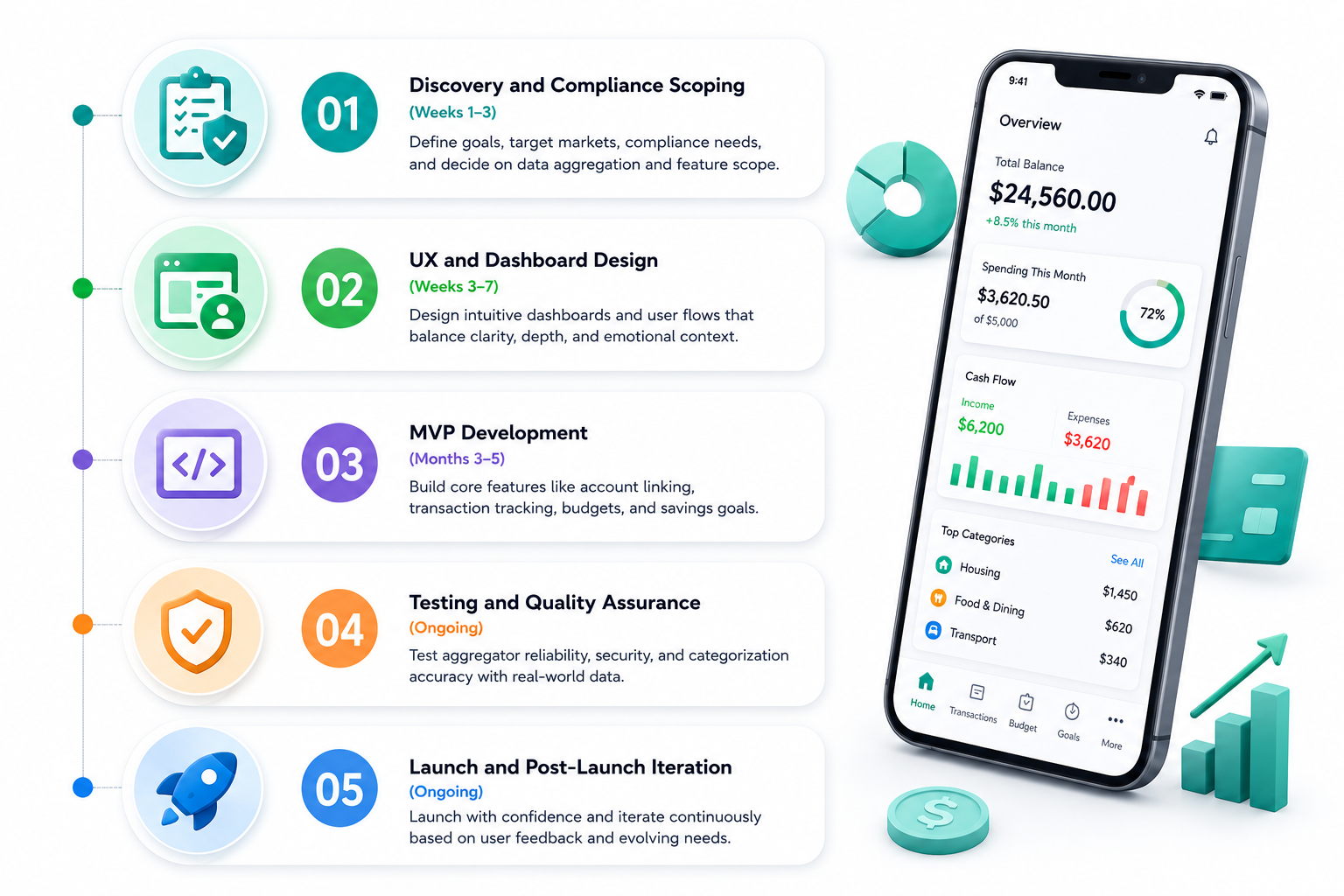
Phase 1: Discovery and Compliance Scoping (Weeks 1–3)
This is where the aggregator-versus-manual decision gets made, along with budgeting-only versus money-movement scope, and target geography, since the US, UK, and EU each have different aggregator providers and different regulatory frameworks. Compliance posture gets decided here, not discovered later.
Phase 2: UX and Dashboard Design (Weeks 3–7)
Financial dashboards face the same tension as health dashboards: too much raw data feels overwhelming, too little feels shallow next to established competitors. Design also needs to account for the fact that people check this app in very different moods, casually browsing on a Sunday versus anxiously checking a balance before a big purchase, and the interface needs to work for both.
Phase 3: MVP Development (Months 3–5)
A realistic MVP usually covers account linking, categorized transactions, basic budgets, and a savings goal or two. AI-driven insights, multi-institution investment tracking, and advanced forecasting are worth holding back until real usage data shows they're worth the investment, rather than building them speculatively on day one.
Phase 4: Testing and Quality Assurance
Aggregator sync reliability needs testing across multiple real bank connections, not just one sandbox account, since different banks behave differently through the same API. Security penetration testing is not optional for anything touching financial data. Categorization accuracy should be validated against real, messy transaction data rather than a clean demo dataset, since that's where most categorization engines actually fail.
Phase 5: Launch and Post-Launch Iteration
Finance-category apps get extra scrutiny during App Store and Play Store review, including close attention to how confidently the app describes its own accuracy and security. After launch, budget for ongoing maintenance around 15–20% of build cost annually, covering aggregator API changes, new bank connections, and security patching that never really stops in this category.
If the goal is a broader platform rather than a single consumer app, a custom software development approach during discovery helps scope that properly, and for a B2B or bank-embedded product specifically, that conversation shifts closer to SaaS product development.
Need help defining the right feature set?
Choosing the right features early is what keeps a personal finance app on budget without cutting corners on security or user experience. Our team can help prioritize your feature list, pick the right aggregator and tech stack, and build a realistic roadmap around your actual goals.
Book a Free Consultation
How Much Does Personal Finance App Development Cost
Costs vary quite a bit depending on aggregation depth, AI involvement, and whether the app moves money. Here's a realistic breakdown:
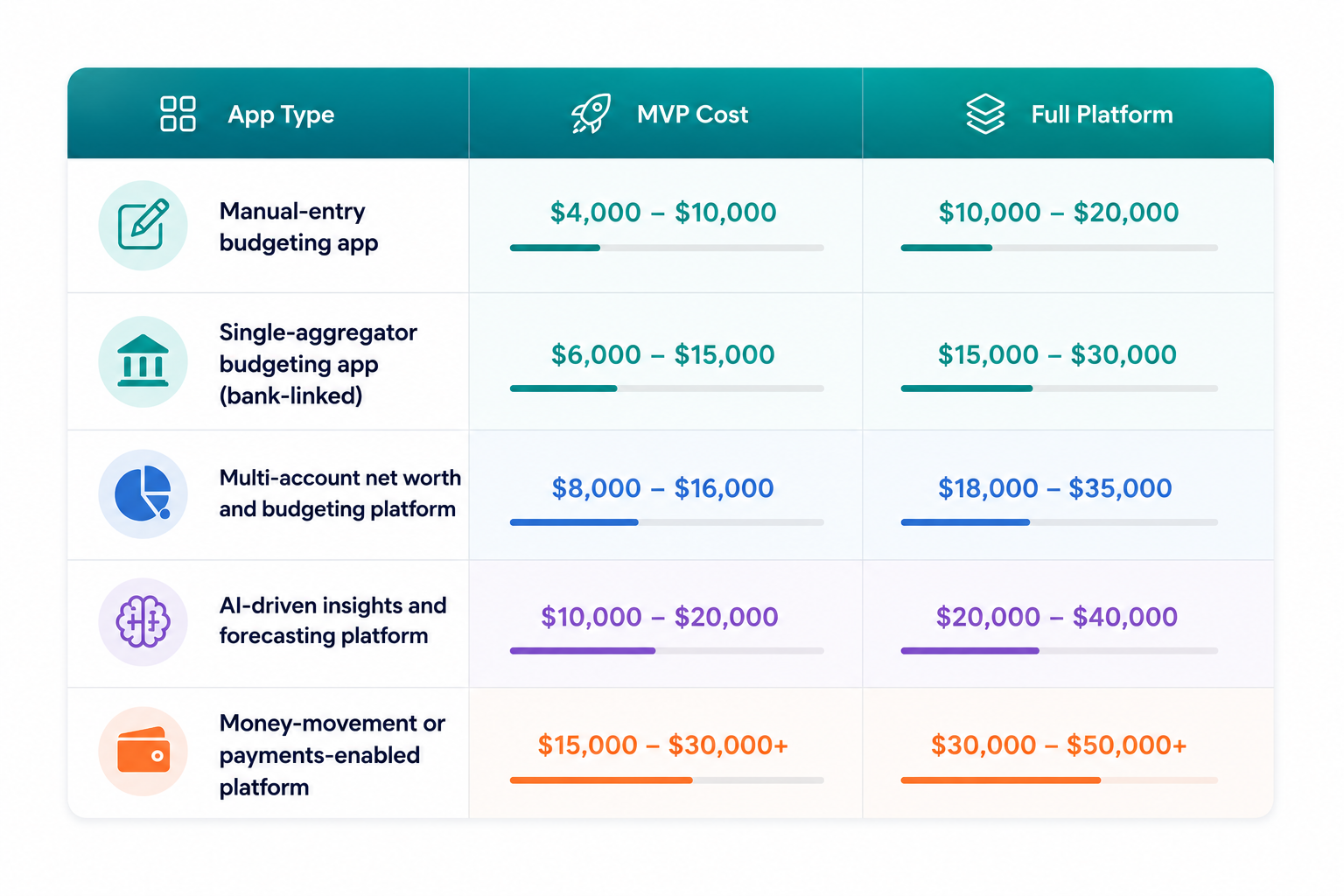
| App Type | MVP Cost | Full Platform |
| Manual-entry budgeting app | $4,000 – $10,000 | $10,000 – $20,000 |
| Single-aggregator budgeting app (bank-linked) | $6,000 – $15,000 | $15,000 – $30,000 |
| Multi-account net worth and budgeting platform | $8,000 – $16,000 | $18,000 – $35,000 |
| AI-driven insights and forecasting platform | $10,000 – $20,000 | $20,000 – $40,000 |
| Money-movement or payments-enabled platform | $15,000 – $30,000+ | $30,000 – $50,000+ |
The main cost drivers: number of aggregator integrations, how deep the AI and forecasting work goes, how much compliance and legal review the project needs, how many platforms you're launching on, and the complexity of the dashboard design itself.
Aggregator API costs are a line item a lot of early estimates leave out entirely. Plaid and similar providers typically charge per connected account or on a tiered basis that scales with your user count, which means this is really an ongoing operating cost rather than a one-time integration fee, and it needs to be modeled into the business plan from the start rather than treated as a rounding error.
Plan for annual maintenance around 15–20% of build cost, which lines up with what most established fintech development shops quote once aggregator upkeep, security patching, and OS-level changes are factored in.
For a broader look at what shapes mobile budgets generally, a good next read is our mobile app development breakdown of the underlying cost drivers across app categories.
Monetization Models That Actually Work
- Freemium subscriptions dominate this category. Free basic tracking, with a paid tier unlocking AI insights, multi-account sync, and deeper forecasting. This model works because the free tier is genuinely useful on its own, which builds trust before asking for a card number.
- B2B and white-label licensing through banks or credit unions is a strong path for steadier, more predictable revenue, since it's priced per member rather than chasing individual app store conversions one download at a time.
- Affiliate and lead-generation revenue, recommending credit cards or savings products based on spending patterns, can work well but needs careful, transparent disclosure. Recommending a product because it genuinely fits a user's situation, and being upfront about any commission involved, protects both the user's trust and the app's own compliance standing.
- One-time purchase pricing fits narrower, single-purpose tools better than full platforms, similar to how a focused debt payoff calculator might sell as a one-time download while a full net worth tracker leans subscription.
- Ad-supported models carry a real trust risk in this category specifically. Financial data is about as sensitive as data gets, and users are understandably wary of anything that looks like their spending habits are feeding an ad network, even indirectly.
Common Mistakes That Sink Personal Finance Apps
- Treating aggregator integration as a one-time task. Bank APIs change, connections break, and banks occasionally update their own login flows without warning. This needs a dedicated maintenance budget, not a "set it and forget it" mindset.
- Overpromising categorization accuracy. No auto-categorization engine gets everything right on day one. Apps that build a visible, easy correction loop keep user trust. Apps that present wrong categories with false confidence lose it fast.
- Delaying the compliance conversation until after the MVP is built. This is consistently one of the most expensive mistakes in fintech development, since retrofitting SOC 2 alignment or GLBA safeguards into an already-built system costs far more than designing around them from the start.
- Overloading the dashboard. The same balance problem that shows up in health apps applies here: too much raw data feels clinical, too little feels shallow.
- Treating security as a later phase instead of a foundation. A data breach in a financial app is close to unrecoverable from a trust standpoint, in a way that's harder to bounce back from than in most other app categories.
- Building advisory-adjacent features without the right registration. A well-intentioned "smart recommendation" feature can drift into regulated investment advice territory without anyone on the team fully realizing it happened.
- Building a Personal Finance App People Actually Trust
Trust in this category gets earned through transparency, honest categorization, and a calm, clear dashboard, not through a long feature list. The apps that last are the ones that tell users the truth about what they can and can't do, rather than chasing every possible feature from day one.
The decision framework from the start of this article holds throughout the whole project: aggregator versus manual entry, budgeting-only versus money-movement, and consumer-facing versus B2B distribution. Get those three calls right early, and the rest of the build, from tech stack to compliance to cost, tends to fall into place around them.
At Nyusoft Solutions, we've worked through this exact set of decisions with fintech clients before, including projects spanning budgeting platforms, portfolio tracking, and lending. Our fintech app development team and our case studies, including the Wekeza stock trading platform we built for African and US users, show how these projects come together end to end. If you're scoping your own personal finance app, that's a solid place to start the conversation.
FAQs
- How much does personal finance app development cost?
The cost depends on whether the app uses manual entry or connects to real bank accounts, how much AI is involved, and how many platforms you're launching on. A basic budgeting app typically starts around $4,000–$20,000, while a full-featured, bank-linked platform with AI insights can range from $25,000 to $40,000 or more. - How long does it take to build a personal finance app?
A basic manual-entry or single-aggregator budgeting app usually takes 3–5 months. A full net worth and multi-account platform with AI-driven forecasting can take 6–9 months or longer, largely depending on how many bank integrations and compliance reviews are involved. - What features should a personal finance app include?
At minimum, it needs secure bank account linking, automatic transaction categorization, budget tracking, savings goals, a net worth dashboard, bill reminders, smart alerts, and biometric login. More advanced apps add AI-powered insights, subscription detection, cash flow forecasting, and multi-institution sync. - Do personal finance apps need to be compliant with financial regulations?
It depends on what the app actually does. A read-only budgeting or aggregation app carries a lighter compliance load than one that moves money, issues cards, or holds a balance. Most personal finance apps need to account for the Gramm-Leach-Bliley Act (GLBA) and state-level privacy laws, and enterprise or investor partners typically expect SOC 2 Type II alignment even when it isn't legally mandated. - Which bank data aggregator should I use - Plaid, Yodlee, or something else?
It depends on your target market and budget. Plaid has strong US bank coverage and a large developer ecosystem. Yodlee (Envestnet) offers broader international reach. TrueLayer and Salt Edge are commonly used for UK and EU open banking compliance. Pricing, bank coverage in your target country, and API reliability should all factor into the decision. - Can a personal finance app work without connecting to a bank account?
Yes. Manual-entry apps let users log transactions themselves or import a CSV periodically. They're cheaper to build and carry less compliance overhead, but they generally see lower engagement than bank-linked apps, since most users won't keep up manual entry for long. - What technology stack is best for personal finance app development?
Most teams use React Native or Flutter for cross-platform mobile apps, Next.js for the web dashboard, Node.js for real-time syncing, and Python for transaction categorization and forecasting models. Native development (Swift/Kotlin) becomes worth considering once biometric security and background sync depth become priorities. - How do personal finance apps make money?
The most common model is freemium subscriptions, where basic tracking is free and AI insights, multi-account sync, or advanced forecasting sit behind a paid tier. B2B licensing to banks or employers, careful affiliate partnerships, and one-time purchases for narrower tools are other viable paths. Ad-supported models are generally avoided in this category due to the sensitivity of financial data. - Is AI necessary for a personal finance app to succeed?
Not for an MVP. AI-driven insights, spending pattern recognition, and predictive cash flow forecasting are strong differentiators, but they're usually worth adding after launch, once real usage data shows which insights users actually want. Starting with solid core budgeting features and a reliable bank sync tends to matter more early on. - Can I launch a personal finance app with an MVP first?
Yes, and it's the more sensible approach for most teams. A realistic MVP usually covers account linking, categorized transactions, basic budgets, and one or two savings goals. Advanced features like AI insights, multi-institution investment tracking, and forecasting are better added after the MVP validates real user demand.
Ready to build your personal finance app?
From product strategy and compliance scoping to development, AI integration, and long-term support, our team can help turn your idea into a secure, scalable platform.
Get a Free Cost Estimate