


 Front End Development
  Back End Development
  CMS / ECommerce Development
  Mobile Apps Development
  Cloud Services
  Fullstack Services
  Solution


Meal Planning App Development: Features, Cost, and Tech Stack
A meal planning app helps users decide what to eat before they eat it. It schedules meals for the week, builds grocery lists automatically, tracks nutritional values, and removes the daily friction of figuring out what is for dinner. Building one means solving a specific product challenge and how to make food decision-making fast, personal, and genuinely useful at the same time.
The cost to develop a meal planning app starts around $20,000 for a focused MVP and rises to $90,000–$130,000 for a full platform with AI recommendations, grocery delivery integration, and multi-user household support. Timelines run from 3 months for a basic build to 8–10 months for a feature-complete product.
This guide walks through every part of the process: what to build, how to build it, what it costs, and what separates apps people use every day from apps they delete after a week.
Why Meal Planning Apps Are a Serious Product Opportunity Right Now
The numbers behind this category are worth understanding before you commit to a build.
The global meal planning app market is projected to grow from USD 2.45 billion in 2025 to USD 6.77 billion by 2034, at a CAGR of 10.5% (Source: Business Research Insights, 2025). The AI-driven meal planning segment alone is expected to reach USD 11,566.5 million by 2034, growing at a CAGR of 28.10% from 2025 (Source: Market.us, 2025). And 42% of leading meal planning apps already use AI or machine learning for personalized recommendations and automated grocery list generation (Source: Business Research Insights, 2025).
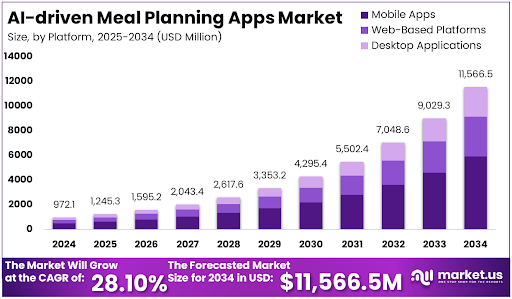
Those three numbers tell a clear story. The market is large, growing fast, and AI-led personalization is already the standard not the differentiator.
What is still underserved is the family and household use case. Most apps today are built for the solo dieter counting macros. The person managing meals for a household of four with a picky 8-year-old, a partner avoiding gluten, and a tight grocery budget does not have a great solution yet. That gap is real, and it is where a lot of product opportunity sits right now.
Beyond consumer apps, corporate wellness programs and clinical nutrition practices are both expanding their digital toolkits. Meal planning has a role in both, and the B2B revenue potential is significantly larger per customer than the consumer subscription model.
Meal Planning App vs. Nutrition Tracking App - What Is the Actual Difference?
This distinction matters more than most people realize when they are planning a build.
A nutrition tracking app is reactive. The user eats something, then opens the app to log it. The core experience is record-keeping calories consumed, macros hit, water intake tracked. The data is always about the past.
A meal planning app is proactive. The user opens the app before eating to decide what they will have. The core experience is decision-making what to cook this week, what to buy at the store, how to balance variety with nutritional goals. The data drives future behavior.
This difference changes the UX priorities, the data architecture, and the features that matter most. A nutrition tracking app needs fast, frictionless logging. A meal planning app needs an intuitive scheduling interface, a strong recipe database, and a grocery list that actually works.
Many full-scale health platforms need both layers planning ahead and tracking what happened. When you are building a product that includes both, the two need to communicate cleanly at the data level. The meal plan informs the expected nutritional intake. The tracking layer records what actually happened. A gap between those two is where users lose confidence in the app.
If you are building a platform that combines meal planning with broader health tracking, our guide on diet and nutrition app development covers the full feature set and how the two layers connect architecturally.
Types of Meal Planning Apps You Can Build
Defining your product type before you scope features is the most important decision in the early planning phase. Each type has a different core user, a different data model, and different features that matter most.
Personal meal planner apps serve individual users planning their own weekly meals around dietary goals, calorie targets, or specific diet types. This is the most common product category and also the most competitive. To stand out here, personalization and recipe quality are what drive retention.
Family meal planning apps handle multiple dietary profiles under one household account, merge them into a single weekly plan, and generate one consolidated grocery list. This is the most underserved product category relative to user demand. The data model is significantly more complex than single-user apps, but the retention rates for family-oriented apps are considerably higher.
Diet-specific planner apps are built around a particular dietary approach: keto, vegan, gluten-free, diabetic-friendly, pregnancy nutrition, or cardiac recovery. The narrower focus makes the recipe curation more manageable and the marketing more targeted. Condition-specific diet apps also tend to attract more loyal, paying users.
Meal prep and batch cooking apps focus on efficiency. They help users cook once and eat across multiple days, with features like ingredient overlap detection between recipes, prep sequencing, and storage instructions. These apps appeal strongly to busy professionals and families trying to reduce weekday cooking effort.
Dietitian and coach-assigned meal plan apps are professional tools. A practitioner builds weekly plans and assigns them to clients. The client app shows what to eat. The practitioner dashboard shows adherence and progress. This is a B2B-leaning product with a very different revenue model than consumer apps.
Corporate wellness meal planning modules sit inside larger employer wellness platforms. Employees access meal planning tools as part of a company health benefit. These are sold as B2B licenses and tend to have multi-year contract structures.
Core Features Every Meal Planning App Needs
Features divide cleanly into three groups: what every meal planning app needs at launch, what separates good apps from great ones, and what the backend admin side requires to operate the product properly.
Essential Features
Weekly meal schedule builder is the centre-piece of the app. Users plan breakfast, lunch, dinner, and snacks across seven days using a visual calendar interface. The UX here is critical if scheduling a meal requires too many taps or feels like filling out a form, users stop using it. Drag-and-drop or one-tap assignment from a recipe card is the standard that users expect.
Recipe database with filtering gives the app its content depth. Users should be able to search by cuisine, cooking time, dietary preference, ingredients they already have, calorie range, and effort level. The size and quality of this database is one of the biggest factors in long-term retention. Apps with thin recipe libraries feel repetitive within weeks.
Automated grocery list generation is the feature users consistently describe as the most practically useful thing a meal planning app does. Select your meals for the week, and the app builds the shopping list automatically. When this works well, ingredients consolidated, quantities calculated, items grouped by store section it saves users a meaningful amount of time every single week.
Pantry and ingredient management lets users log what they already have at home. The app then excludes those items from the grocery list or prioritizes recipes that use up existing ingredients. This reduces food waste and feels genuinely thoughtful. Most basic competitors skip this feature entirely, which makes it a meaningful differentiator at MVP stage.
Nutritional breakdown per meal and per day shows the calorie and macro profile of the entire meal plan, not just individual recipes. Users need to see their weekly picture at a glance if Tuesday is going to be 600 calories short of their target, they want to know that when they are planning Tuesday, not after.
Dietary preference and restriction profiles must be applied globally and automatically across all recommendations and suggestions. A user who sets nut allergy in their profile should never see a recipe with nuts, anywhere in the app, in any context. This sounds obvious but requires restriction logic enforced at the data layer not just as a search filter.
Serving size and portion adjustment scales recipe quantities automatically when the user changes the number of servings. If a recipe serves 4 and the user wants to cook for 2, every ingredient quantity and every nutritional value needs to update accurately. Errors here frustrate users disproportionately.
Meal swap and substitution lets users replace a scheduled meal with one tap. The replacement should be contextually relevant, similar calorie range, compatible with dietary restrictions, different enough to feel like genuine variety. Swap logic is one of the harder features to get right but one of the most used.
Advanced Features That Differentiate Your App
AI-powered meal recommendations learn from a user's history, stated goals, and nutritional gaps to suggest meals proactively. In V1, this can be rule-based filtering by preference and calorie range. In V2, once behavioral data exists, machine learning models can personalize recommendations meaningfully. Starting with rules and upgrading to ML is the right sequencing for most new apps.
Grocery delivery API integration connects the grocery list directly to a delivery service Instacart, Walmart Grocery, or a regional equivalent so users can order ingredients without leaving the app. This single integration has been shown to be the strongest driver of long-term daily active use in apps that have it. Users who place even one grocery order through the app have significantly higher 90-day retention rates.
Budget tracking per meal plan estimates the weekly cost of the planned meals based on ingredient prices. Almost no app does this well. For the large portion of users for whom grocery spend is a real constraint, this feature creates genuine loyalty.
Multi-person household planning merges separate dietary profiles into a single shared weekly plan. Each person's restrictions are honoured, preferences are weighted, and the final grocery list reflects the whole household. This is the feature that makes family meal planning actually work and it requires multi-user data architecture from day one.
Recipe import from external URLs lets users paste a link from any cooking website and have the app automatically extract the ingredients, quantities, and nutritional data. This is one of the highest-requested features in app store reviews for meal planning apps that do not have it.
Offline access for saved meal plans and grocery lists is not optional for users who shop in areas with poor signal, or who want to check their meal plan on the way home from work without relying on connectivity.
Admin Panel Features
The admin side needs a recipe and content management system for adding, editing, and categorising recipes. User analytics and engagement reporting show which features drive daily use and where drop-off happens. Dietary database management keeps nutritional data accurate as product formulations change. Subscription and billing administration handles plan upgrades, cancellations, and payment failures. Push notification scheduling lets the team send timely reminders around meal planning cycles.
Third-Party APIs and Integrations That Make or Break a Meal Planning App
The integrations you choose and when you integrate them affect both your build timeline and your product quality significantly.
Recipe APIs are the most critical third-party dependency in any meal planning app. Spoonacular is the most comprehensive option, with a large recipe database, nutritional analysis, ingredient substitution data, and dedicated meal planning API endpoints. Edamam is strong for nutritional accuracy and recipe analysis. The Tasty API, backed by BuzzFeed, has strong video recipe content and performs well with younger audiences. Most production apps use one primary recipe API supplemented by a caching layer to manage API call costs at scale.
Nutrition data APIs provide ingredient-level nutritional information. USDA Food Data Central is free, government-maintained, and authoritative, particularly strong for whole foods and common ingredients. Nutritionix covers branded packaged foods and restaurant menu items, which matters for users who shop from specific brands or eat out regularly.
Grocery delivery APIs connect your app to ordering platforms. Instacart, Kroger, and Walmart Grocery all have developer partner programs, but each has its own approval process and integration requirements. Instacart's partner program approval can take 4–8 weeks. This is worth knowing at the scoping stage if grocery integration is a launch feature, partner application needs to start at the beginning of the project, not the end.
Wearable and health platform SDKs: Apple HealthKit and Google Fit let the app pull activity data and adjust daily calorie targets in meal plans accordingly. A user who went for a long run wants their meal plan to reflect the extra calories they burned.
Smart home integrations via Amazon Alexa and Google Assistant let users add items to their grocery list or query their meal plan by voice. Useful for users who cook while managing other household tasks.
Push notification services like Firebase Cloud Messaging handle the delivery of meal reminders, grocery list alerts, and weekly planning prompts. These are not glamorous integrations, but they are directly tied to daily active use metrics.
Tech Stack for Meal Planning App Development
The right stack for a meal planning app depends on your platform targets, the complexity of your recipe search, and whether you are building AI recommendations into V1 or phasing them in later.
For mobile development, Flutter and React Native are both strong cross-platform options. Flutter's rendering engine handles complex weekly calendar views and recipe card layouts particularly well the visual scheduling interface that sits at the heart of a meal planning app benefits from Flutter's flexibility in building custom UI components. React Native has a larger ecosystem and integrates more easily with certain third-party health SDKs. Both are significantly more cost-effective than building separate native apps for iOS and Android. Our Flutter app development and React Native development teams build regularly for health and wellness products on both frameworks.
For the backend, Node.js is well-suited to real-time features live grocery list sync across household members, instant meal swap updates, push notification triggers. Python with Django or FastAPI is the better choice when the app has significant AI components, such as a recommendation engine or ingredient substitution logic that involves ML models. Our Node.js development and Python development teams handle both regularly, and the choice between them depends on your feature priorities in V1.
For databases, PostgreSQL handles structured relational data well user profiles, meal plan records, subscription data, household member relationships. Elasticsearch or MongoDB is better for the recipe search layer. Full-text recipe search across a database of tens of thousands of recipes with filtering by ingredient, cuisine, dietary tag, and cooking time performs significantly better in a search-optimized or document database than in a relational one.
For the AI and recommendation layer, collaborative filtering models match users to recipes based on what similar users have chosen. Content-based filtering enforces dietary restrictions and preferences at the model level rather than just the interface level. In V1, rule-based filtering is a practical starting point that works reliably without requiring training data. ML personalization improves meaningfully once you have 60–90 days of real user behavioral data.
For cloud infrastructure, AWS and Google Cloud are both mature choices. Recipe image and video content at scale benefits from a CDN CloudFront on AWS or Cloud CDN on Google to ensure fast load times for users across geographies.
For search specifically, Elasticsearch or Algolia handles fuzzy search, autocomplete, and filtered recipe queries far better than a standard database query. For a recipe-heavy app, the search experience is a daily-use touchpoint and worth investing in properly.
For authentication, OAuth 2.0 with social login options Sign in with Apple, Google reduces onboarding friction. Biometric login for returning users keeps the daily open experience fast.
A well-thought-out UI/UX design process should precede any frontend development. The weekly planning calendar, the meal swap flow, and the grocery list screen are the three screens users interact with most. Getting the interaction design right on these three before any code is written pays off significantly in retention.
Meal Planning App Development Process - Step by Step
Step 1: Define the Product Focus
The first decision is not about features. It is about who the app is for and what one problem it solves better than anything currently available. A meal prep app for solo professionals has different core screens, different recipe filters, and a different onboarding flow than a family planning app. The product definition drives everything downstream.
Step 2: Decide Your Recipe Database Strategy
This is a decision most first-time builders underestimate. A third-party recipe API like Spoonacular gets you to market faster and is the right choice for V1. The tradeoff is that every app using the same API serves similar content, which limits differentiation over time. Building a proprietary recipe library creates a competitive moat but requires significant editorial investment and ongoing maintenance. The practical answer for most early-stage products: start with an API, identify the recipe categories where your users want more than what exists, and build proprietary content in those specific areas over time.
Step 3: Design the Three Core Screens First
The weekly meal calendar, the meal swap flow, and the grocery list screen are the three highest-traffic interfaces in any meal planning app. Before designing anything else, wireframe these three, prototype them, and test them with real users. Problems discovered at the wireframe stage cost a fraction of what they cost to fix after development. A good design process here includes user journey mapping, interaction design, and accessibility review.
Step 4: Backend and API Setup
Set up user profile management, meal plan data storage, the recipe data pipeline from your chosen API, and the grocery list consolidation logic. The consolidation logic combining duplicate ingredients across multiple recipes, handling unit conversions, grouping by store category is more technically involved than it appears from the outside. Budget adequate time for it.
Step 5: Apply for Grocery Delivery API Access Early
If grocery integration is in your V1 scope, apply for partner access to Instacart or your target grocery platform on day one of the project. Approval timelines can range from a few weeks to two months. Waiting until the app is mostly built before applying is a common mistake that delays launch unnecessarily.
Step 6: Phase the AI Recommendation Layer
In V1, rule-based meal recommendations filter by dietary preference, calorie target, and cuisine type deliver reliable results without requiring training data. Plan the data schema from the start to capture the user behavior signals you will need for ML-based personalization in V2. Once you have 60–90 days of real usage data, collaborative filtering models can be introduced meaningfully.
Step 7: Test Dietary Restriction Filtering Specifically
Serving a recipe containing nuts to a user who has declared a nut allergy is not a minor bug, it is a product failure that generates app store reviews and user complaints. Dietary restriction compliance needs dedicated testing across all recipe surfaces: recommendations, search results, suggested swaps, and weekly plan generation. It needs to be enforced at the data layer, not just the UI layer.
Step 8: Launch, Measure, and Iterate
Track which features drive daily active use in the first 30 days. In meal planning apps, the weekly planning session and the grocery list are the behaviors most correlated with long-term retention. If users plan their meals but never use the grocery list, there is a friction problem in the list feature. If users open the app but do not complete a weekly plan, there is an onboarding or scheduling UX problem. Real usage data makes these problems visible and directable.
Lessons Learned From Building Meal Planning Apps
Building a meal planning app involves much more than creating a recipe database and a scheduling calendar. User behavior, content quality, and ease of use often determine success more than the number of features included in the first release.
Recipe Quality Matters More Than Recipe Quantity
Many businesses focus on adding thousands of recipes before launch. In practice, users are more likely to stay engaged when recipes are relevant, well-organized, and tailored to their dietary preferences. A smaller collection of high-quality recipes often performs better than a large library filled with generic content.
Grocery List Experience Drives Retention
One of the most-used features in meal planning apps is the grocery list. Users expect ingredient consolidation, accurate quantities, and simple organization. Small issues in this feature can quickly reduce trust and affect long-term engagement.
Family Planning Requires Different Architecture
Supporting multiple users within the same household introduces additional complexity. Dietary restrictions, serving sizes, food preferences, and shared grocery lists must work together seamlessly. Planning for multi-user functionality early can prevent costly redevelopment later.
Personalization Improves Long-Term Engagement
Users are more likely to continue using an app when recommendations match their goals, dietary habits, cooking preferences, and schedules. Generic meal suggestions often lead to lower engagement over time.
AI Works Best After Real User Data Exists
Many founders want AI-powered recommendations from day one. In reality, recommendation quality improves significantly when the app has collected enough user behavior data. Starting with rule-based recommendations and introducing machine learning later is often the most practical approach.
Recipe Variety Prevents User Fatigue
One of the most common reasons users stop using meal planning apps is repetition. Regularly refreshing recipes, introducing seasonal content, and offering meal alternatives help maintain engagement over longer periods.
Simplicity Wins Over Feature Overload
Successful meal planning apps make weekly planning quick and intuitive. Features that add unnecessary complexity can create friction and reduce adoption. The most effective products focus on helping users make meal decisions faster rather than providing endless options.
The Biggest Lesson
The most successful meal planning apps are not necessarily the ones with the most features. They are the ones that save users time, simplify grocery shopping, reduce meal-planning stress, and fit naturally into everyday routines.
How Much Does It Cost to Build a Meal Planning App?
Cost ranges for meal planning apps differ from general nutrition apps in one important way: most meal planning products do not require HIPAA compliance unless they are serving clinical populations. That removes one of the larger cost drivers from the typical health app build.
A basic MVP covering a weekly meal schedule builder, recipe database integration, dietary filtering, and automated grocery list typically costs between $2,500 and $4,500. This is enough to validate demand, test core features with real users, and understand what V2 needs to include.
A mid-range app that adds AI-powered recommendations, grocery delivery API integration, pantry management, multi-diet support, and a solid admin panel typically costs between $5,000 and $8,000. This is the range where most serious consumer products sit at launch.
A full-featured platform with family/multi-user planning, recipe import, budget tracking, offline support, a dietitian dashboard, and enterprise-grade admin tools runs $8,000 to $15,000 and above.
Key cost factors specific to meal planning apps: the recipe database approach (third-party API vs. proprietary library), the complexity of the grocery integration, whether multi-user household architecture is needed from day one, the depth of the AI recommendation engine, and recipe image and video hosting infrastructure at scale.
Annual maintenance bug fixes, API version updates, grocery partner changes, OS compatibility typically runs 15–20% of the initial build cost per year. This is worth budgeting from the start rather than discovering it after launch.
Monetization Models for Meal Planning Apps
The right monetization structure depends on your product type and your primary user. Here are the models that work specifically for meal planning, several of which do not apply to general nutrition apps.
Freemium with a plan limit is the most common starting point. Free users get a limited number of meal plans per week typically 3 to 5. Premium unlocks unlimited planning, AI recommendations, grocery delivery integration, and advanced filtering. The free tier needs to be genuinely useful to drive conversions, not artificially restricted to the point of being frustrating.
Individual vs. family subscription tiers is a pricing structure that most meal planning apps should implement from day one. Family tier pricing typically 1.5x to 2x the individual price directly acknowledges the added value of multi-user household planning and increases average revenue per account significantly.
Grocery affiliate revenue is a meaningful secondary revenue stream. Instacart and similar grocery delivery platforms offer affiliate commission programs for apps that drive order volume through their APIs. A meal planning app with good grocery integration can generate meaningful passive revenue from this channel without any cost to the user.
Specialist content packs a 30-day keto plan, a post-pregnancy nutrition program, a budget meal planning pack work as one-time purchases that complement the subscription model without replacing it. These can be tested and priced independently and retired if they do not convert.
Practitioner platform tier where dietitians and coaches pay a monthly fee to create plans and assign them to clients opens a B2B revenue stream without changing the consumer product at all. The practitioner gets a professional tool. Their clients get plans through the same app. This model scales well because each practitioner brings their own client base.
White-label licensing to grocery chains, meal kit companies, supplement brands, and food retailers is a high-value B2B revenue model for apps that have strong recipe content and a proven user experience. The buyer gets a co-branded version of the platform without building their own. Contract values are substantially higher than individual subscriptions.
Mistakes That Kill Meal Planning Apps Before They Get Traction
These are the patterns that show up consistently in failed meal planning products and almost none of them appear in any competing article on this topic.
Launching with too few recipes is the single most common cause of early churn in meal planning apps. If users see the same recipes rotating after two weeks, they stop planning. A minimum viable recipe database needs more depth than a minimum viable feature set. Quality and variety in the recipe library matter more at launch than most builders expect.
Dietary filtering that leaks is a trust-destroying bug. A user who marks themselves as gluten-free and later receives a pasta recommendation anywhere in the app, in any context loses confidence immediately. Dietary restriction logic needs to be enforced at the database query level, not applied as a post-query filter on the front end.
Grocery list consolidation errors make the most useful feature feel broken. If three recipes all use olive oil and the grocery list shows three separate olive oil line items with three different quantities rather than one consolidated total, users notice immediately. Getting consolidation and unit conversion right 2 tablespoons plus 1/4 cup equals how many millilitres to buy requires dedicated backend logic and thorough testing.
Building single-user architecture when family planning is on the roadmap is expensive to fix later. Adding multi-user support to an app designed for one profile requires rearchitecting the data model, the permission system, and many of the core features. If family planning is a year-two priority, it is worth designing the data model to support it from day one even if the feature is not shipped until later.
No solution for recipe fatigue causes long-term churn that is hard to diagnose. Users who stopped using the app after 6 weeks often report that they "got bored of the recipes." Recipe variety and refresh cadence need to be treated as a product feature planned, scheduled, and measured not left to the recipe database provider.
Over-relying on AI before the data exists produces recommendations that feel random. A new app with no user history cannot train a meaningful ML model. Launching with underdeveloped AI recommendations that suggest irrelevant meals damages trust in the feature before users have a chance to see it work well. Start with reliable rule-based recommendations and layers in ML once real behavioral data exists.
A broken meal swap experience is a retention problem in disguise. Users will not always want the meal the app suggests. If swapping a meal requires more than one or two taps, or if swapping does not automatically update the grocery list, users disengage from the planning flow entirely. One-tap swap with instant grocery list sync is a non-negotiable interaction requirement.
What Makes a Meal Planning App Part of a Larger Nutrition Platform
Some products need both a meal planning layer and a nutrition tracking layer. Understanding how they connect and what that means for your build is something no competing article addresses.
A standalone meal planner and a full nutrition platform serve related but different user needs. The meal planning layer helps users decide what to eat. The tracking layer records what they actually ate. When both live in the same product, the gap between planned intake and actual intake becomes the insight that drives personalization.
Architecturally, connecting the two requires a shared data model. The meal plan generates an expected nutritional profile for the day. The tracking layer records the actual intake. The difference between planned and actual surfaces in the analytics layer and feeds back into future recommendations. Designing these two layers to communicate cleanly from the start rather than bolting them together later affects the backend architecture meaningfully.
For product owners building a full health platform: the fastest approach is to build one layer well first, design the data model to support both from day one, and add the second layer in V2 with real user data informing what it should look like.
For a detailed look at what the full nutrition platform layer involves: calorie tracking, macro monitoring, health goal management, and wearable integration, our guide on nutrition app development covers the complete feature set and the architectural decisions that connect planning to tracking.
Building a Meal Planning App the Right Way
A meal planning app looks straightforward from the outside. Most people have used one and have an intuitive sense of what it does. But building one that people actually use every week where the grocery list works properly, the dietary filtering holds, the recipe variety stays fresh, and the weekly planning experience feels fast rather than laborious requires careful thinking at every stage of the build.
The product decisions that matter most: how deep your recipe database is at launch, whether you design for single users or households from the start, how you phase in AI recommendations, and which grocery integrations you prioritize. Getting these right before development starts is worth more than any individual feature decision made during development.
If you are working through the planning phase for a fitness app development project that includes meal planning as a module, or building a standalone meal planning product from scratch, the architecture and feature decisions deserve serious attention before scoping begins.
At Nyusoft, we build mobile app development solutions for health, wellness, and nutrition products from initial product scoping through post-launch iteration. Our teams have worked across the full HealthTech stack: cross-platform mobile development, backend API architecture, recipe database integration, AI recommendation systems, and grocery platform connections.
If you are at the planning stage and want to talk through what your specific product needs, we are happy to discuss your requirements.
FAQs
Q1. What is the difference between a meal planner app and a meal kit delivery app?
A meal planner app helps users decide what to cook by suggesting recipes, building weekly schedules, and generating grocery lists but the user buys the ingredients themselves, from wherever they choose. A meal kit delivery app like HelloFresh or EveryPlate packages and ships pre-portioned ingredients directly to the user's door based on a selected meal plan. Building a meal planner app is primarily a software problem: recipes, planning logic, and grocery list generation. Building a meal kit delivery app adds an entire logistics layer: inventory management, cold chain fulfilment, subscription box operations, and delivery partner integrations. The two products share some surface-level similarity but are fundamentally different in scope, cost, and operational complexity.
Q2. How important is the recipe database size when building a meal planning app?
It is more important than most first-time builders expect, and it affects retention more than almost any other single factor. A small recipe library feels repetitive within two to three weeks of daily use, and users who exhaust the visible variety stop opening the app. The minimum viable recipe depth for a consumer meal planning app launch is typically 500–1,000 well-categorised, nutritionally verified recipes enough to give users genuine variety across dietary preferences and cuisine types for at least the first 30 days. Quality matters as much as quantity. Recipes with incorrect nutritional data, vague ingredient quantities, or missing allergen tags damage user trust quickly and generate the kind of app store reviews that are hard to recover from.
Q3. Can a meal planning app integrate directly with grocery stores for automatic ordering?
Yes, and this integration is one of the strongest retention drivers in apps that have it. Users who place even one grocery order through the app have significantly higher 30 and 90-day retention rates than users who only use the planning features. The most commonly integrated platforms are Instacart, Walmart Grocery, and Kroger, each of which has a developer partner program. The key thing to understand at the planning stage is that grocery API partner approvals are not instant Instacart's process alone can take four to eight weeks. If this integration is a launch feature rather than a V2 addition, the partner application process needs to begin at the very start of the project, not after development is underway.
Q4. What does it actually take to make dietary restriction filtering work reliably?
Reliable dietary restriction filtering is harder to implement correctly than it appears. The most common failure mode is enforcing restrictions at the user interface level only applying a filter after a database query returns results. This approach creates gaps. A recipe that lists an allergen in a sub-ingredient, or one that uses an ambiguous ingredient name, can slip through UI-level filtering. Reliable restriction logic needs to be enforced at the database query level, meaning the query itself excludes non-compliant recipes before any results are returned. It also requires a well-structured ingredient taxonomy, consistent naming, allergen tagging, and ingredient relationship mapping so that "groundnut oil" and "peanut oil" are both correctly flagged for a peanut allergy profile. Testing this specifically, across all recipe surfaces in the app, is a non-negotiable part of QA before launch.
Q5. How does a meal planning app handle multiple people with different dietary needs in one household?
This is one of the more architecturally complex features in meal planning app development and one of the most underserved by existing consumer apps. The correct approach requires a true multi-user data model from the start of separate dietary profiles for each household member, each with their own restrictions, preferences, and calorie targets. The meal planning engine then needs to find recipes that satisfy the intersection of those constraints, or offer separate meal options for members whose needs cannot be reconciled in a single dish. The grocery list aggregates ingredients across all selected meals into one consolidated list. The challenge is that this multi-user architecture cannot easily be retrofitted onto a single-user data model after the fact. If household planning is part of the product vision even for a future version the data model needs to support it from day one of development.
Q6. What is the right way to phase AI into a meal planning app?
The biggest mistake with AI in meal planning apps is launching with machine learning recommendations before enough user data exists to train them meaningfully. A new app has no behavioral history, which means an ML model produces recommendations that feel random or irrelevant and once users decide the recommendations are not useful, they stop engaging with that feature even after it improves. The right sequencing is to launch V1 with rule-based recommendations filtering recipes by stated preferences, calorie targets, and dietary restrictions which are reliable and deterministic from day one. Meanwhile, the app collects real behavioral signals: which meals users accept, which they swap, how long they spend browsing, and which recipe categories they return to. After 60 to 90 days of production data, a collaborative filtering or content-based ML model can be introduced with enough signal to produce recommendations users actually find relevant.
Q7. How does meal planning app development differ from building a general fitness app?
A general fitness app development project centers on workout programming, activity tracking, exercise libraries, and performance metrics. The core data is movement-based sets, reps, heart rate, pace, calories burned. A meal planning app centers on food decision-making, recipe content, grocery logistics, and nutritional planning. The data is food-based ingredients, recipes, macros, meal schedules, shopping lists. Where the two overlap is in calorie and macro targets a fitness app tracks calories burned, a meal planning app tracks calories planned and consumed and in wearable integrations that connect activity data to nutritional recommendations. Products that combine both need the two data layers to communicate cleanly, which requires careful architectural planning. Building them as separate systems that share data is usually more maintainable than trying to build them as one unified codebase.
Q8. What is the best way to keep users engaged with a meal planning app beyond the first month?
The first 30 days of user behavior in a meal planning app are driven by novelty trying features, exploring recipes, setting up preferences. Retention beyond 30 days is driven almost entirely by habitual use of two specific behaviors: completing the weekly planning session and using the grocery list. Apps that successfully anchor both behaviors into a weekly routine through well-timed reminders, frictionless replanning, and a grocery experience that genuinely saves time retain users at much higher rates than apps that focus on feature breadth. Practically, this means the weekly planning trigger (a notification or prompt at the right moment in the user's week), the ability to reuse or adjust last week's plan with minimal effort, and a grocery list that is fast to review and act on are the three most important retention mechanics to get right. Community features and challenges improve engagement at the margin, but they do not substitute for the core weekly utility.
Q9. Does a meal planning app need to comply with HIPAA or GDPR?
It depends on what data the app collects and how it is used. A consumer meal planning app that stores dietary preferences, recipe choices, and grocery lists without connecting to medical records, health conditions, or clinical data typically does not fall under HIPAA jurisdiction in the US. However, if the app collects health condition data (diabetes, pregnancy, cardiovascular disease) to personalise dietary recommendations, or if it connects to electronic health records or works within a clinical setting, HIPAA compliance becomes relevant. GDPR applies to any app with users in the European Union regardless of where the company is based, and it covers any personal data including dietary preferences and health goals. The practical advice is to involve a legal or compliance specialist early in the project to define what data the app actually needs to collect data minimization is both a GDPR principle and a good product habit that reduces compliance exposure before it becomes a problem.
Q10. Can a meal planning app be built as a module inside a larger diet and nutrition platform?
Yes, and for many product owners this is the smarter approach than building a standalone app. A meal planning module within a larger platform connects proactive planning (what the user intends to eat) with reactive tracking (what the user actually ate), which creates the feedback loop that makes both features more valuable. The planned nutritional intake from the meal plan surfaces in the tracking layer as a baseline. The difference between planned and actual intake becomes a data point that drives more accurate future recommendations. Building meal planning as a module requires the data model to be designed for both layers from the start meal plan data and food log data need to share the same ingredient taxonomy, the same user profile, and the same nutritional calculation logic. If you are building a platform that includes both, our diet and nutrition app development work covers exactly this kind of full-platform architecture.