

 Front End Development
  Back End Development
  CMS / ECommerce Development
  Mobile Apps Development
  Cloud Services
  Fullstack Services
  Solution


AI Chatbots in Education: Use Cases, Features & Development
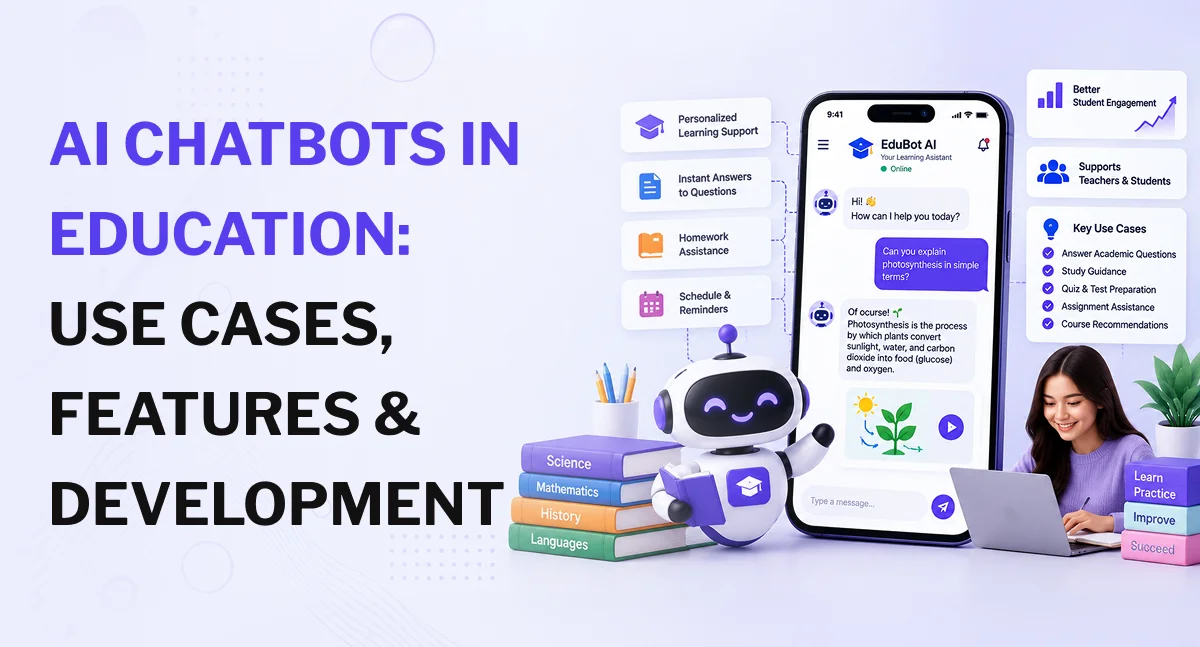
AI chatbots in education are conversational software systems that can answer student questions, support teachers and faculty, assist with admissions and student services, provide tutoring, and help learners find relevant course content. The broader global AI in education market was valued at about $7.05 billion in 2025 and is projected to reach approximately $136.79 billion by 2035, according to Precedence Research. This figure covers the wider AI in education market rather than chatbots alone, but it provides useful context for the growth of AI-based learning and support technologies.
For schools, colleges, universities, EdTech companies, and corporate training providers, the important question is not simply whether to add a chatbot. The real question is what the chatbot should do, what information it should access, and how it should fit into the existing learning environment.
A basic FAQ chatbot may only need predefined responses. An AI education chatbot may require a large language model (LLM), retrieval-augmented generation (RAG), a controlled knowledge base, LMS integration, authentication, role-based permissions, analytics, and human escalation.
That difference affects the technology, development process, cost, and level of testing required.
What Is an AI Chatbot in Education?
An AI chatbot in education is a conversational application that allows students, teachers, faculty members, parents, administrators, or employees to interact with an education platform using natural language.
Instead of searching through several menus or documents, a learner can ask:
- "Can you explain this topic in simpler terms?"
- "Where can I find the Week 4 assignment?"
- "What are the prerequisites for this course?"
- "When is my next tutoring session?"
- "Give me five practice questions about this chapter."
The system interprets the request, identifies relevant information, and generates a response based on its AI model, instructions, connected data, and approved knowledge sources.
There are two broad types of education chatbots.
Rule-Based Education Chatbots
Rule-based chatbots follow predefined conversation paths. They are useful for predictable requests such as:
- Admissions FAQs
- Registration instructions
- Office hours
- Course requirements
- Campus directions
- Payment questions
- General student services
Because the responses are predefined, these systems are relatively easy to control.
AI-Powered Education Chatbots
AI-powered chatbots can understand natural-language questions, maintain conversational context, retrieve information from documents, and generate responses.
A more advanced system can connect with an LMS, student information system, CRM, ERP, tutoring platform, or campus application.
That distinction matters. A general-purpose AI assistant has broad knowledge, while an education chatbot should also have access to the specific information that a school, university, training provider, or EdTech platform has approved for use.
Have an Education Chatbot Idea in Mind?
Whether you need a student support chatbot, AI tutor, admissions assistant, or learning platform assistant, the right architecture depends on your users, content, integrations, and goals. Discuss your requirements with an AI development team and identify the right approach for your project.
How AI Chatbots Are Used Across Education
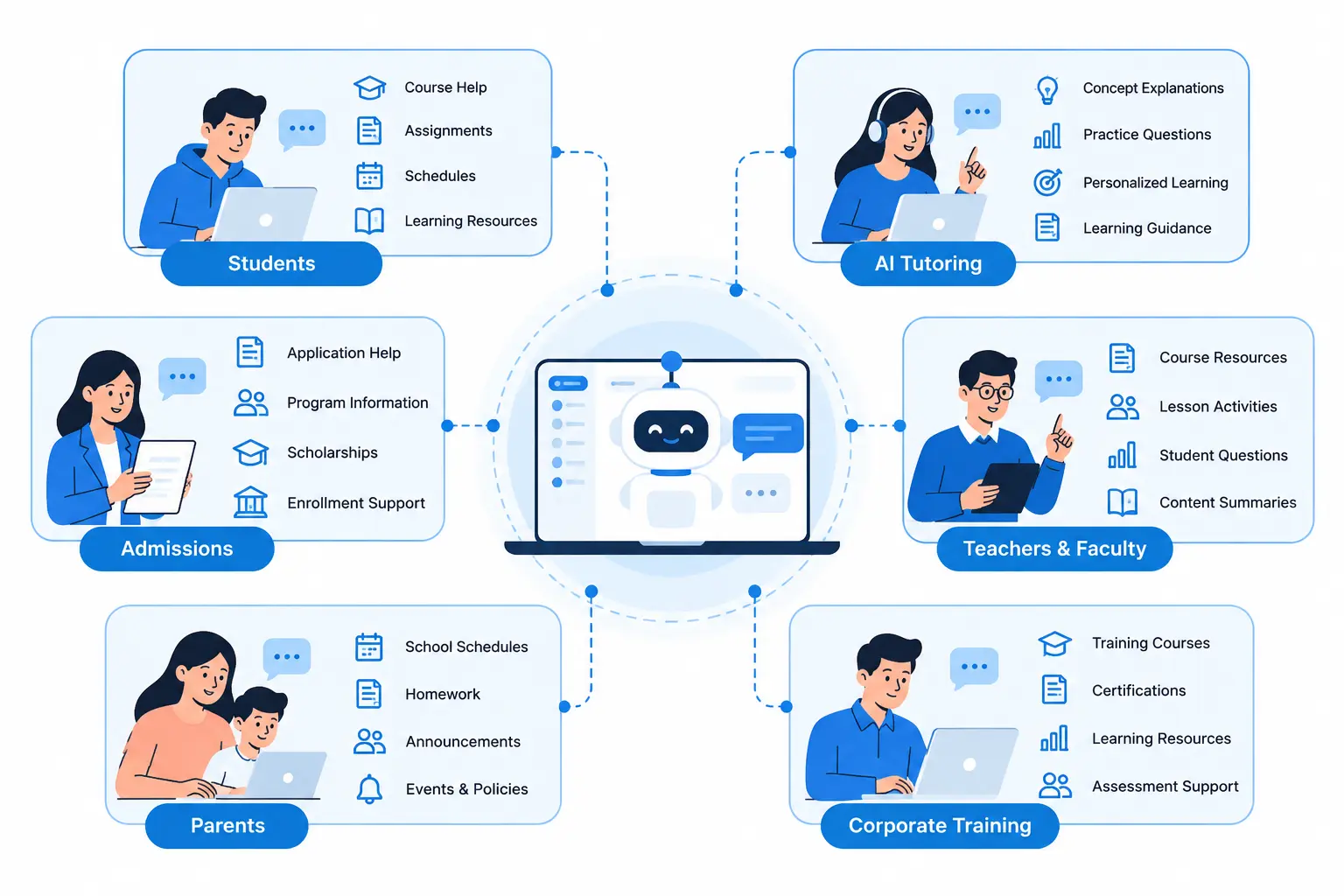
Education has several different chatbot users, and each group has different needs.
Student Support and Academic Questions
Students often need quick answers about course material, assignments, schedules, policies, and learning resources.
An AI chatbot can handle routine questions, explain concepts, point students toward relevant resources, and route questions to faculty or support staff when human assistance is required.
For academic questions, the chatbot can explain a concept in multiple ways, provide examples, generate practice questions, or help a learner identify where they are struggling.
It should also be able to acknowledge when it does not have enough information to provide a reliable answer.
AI Tutoring and Personalized Learning
A tutoring chatbot can provide an additional layer of academic support between scheduled tutoring sessions or classroom instruction.
For example, instead of simply giving a student the answer to a math problem, the chatbot can explain the concept, provide a hint, ask the student to complete the next step, and adjust the explanation when the student is confused.
This functionality fits naturally alongside an AI-powered tutoring solution, particularly when students already have access to tutor profiles, scheduling, chat, video sessions, exercises, and learning resources.
Admissions and Student Services
Admissions teams can use conversational AI to answer routine questions about:
- Application requirements
- Deadlines
- Required documents
- Degree programs
- Tuition information
- Scholarships
- Enrollment procedures
- Campus services
For questions involving a specific applicant or student record, the chatbot needs authenticated access to the appropriate system.
Teacher and Faculty Assistance
Teachers and faculty can use AI assistants for tasks such as:
- Finding course resources
- Creating practice questions
- Drafting lesson activities
- Explaining concepts in different ways
- Summarizing course materials
- Identifying recurring student questions
- Preparing learning activities
AI-generated instructional material should still receive human review, especially when it affects grading, assessments, curriculum decisions, or student feedback.
Parent Communication
For K-12 schools, a chatbot can answer general questions about:
- School schedules
- Homework
- Attendance procedures
- Announcements
- Events
- School policies
- Parent communication channels
Access to individual student records should remain protected by authentication and role-based permissions.
Corporate Training and Professional Learning
Education chatbots are also useful in corporate learning environments.
Employees can use them to find training courses, understand certification requirements, locate learning resources, prepare for assessments, and get help with training-related questions.
A corporate training app can use conversational AI as another way for employees to interact with existing training content.
10 Practical Use Cases for AI Chatbots in Education
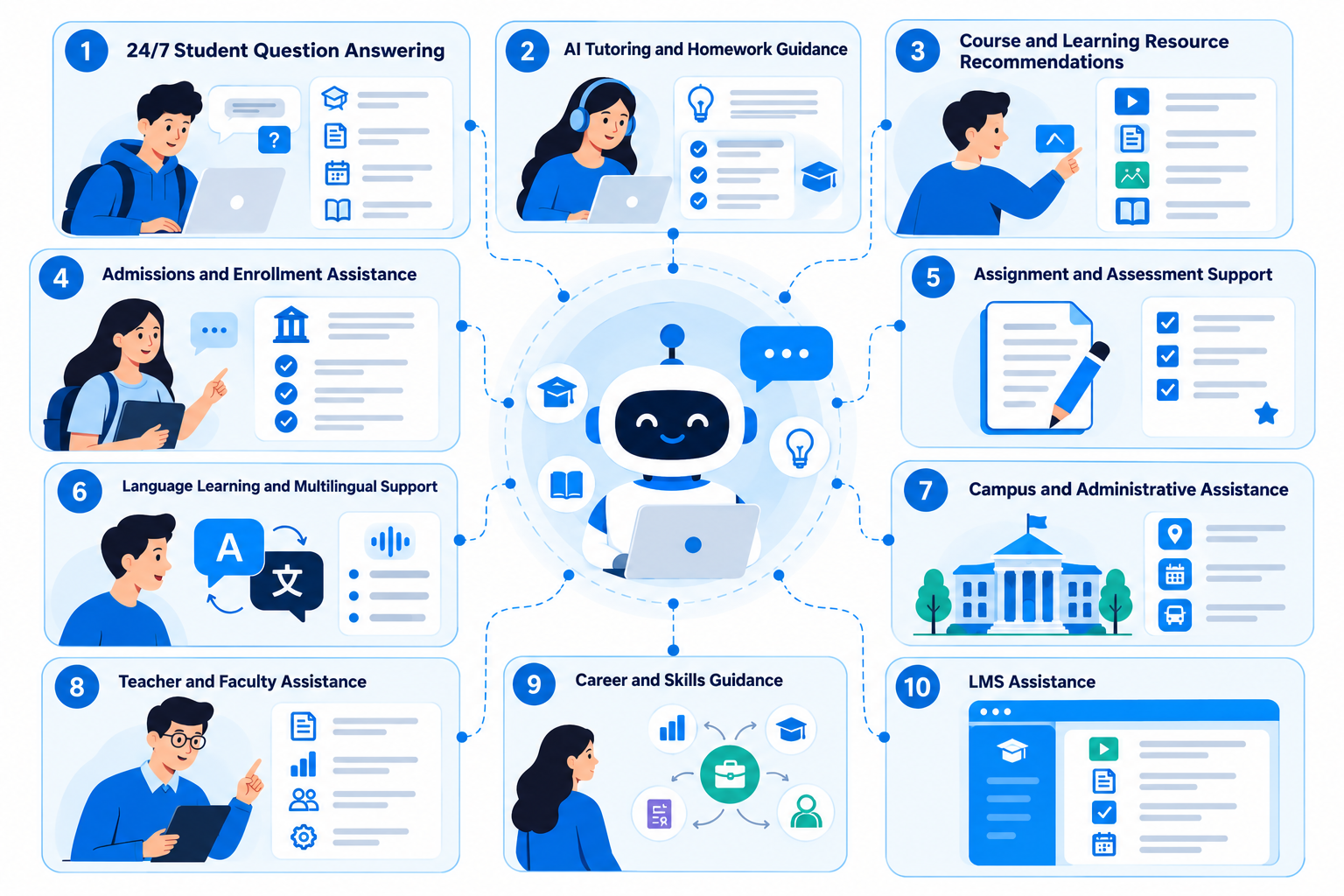
1. 24/7 Student Question Answering
Students can ask questions about course content, assignments, policies, or learning resources without waiting for a support representative or faculty member to respond.
The chatbot can answer routine questions and route more complex requests to the appropriate person.
2. AI Tutoring and Homework Guidance
An AI tutoring chatbot can explain concepts, provide hints, create practice questions, and adjust explanations based on the learner's responses.
The goal should be to support learning rather than simply produce answers for graded assignments.
3. Course and Learning Resource Recommendations
A chatbot can help learners find:
- Courses
- Lessons
- Videos
- Documents
- Practice exercises
- Quizzes
- Supplementary materials
If the system can access course prerequisites and learner progress, recommendations can be more useful than a basic keyword search.
4. Admissions and Enrollment Assistance
Applicants can ask about admission requirements, deadlines, application steps, required documents, and available programs.
For application-specific information, the chatbot should authenticate the user before retrieving personal data.
5. Assignment and Assessment Support
AI chatbots can explain assignment instructions, clarify rubrics, generate practice questions, and provide feedback on learning exercises.
For graded work, institutions should establish clear policies around what the chatbot can and cannot generate.
6. Language Learning and Multilingual Support
Conversational AI can support:
- Language practice
- Vocabulary exercises
- Translation
- Grammar explanations
- Conversational practice
- Multilingual student support
Voice capabilities can also be added for speaking and pronunciation practice.
7. Campus and Administrative Assistance
A campus chatbot can help students find:
- Class schedules
- Campus buildings
- Departments
- Library information
- Student services
- Payment information
- Campus policies
- Events
The system becomes more useful when it connects to current institutional information instead of relying on a static FAQ database.
8. Teacher and Faculty Assistance
Faculty members can use AI assistants to find course resources, prepare practice exercises, summarize material, and identify common student questions.
The system should support faculty workflows rather than make high-impact academic decisions without human review.
9. Career and Skills Guidance
An education chatbot can help learners explore:
- Courses
- Certifications
- Skills
- Training programs
- Learning resources
It can also help students compare educational pathways based on their stated interests and goals.
Career-related information should be presented as guidance and research support rather than an unquestionable recommendation.
10. LMS Assistance
An LMS-integrated chatbot can answer questions about courses, lessons, assignments, schedules, assessments, and learning resources directly inside the learning platform.
This removes the need for students to switch between multiple systems for routine questions.
Key Features of an AI Education Chatbot
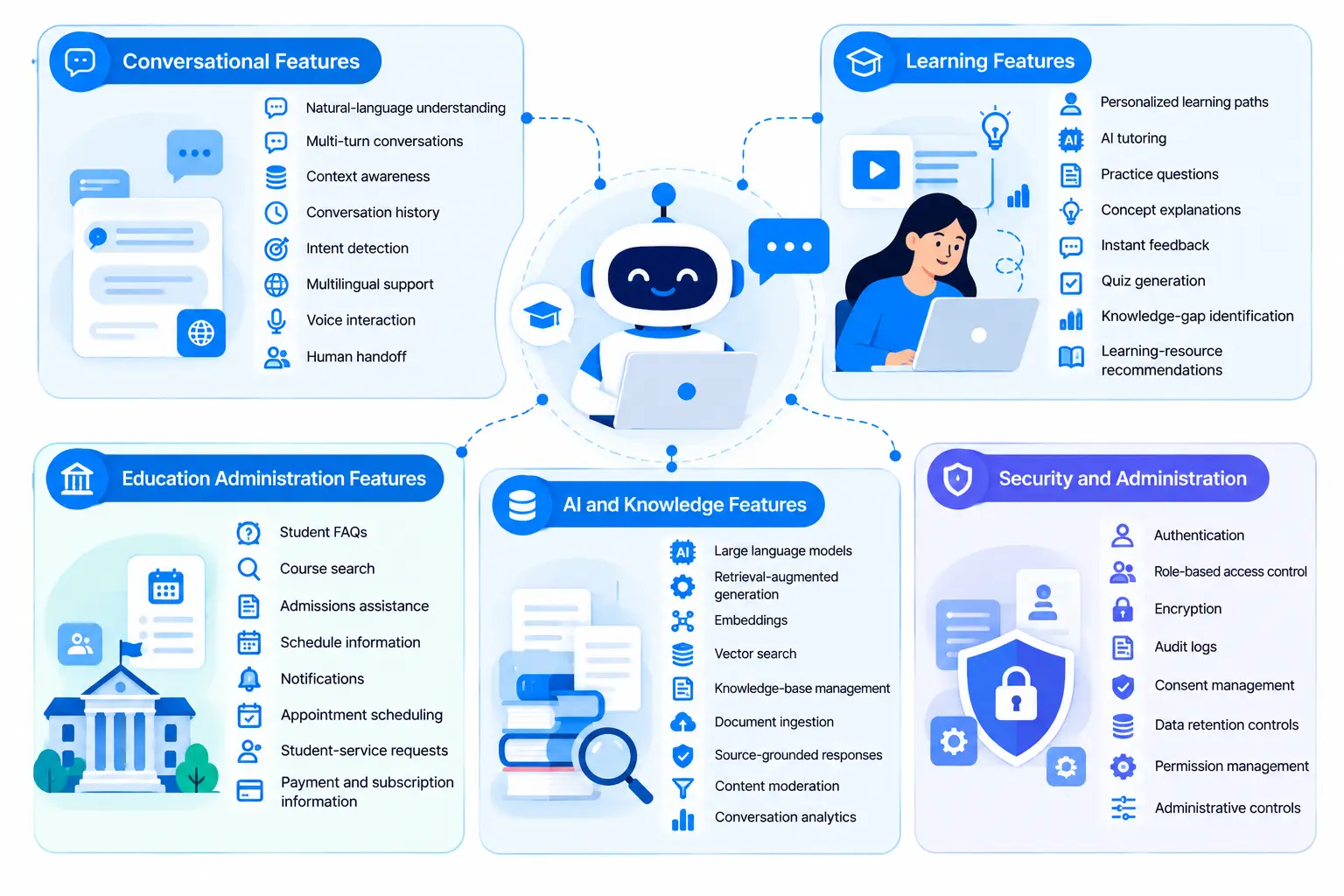
The right feature set depends on the purpose of the chatbot. A student-services chatbot does not need every feature required by an AI tutoring platform.
Conversational Features
An education chatbot may include:
- Natural-language understanding
- Multi-turn conversations
- Context awareness
- Conversation history
- Intent detection
- Multilingual support
- Voice interaction
- Human handoff
Learning Features
For tutoring and learning support, useful features include:
- Personalized learning paths
- AI tutoring
- Practice questions
- Concept explanations
- Instant feedback
- Quiz generation
- Knowledge-gap identification
- Learning-resource recommendations
An AI course delivery platform with AI avatars can combine conversational interaction with structured course delivery and personalized learning experiences.
Education Administration Features
For schools and universities, the chatbot may need:
- Student FAQs
- Course search
- Admissions assistance
- Schedule information
- Notifications
- Appointment scheduling
- Student-service requests
- Payment and subscription information
AI and Knowledge Features
An institution-specific chatbot can use:
- Large language models
- Retrieval-augmented generation
- Embeddings
- Vector search
- Knowledge-base management
- Document ingestion
- Source-grounded responses
- Content moderation
- Conversation analytics
RAG is especially useful when answers need to come from current course documents, institutional policies, handbooks, or other approved sources.
Security and Administration
Education platforms should consider:
- Authentication
- Role-based access control
- Encryption
- Audit logs
- Consent management
- Data retention controls
- Permission management
- Administrative controls
These controls become more important once the chatbot moves beyond general questions and starts accessing student-specific information.
Build the Right Features for Your Education Platform
From AI tutoring and personalized learning to RAG, LMS integration, analytics, and role-based access, the feature set should match how students, faculty, and administrators will use the chatbot. Get help defining the features that fit your education product.
Let’s Plan Your AI Chatbot
How an AI Education Chatbot Works
A typical education chatbot architecture contains several layers.
1. The User Sends a Question
A student, faculty member, parent, administrator, or employee submits a question through a website, mobile app, LMS, or other supported interface.
2. The System Identifies Intent and Context
The conversational layer determines what the user is asking and considers relevant conversation history.
For example, a student may ask about a lesson and then say, "Can you explain the second example?"
The second question depends on the earlier conversation.
3. Relevant Knowledge Is Retrieved
The system can search approved sources such as:
- Course documents
- PDFs
- LMS content
- FAQs
- Student handbooks
- Institutional policies
- Knowledge bases
With RAG, relevant information is retrieved before the language model generates the response.
4. The AI Generates the Response
The language model uses the retrieved information, system instructions, conversation context, and user permissions to generate the response.
5. Access Rules Are Applied
Different users may have different permissions.
A student should not receive the same information available to an administrator or faculty member.
6. The System Answers or Escalates
If the chatbot has enough information, it responds.
If the question is outside its scope, sensitive, or requires a human decision, it can route the conversation to a teacher, tutor, admissions representative, counselor, or support team.
AI Chatbot Integrations for Education Platforms
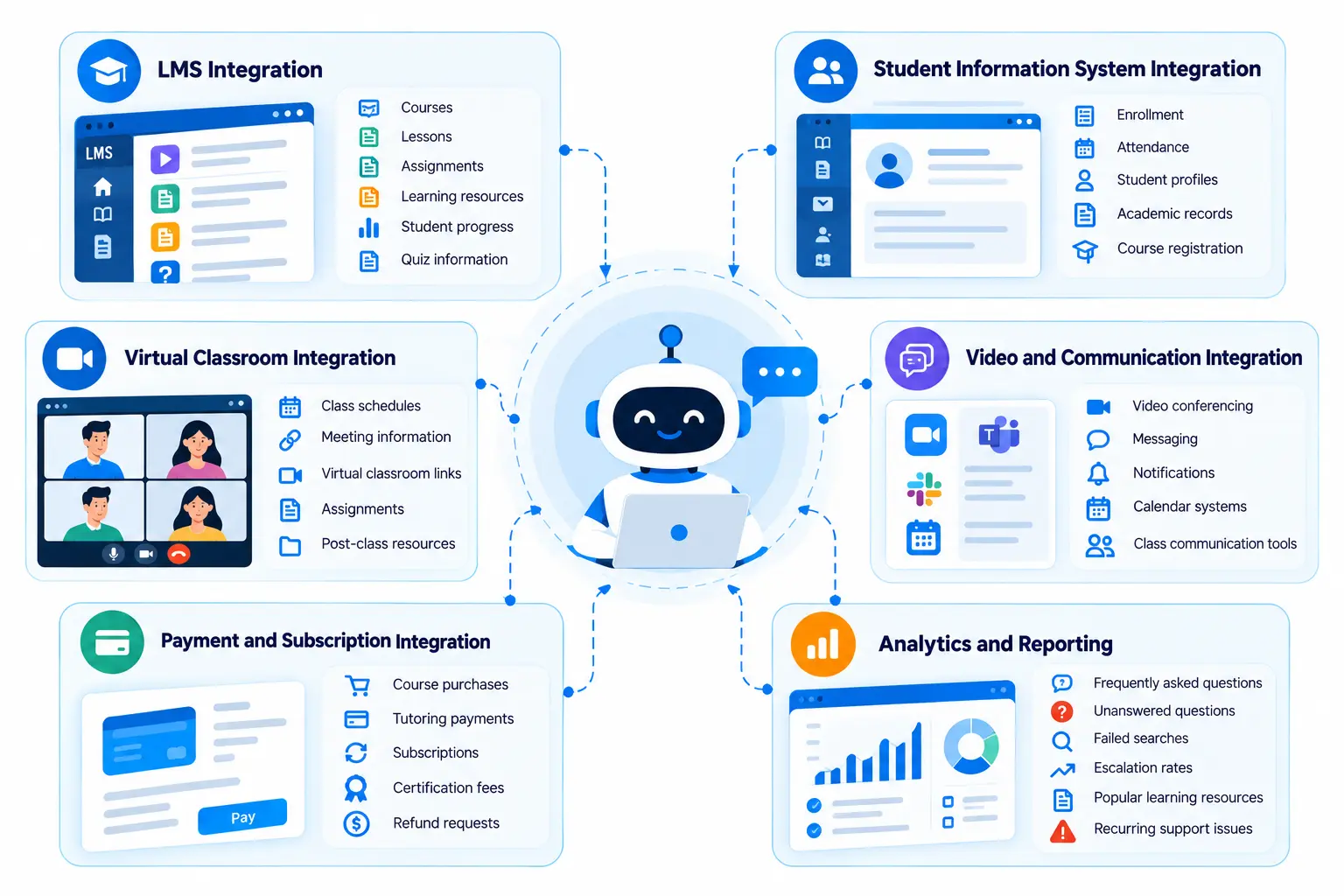
The chatbot becomes more useful when it works with the systems an institution already uses.
LMS Integration
An LMS integration can provide access to:
- Courses
- Lessons
- Assignments
- Learning resources
- Student progress
- Quiz information
A learning management system can provide the structured environment in which an AI assistant operates.
Student Information System Integration
A chatbot can connect with student information systems to support authenticated access to:
- Enrollment
- Attendance
- Student profiles
- Academic records
- Course registration
The chatbot should only return information the logged-in user is authorized to access.
Virtual Classroom Integration
A chatbot can help students find class schedules, meeting information, virtual classroom links, assignments, and post-class resources.
This works well with a virtual classroom app that supports live classes, attendance, Q&A, assignments, analytics, and integrations.
Video and Communication Integration
For online learning, the chatbot can connect with:
- Video conferencing
- Messaging
- Notifications
- Calendar systems
- Class communication tools
Payment and Subscription Integration
For paid learning products, integrations may be required for:
- Course purchases
- Tutoring payments
- Subscriptions
- Certification fees
- Refund requests
Analytics and Reporting
Conversation analytics can reveal:
- Frequently asked questions
- Unanswered questions
- Failed searches
- Escalation rates
- Popular learning resources
- Recurring support issues
These insights can help improve both the chatbot and the educational content behind it.
Technology Stack for an AI Education Chatbot
The technology stack should be selected according to the product's requirements.
Frontend
Common technologies include:
- React
- Next.js
- Vue
- Flutter
- React Native
The chatbot can be embedded in a website, LMS, mobile application, student portal, or education platform.
Backend
Common backend technologies include:
- Python
- Node.js
- PHP
- Laravel
The backend manages authentication, business logic, APIs, permissions, integrations, and communication with AI services.
AI and NLP Layer
The AI layer may include:
- LLM APIs
- NLP frameworks
- Embedding models
- Vector databases
- RAG pipelines
- Prompt orchestration
- Content moderation
Natural language processing can support intent detection, document processing, multilingual interaction, speech processing, and conversational interfaces. A dedicated NLP development solution can support these capabilities when language processing is central to the product.
Database and Storage
The system may store:
- User profiles
- Course metadata
- Permissions
- Conversation records
- Knowledge-base metadata
- Learning activity
- Analytics
Sensitive information should be stored and accessed according to the application's security and compliance requirements.
Cloud and Deployment
Cloud infrastructure can support:
- API hosting
- AI services
- Document storage
- Vector databases
- Monitoring
- Logging
- Autoscaling
Some organizations may prefer a private, on-premises, or hybrid architecture based on their data governance requirements.
How to Develop an AI Chatbot for Education
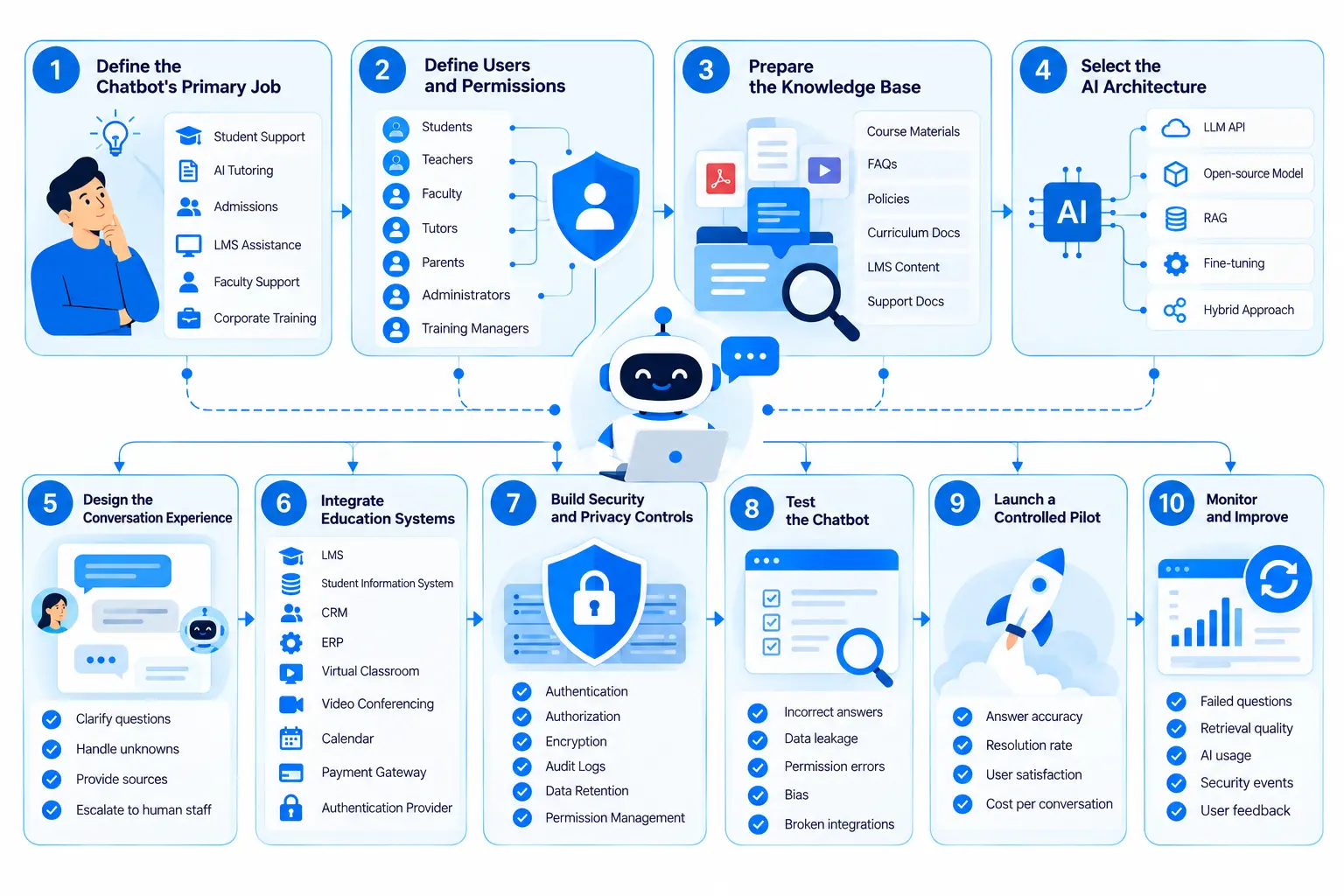
Step 1: Define the Chatbot's Primary Job
Start with one clearly defined problem.
Examples include:
- Student support
- AI tutoring
- Admissions assistance
- LMS assistance
- Faculty support
- Corporate training
Trying to solve every education workflow in the first version can make the system harder to test and maintain.
Step 2: Define Users and Permissions
Identify every user type before connecting institutional data.
Typical roles include:
- Students
- Teachers
- Faculty
- Tutors
- Parents
- Administrators
- Training managers
Each role should have clearly defined access boundaries.
Step 3: Prepare the Knowledge Base
Collect the information the chatbot is expected to use.
This may include:
- Course materials
- FAQs
- Policies
- Curriculum documents
- LMS content
- Student-support documentation
Documents may need to be cleaned, divided into meaningful sections, tagged with metadata, indexed, and embedded before they can be retrieved effectively.
Step 4: Select the AI Architecture
Depending on the project, the architecture may use:
- A hosted LLM API
- An open-source model
- RAG
- Fine-tuning
- A hybrid approach
Fine-tuning is not automatically required. If the chatbot primarily needs to answer questions from frequently updated institutional documents, RAG can be a practical approach because the knowledge base can be updated without retraining the entire model.
Step 5: Design the Conversation Experience
Define how the chatbot should:
- Ask clarification questions
- Handle unknown information
- Refuse inappropriate requests
- Provide sources where appropriate
- Escalate to human staff
- Recover from failed searches
- Handle ambiguous requests
The conversation design is as important as the AI model itself.
Step 6: Integrate Education Systems
Depending on the product, integrations may include:
- LMS
- Student information system
- CRM
- ERP
- Virtual classroom
- Video conferencing
- Calendar
- Payment gateway
- Authentication provider
Step 7: Build Security and Privacy Controls
Education systems can contain sensitive personal information. The architecture should address authentication, authorization, encryption, logging, data retention, and data minimization.
UNESCO's Guidance for Generative AI in Education and Research recommends protecting data privacy and considering age-appropriate approaches to the use of generative AI in education. UNESCO also emphasizes the need for educational institutions to assess AI systems for ethical and pedagogical suitability.
Step 8: Test the Chatbot
Testing should cover more than whether the chatbot can answer a few sample questions.
Test for:
- Incorrect answers
- Hallucinations
- Poor retrieval
- Prompt injection
- Data leakage
- Permission errors
- Bias
- Unsafe responses
- Slow responses
- Broken integrations
Education-specific testing should include realistic questions from actual courses and student-support workflows.
Step 9: Launch a Controlled Pilot
Start with a limited course, department, student-service workflow, or corporate training program.
Useful measurements include:
- Answer accuracy
- Resolution rate
- Escalation rate
- Unanswered questions
- User satisfaction
- Cost per conversation
A pilot can expose missing content, permission problems, weak retrieval, and confusing workflows before a full rollout.
Step 10: Monitor and Improve
After launch, review:
- Failed questions
- Incorrect responses
- Retrieval quality
- AI usage
- API costs
- Security events
- User feedback
A chatbot should be improved based on actual conversations and measurable problems rather than assumptions about how users will interact with it.
Ready to Build an AI Chatbot for Education?
Turn your use case into a practical development plan covering AI architecture, knowledge sources, integrations, security, user roles, and testing. Share your requirements to discuss the right technical approach for your education platform.
Let’s Start Your AI Chatbot Project
How Much Does It Cost to Develop an AI Chatbot for Education?
There is no single development price because an FAQ chatbot and an AI tutoring platform have very different requirements.
For initial planning, these ranges can be used as broad project estimates:
| Chatbot type | Approximate development range |
| Basic FAQ chatbot | $2,500 to $5,000+ |
| AI chatbot with LLM and knowledge base | $5,000 to $10,000+ |
| LMS-integrated education chatbot | $10,000 to $15,000+ |
| AI tutoring chatbot with personalization | $15,000 to $20,000+ |
| Enterprise education AI platform | $20,000 to $25,000+ |
These are planning ranges rather than fixed market prices. A project can fall outside these ranges depending on integrations, security requirements, AI architecture, user volume, and product scope.
Main Cost Factors
The final development budget can change based on:
- AI model and API usage
- RAG architecture
- Data preparation
- LMS and SIS integrations
- Voice functionality
- Multilingual support
- Mobile applications
- Admin dashboards
- Security requirements
- Testing
- Cloud infrastructure
- Monitoring and maintenance
The chatbot interface itself may be a relatively small part of the total project. Data preparation, integrations, permissions, testing, and ongoing AI usage can have a much larger effect on cost.
Get a Clear Estimate for Your AI Chatbot
Development costs vary based on features, AI architecture, integrations, personalization, and security requirements. Share your project scope and get a development estimate based on the functionality you actually need.
Request a Project Estimate
AI Chatbot vs. Traditional Education Chatbot
| Factor | Traditional chatbot | AI chatbot |
| Responses | Predefined | AI-generated |
| Context | Limited | Multi-turn |
| Knowledge | Fixed conversation flows | Can retrieve from knowledge sources |
| Personalization | Basic | More flexible |
| Updates | Often require flow changes | Knowledge base can be updated |
| Integrations | Usually simpler | Often more complex |
| Predictability | High | Requires additional testing |
| Best suited for | FAQs and simple workflows | Learning, support, and complex questions |
A traditional chatbot can still be appropriate for a narrow workflow. AI becomes more useful when users need to ask questions in their own words or when the system needs to work across a larger knowledge base.
What Needs to Be Solved Before Deploying an AI Education Chatbot?
Hallucinations and Incorrect Answers
An AI model can produce an answer that sounds convincing while being incorrect.
Grounding responses in approved content, testing retrieval quality, and providing a clear fallback process can reduce this risk.
Student Data Privacy
A chatbot connected to student records needs strong access controls.
The system should not expose personal information simply because someone requests it through a natural-language conversation.
Academic Integrity
There is a difference between helping a student understand a concept and completing an assessed assignment for them.
Schools, colleges, and universities should define what the chatbot can generate, what it should refuse, and when it should encourage students to work through a problem independently.
Age and Student Safeguarding
K-12 deployments require additional consideration around age, privacy, content, communication, and student safety.
These requirements should be part of the product architecture from the beginning.
Bias and Accessibility
The chatbot should be tested across different languages, reading levels, accessibility requirements, and educational contexts.
It should also be evaluated for biased or inappropriate responses.
Integration Complexity
Every additional integration adds development and testing requirements.
Connecting an LMS, ERP, student information system, payment platform, and virtual classroom can create a more capable system, but each connection also creates another dependency that must be secured and maintained.
What Makes an Education Chatbot Actually Useful?
A useful education chatbot does not need to answer every possible question.
It needs to perform its defined job accurately and consistently.
Strong implementations generally have:
- A clearly defined purpose.
- Approved and current knowledge sources.
- Proper user authentication.
- Role-based access to institutional data.
- Clear handling of unknown questions.
- Human escalation for sensitive or complex issues.
- Integration with the platform students already use.
- Monitoring of failed and unanswered questions.
- Testing with realistic education scenarios.
- Metrics that measure useful outcomes rather than chatbot message volume alone.
A chatbot that handles thousands of conversations but regularly provides incorrect course information creates a different problem. A smaller system that reliably handles a defined student-support workflow may be much more useful.
Common Mistakes When Building an AI Education Chatbot
Building a Generic AI Chatbot
A general chatbot may work well in a demonstration but provide limited value if it has no access to approved institutional content or education workflows.
Feeding Unstructured Documents Into the AI
Poorly prepared documents can lead to poor retrieval.
Course materials should be cleaned, structured, indexed, and tested before becoming part of the chatbot's knowledge system.
Ignoring Permissions
A chatbot should not treat every user as having the same level of access.
Student, faculty, tutor, administrator, and parent permissions should be defined before backend integrations are connected.
Measuring Only Response Accuracy
A response can be factually correct and still be unsuitable for a learner.
Clarity, reading level, educational usefulness, source relevance, and appropriate escalation also matter.
Skipping Human Escalation
Some questions require a faculty member, admissions representative, counselor, administrator, or support specialist.
The chatbot should have a clear path to a human.
Launching Without a Pilot
A limited pilot gives the development team an opportunity to identify inaccurate answers, missing documents, permission issues, and confusing workflows before a full rollout.
Where AI Chatbots Fit Into a Complete EdTech Platform
An education chatbot does not need to operate as a separate product.
It can act as a conversational layer across an education ecosystem:
AI chatbot → LMS → virtual classroom → tutoring → course marketplace → student management → analytics
For example, a learner could ask the chatbot about a course, open the appropriate lesson, attend a virtual class, book a tutoring session, complete an assessment, and review progress without navigating multiple disconnected systems.
For institutions with broader operational requirements, a smart campus ERP can support areas such as admissions, attendance, course registration, finance, compliance, and student lifecycle management. An AI chatbot can then provide a conversational interface for selected workflows while the underlying systems remain the source of record.
This approach is often more practical than treating the chatbot as an isolated feature. The AI handles conversation, while the underlying education systems remain responsible for structured records, permissions, and business rules.
Building an AI Chatbot for Education With Nyusoft
Nyusoft has development capabilities across the areas required for an education chatbot, including AI chatbot development, NLP, education applications, tutoring platforms, LMS products, virtual classrooms, AI-based course delivery, and smart campus systems.
Its AI chatbot development services cover custom conversational AI, LLM-based systems, multilingual chatbots, voice-enabled assistants, and backend integrations. Its education development portfolio also includes tutoring, LMS, virtual classroom, course delivery, and campus ERP solutions.
For a new project, the practical starting point is to define the chatbot's first job, identify the education systems it needs to access, determine which data each user type can see, and establish where human support is required. The AI architecture, integrations, security model, testing plan, and development budget can then be designed around those requirements.
FAQs About AI Chatbots in Education
1. What is an AI chatbot in education?
An AI chatbot in education is a conversational software system that uses artificial intelligence to answer questions, support students and teachers, provide tutoring, assist with administrative tasks, and connect users with relevant learning resources.
2. What are the main use cases of AI chatbots in education?
Common use cases include AI tutoring, student support, admissions assistance, course and resource recommendations, assignment guidance, faculty support, campus information, language learning, and LMS assistance.
3. How can AI chatbots improve student learning?
AI chatbots can provide personalized explanations, practice questions, instant feedback, learning resources, and academic assistance based on a student's needs. They can also direct students to faculty or tutors when a question requires human support.
4. Can an AI chatbot integrate with an LMS?
Yes. An AI chatbot can integrate with an LMS to access authorized course materials, assignments, schedules, quizzes, learning resources, and student progress information. Access should be controlled based on user roles and permissions.
5. What features should an AI education chatbot include?
Important features can include natural-language conversations, contextual responses, AI tutoring, RAG, knowledge-base search, personalized learning, multilingual support, analytics, authentication, role-based access, and human escalation.
6. How much does it cost to develop an AI chatbot for education?
The cost can range from $2,500 to $25,000+, depending on the chatbot's complexity. A basic FAQ chatbot may cost $2,500 to $5,000+, while an enterprise education AI platform with advanced integrations and personalization can reach $20,000 to $25,000+.
7. What technologies are used to develop AI chatbots for education?
An education chatbot may use large language models, natural language processing, RAG, vector databases, APIs, Python, Node.js, React, cloud infrastructure, and integrations with LMS, student information systems, CRM, or ERP platforms.
8. Can AI chatbots provide personalized learning?
Yes. When connected to relevant learner data and course content, an AI chatbot can provide personalized explanations, practice exercises, learning resources, and recommendations based on a student's learning needs and progress.
9. How can an AI education chatbot protect student data?
Security measures can include authentication, role-based access control, encryption, audit logs, data minimization, secure integrations, and data-retention policies. Student information should only be accessible to authorized users and systems.
10. How long does it take to develop an AI chatbot for education?
Development time depends on the scope and integrations. A basic FAQ chatbot may take a few weeks, while an AI chatbot with an LLM, RAG, LMS integration, personalization, analytics, and advanced security can take several months.
Turn Your Education Chatbot Concept Into a Working Product
Whether you're building an AI tutor, LMS chatbot, student support assistant, or a complete conversational learning platform, the next step is defining the technology, integrations, and development scope. Talk with the team about your project requirements.