

 Front End Development
  Back End Development
  CMS / ECommerce Development
  Mobile Apps Development
  Cloud Services
  Fullstack Services
  Solution


AI Chatbot for Fitness Studio Scheduling: How to Build One
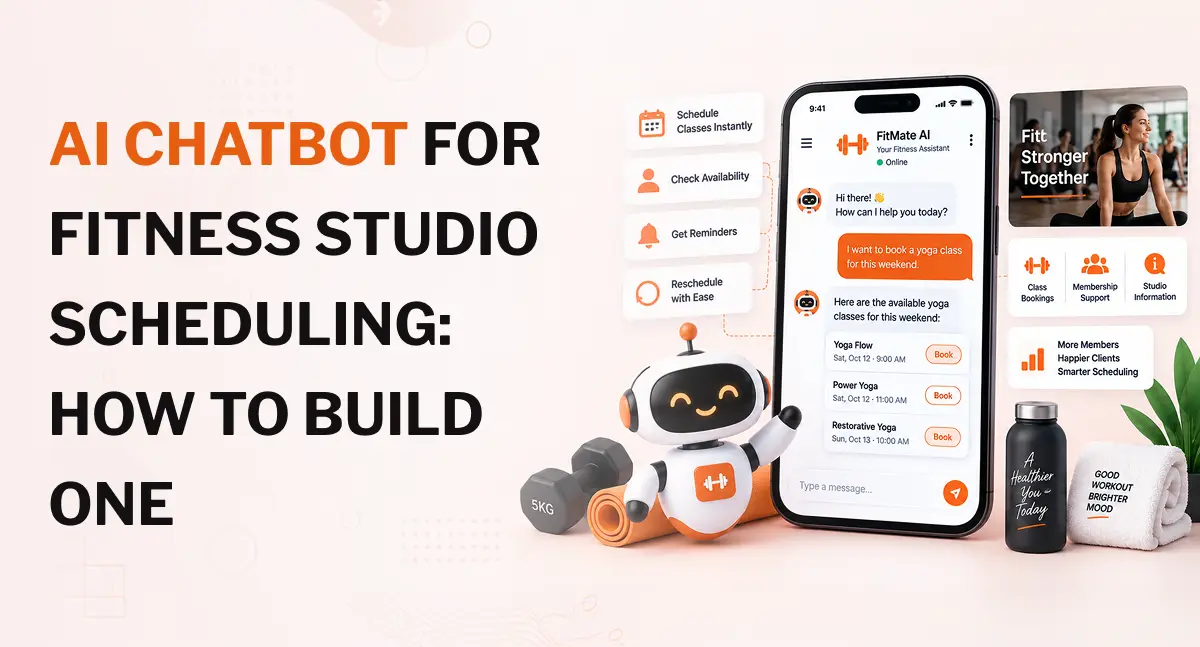
An AI chatbot for fitness studio scheduling can do much more than answer questions. When connected to a studio's booking system, it can understand requests such as "Book me into Pilates tomorrow after 6 PM," check live availability, apply booking rules, create the appointment, and confirm it with the member. That matters as fitness facilities handle large volumes of member activity. The Health & Fitness Association reported that 81 million Americans belonged to a gym, studio, or other fitness facility in 2025, while Americans made nearly 7 billion visits to fitness facilities during the year.
The key is the connection between the chatbot and the scheduling system. A language model can understand what someone is asking, but it should not decide whether a class has an open place or whether a member is allowed to book it. Those decisions need to come from the studio's scheduling and business systems.
What an AI Scheduling Chatbot Should Actually Do
A basic website chatbot might answer a question such as, "What time is the evening yoga class?" A scheduling chatbot needs to go further.
It should understand the request, find the relevant class or appointment, check current availability, apply the studio's booking rules, and take the appropriate action.
For example, a member could write:
"I'd like to book a beginner yoga class tomorrow around 6 PM."
The chatbot needs to identify several pieces of information from that sentence:
- Activity: beginner yoga
- Date: tomorrow
- Preferred time: around 6 PM
- Intent: new booking
It can then query the scheduling system for suitable classes.
An illustrative response might be:
"There are beginner yoga classes at 5:45 PM and 6:30 PM tomorrow. The 6:30 PM class currently has two spaces available. Would you like me to book it?"
After the member confirms, the booking system creates the appointment and returns a confirmed result to the chatbot.
The distinction is important. A chatbot that sends someone to a booking page is a conversational interface. A chatbot that can check availability and complete the booking is connected to the studio's operational systems.
Planning a Fitness Scheduling Chatbot?
If you need a chatbot that can check live class availability, handle bookings, and connect with your existing fitness software, start by defining the scheduling workflows and integrations your platform needs.
Which Fitness Studio Scheduling Tasks Can a Chatbot Handle?
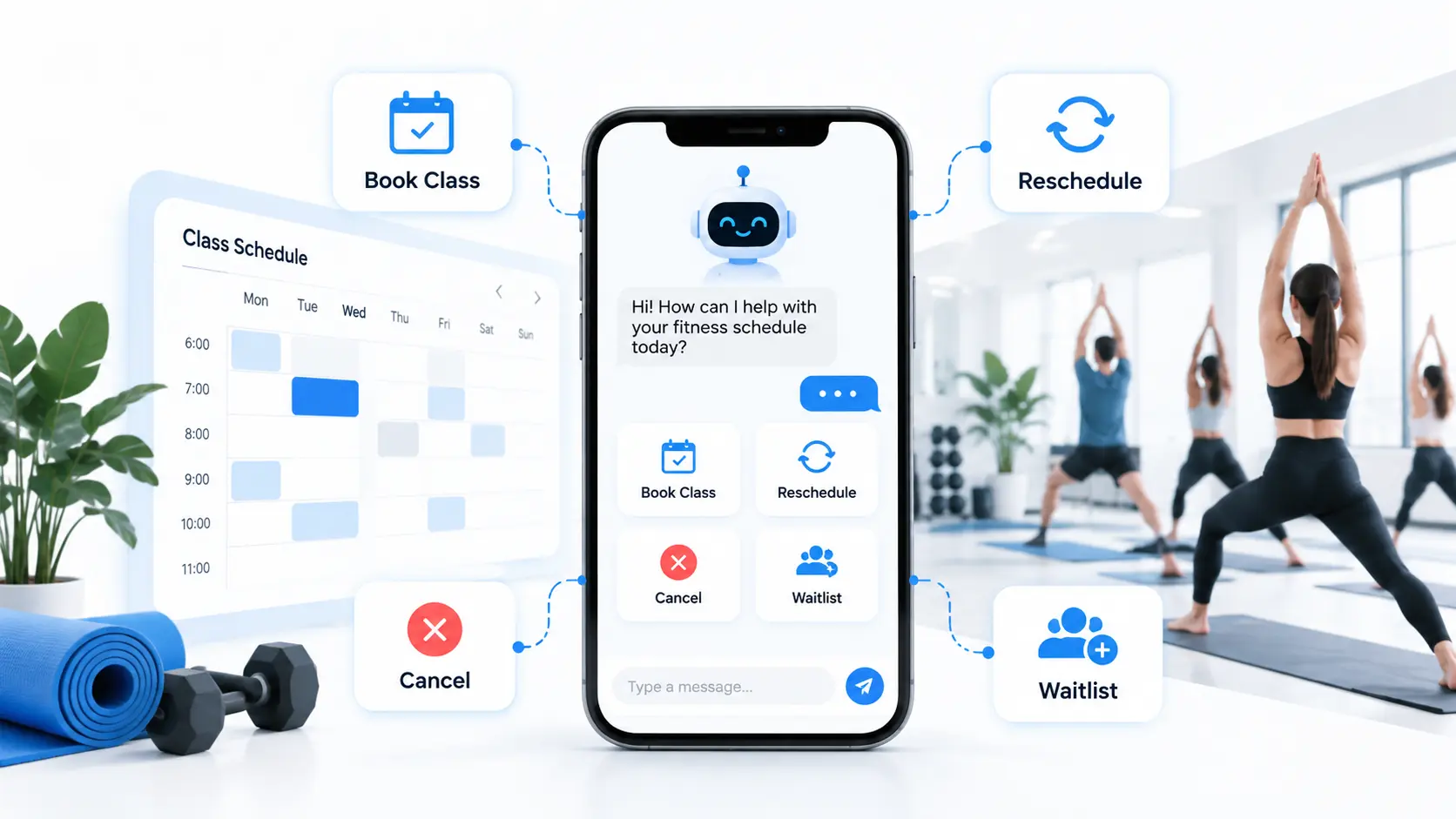
The exact scope depends on the studio's software and booking rules, but several scheduling workflows are well suited to conversational AI.
Class and group-session bookings
A chatbot can help members find and book classes such as:
- Yoga
- Pilates
- Spin
- HIIT
- Strength training
- Group fitness
- Dance
- Personal development or specialist fitness sessions
It can ask follow-up questions when the initial request is incomplete.
For example, if someone says, "Book me a Pilates class," the chatbot may need to ask which location or which day they prefer before checking available sessions.
Capacity also needs to be checked before the booking is offered.
Personal training appointments
One-to-one sessions introduce additional scheduling requirements.
The chatbot may need to check:
- Trainer availability
- Session length
- Member preferences
- Location
- Membership eligibility
- Existing appointments
- Cancellation rules
A member could ask, "Can I see Sarah for a 60-minute session next Wednesday evening?" The chatbot should convert that request into a structured availability search instead of simply replying with a generic booking message.
Trial classes, consultations, and studio tours
Fitness businesses often need to schedule more than existing-member classes.
A chatbot can handle requests for:
- Free trials
- Introductory sessions
- Fitness consultations
- Gym tours
- Personal training consultations
- New-member appointments
These conversations can also collect basic contact information and create a lead in the studio's CRM when appropriate.
Cancellations, rescheduling, and waitlists
Scheduling automation becomes more useful when it can handle changes after the original booking.
A member might say:
"I can't make my Thursday session. Can you move it to Friday?"
The system needs to identify the existing booking, check the member's eligibility to change it, find available Friday slots, and update the appointment after confirmation.
Waitlists require another layer of logic. If a class is full, the chatbot can offer a waitlist instead of treating the booking as impossible. When a place opens, a separate notification workflow can alert eligible members.
How an AI Chatbot for Fitness Studio Scheduling Works
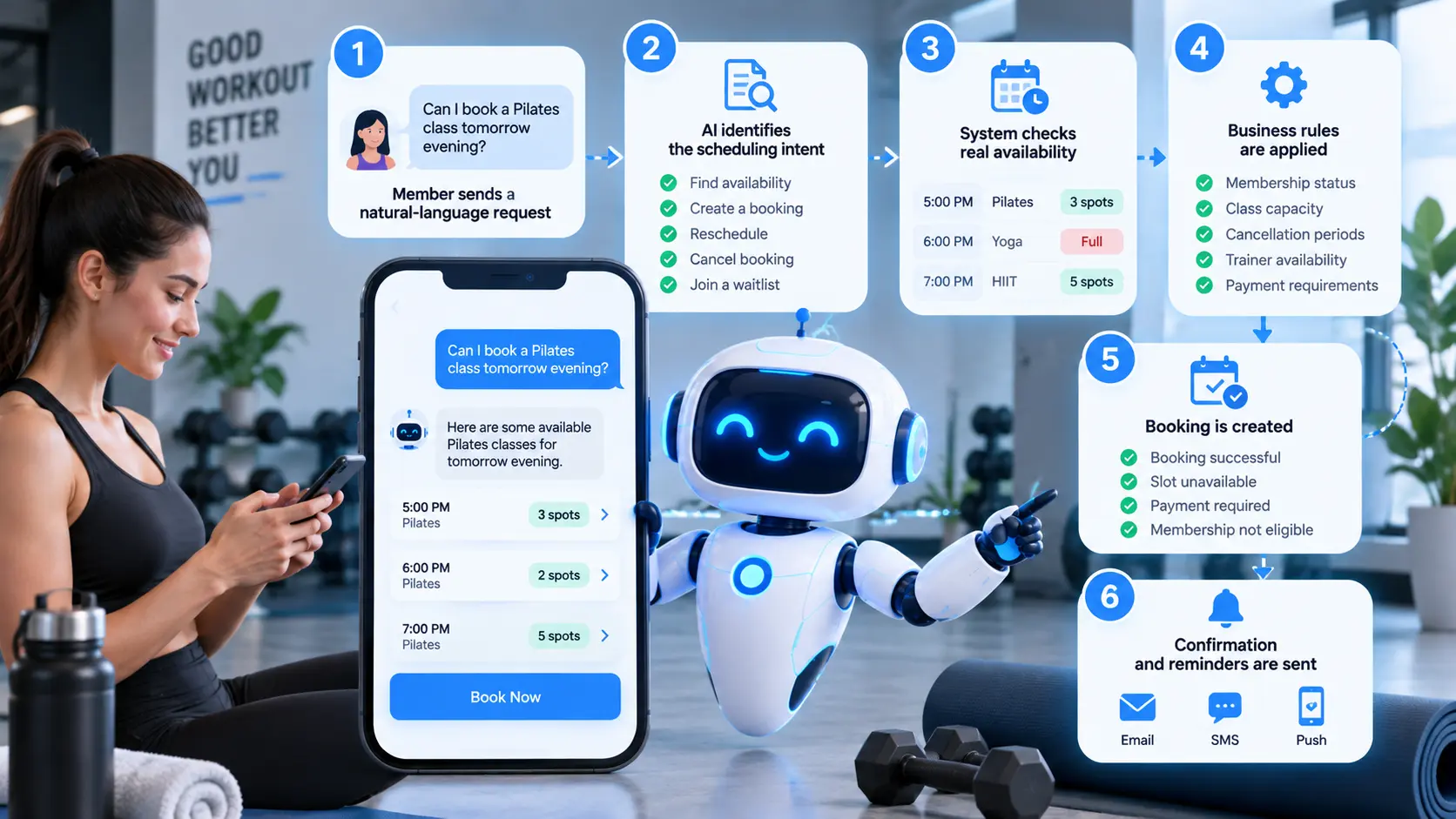
The chatbot is only one part of the system. A typical scheduling workflow has several layers.
1. The member sends a natural-language request
Members do not always use the terminology found in a booking system.
They may say:
- "Anything available after six?"
- "Can I train with James tomorrow?"
- "Move my Saturday workout to Monday."
- "I need something beginner friendly."
- "Is there a class near me this evening?"
The AI needs to understand the meaning behind the request rather than depend on exact phrases.
2. The AI identifies the scheduling intent
The system determines what the member is trying to do.
Common intents include:
- Find availability
- Create a booking
- Cancel a booking
- Reschedule a booking
- Join a waitlist
- Find a trainer
- Find a class
- Ask about a booking
It can also extract information such as date, time, class, trainer, location, and duration.
3. The system checks real availability
This is one of the most important parts of the architecture.
The chatbot should not generate a class time based on information stored in its prompt or knowledge base. It should query the current scheduling system.
That matters because availability can change quickly. A class that has two spaces at 6:05 PM may be full a few minutes later.
The scheduling platform should remain the source of truth.
4. Business rules are applied
Availability is only one part of the decision.
The backend may also need to check:
- Membership status
- Booking windows
- Class capacity
- Cancellation periods
- Trainer availability
- Location restrictions
- Session eligibility
- Payment requirements
The language model can help understand the request, but these rules should be handled by predictable application logic.
5. The booking is created
Once the member confirms a suitable slot, the chatbot calls the booking function.
The backend should return a clear result such as:
- Booking successful
- Slot unavailable
- Payment required
- Membership not eligible
- Booking failed
The chatbot should communicate the actual result returned by the system.
It should never tell a member, "You're booked," simply because it generated a booking-style response.
6. Confirmation and reminders are sent
After a successful booking, the system can send confirmation through email, SMS, push notifications, or another supported communication channel.
The message can include:
- Class or session
- Date
- Time
- Location
- Trainer
- Booking reference
- Cancellation information
Core Features to Include in a Fitness Scheduling Chatbot
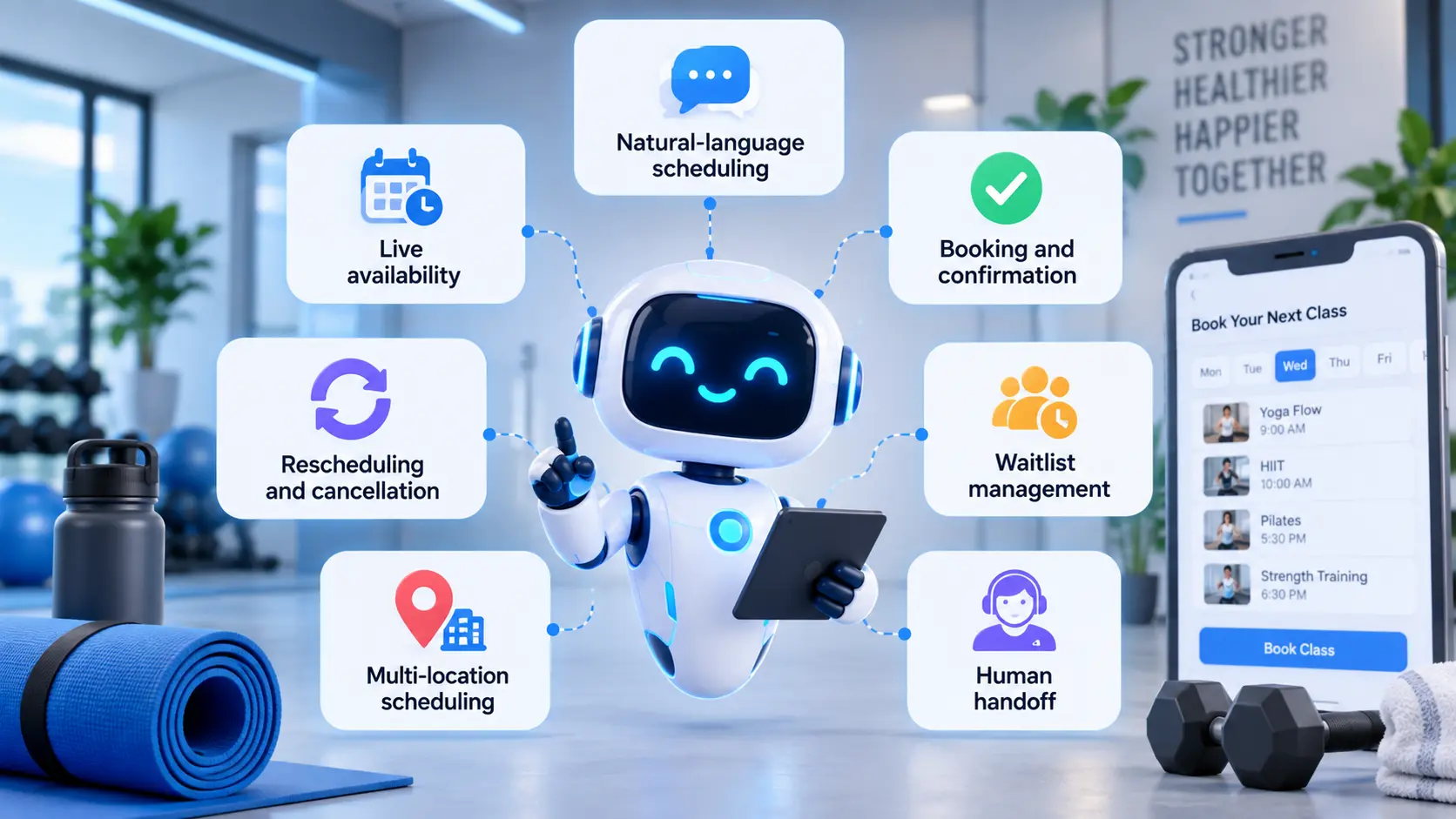
The right feature set depends on the studio, but several capabilities are useful across different types of fitness businesses.
Natural-language scheduling
Members should be able to describe what they want in ordinary language.
For example:
"Find me something after work on Tuesday."
The chatbot can ask for the missing information instead of forcing the member through a rigid sequence of forms.
Live availability
Availability should come directly from the booking system.
This allows the chatbot to work with changing class capacity, trainer schedules, and cancellations.
Booking and confirmation
The booking workflow should include validation before the appointment is created.
A good flow is:
Request → availability check → member confirmation → booking → confirmed result
Rescheduling and cancellation
The chatbot can reduce front-desk work by handling routine booking changes.
The system still needs to enforce the studio's cancellation and rescheduling rules.
Waitlist management
A scheduling chatbot can allow members to join waitlists and communicate when spaces become available.
The exact process depends on how the fitness management platform handles waitlists.
Multi-location scheduling
This becomes particularly useful for fitness brands operating several studios.
A member could ask:
"Do you have a Pilates class near downtown tomorrow evening?"
The chatbot can search across locations and return suitable options.
Human handoff
Some conversations should be transferred to staff.
Examples include:
- Complex membership disputes
- Unusual payment issues
- Requests outside the chatbot's permissions
- Complaints
- Account problems
- Situations where the system cannot verify the required information
A good chatbot does not need to answer everything. It needs to know when an employee should take over.
Integrations Needed to Build the Chatbot
A scheduling chatbot needs access to the systems that contain the information required to answer and act on member requests.
Gym or fitness management software
The chatbot may need controlled access to:
- Member records
- Membership status
- Class schedules
- Trainer availability
- Bookings
- Locations
- Capacity
- Waitlists
A broader gym management app can provide many of these operational functions through a central backend.
Calendar integration
Calendar integration can be useful for creating and updating appointments, especially for personal training and consultation workflows.
For example, a studio may connect its scheduling workflow with Google Calendar so confirmed appointments can be added to the appropriate calendar system.
The important point is that the calendar should reflect a confirmed booking. It should not become a substitute for the studio's primary booking rules.
CRM integration
CRM integration is useful when the chatbot handles new-member enquiries and trial bookings.
A conversation can capture:
- Name
- Contact details
- Preferred location
- Fitness interest
- Trial preference
- Preferred appointment time
The information can then be passed to the CRM for follow-up.
Payment integration
Payment functionality is optional.
A studio may allow the chatbot to:
- Collect a deposit
- Pay for a single session
- Purchase a trial
- Complete another approved transaction
If payments are involved, the payment provider should handle the transaction securely. The chatbot should not be given unnecessary access to sensitive payment information.
Communication channels
A scheduling chatbot does not have to live only on a website.
Depending on the business requirements, it can be connected to:
- Mobile apps
- SMS
- Facebook Messenger
- Other messaging channels
A broader fitness app development project can also include scheduling, trainer management, member profiles, notifications, and other member-facing functionality.
Recommended Architecture for a Fitness Scheduling Chatbot
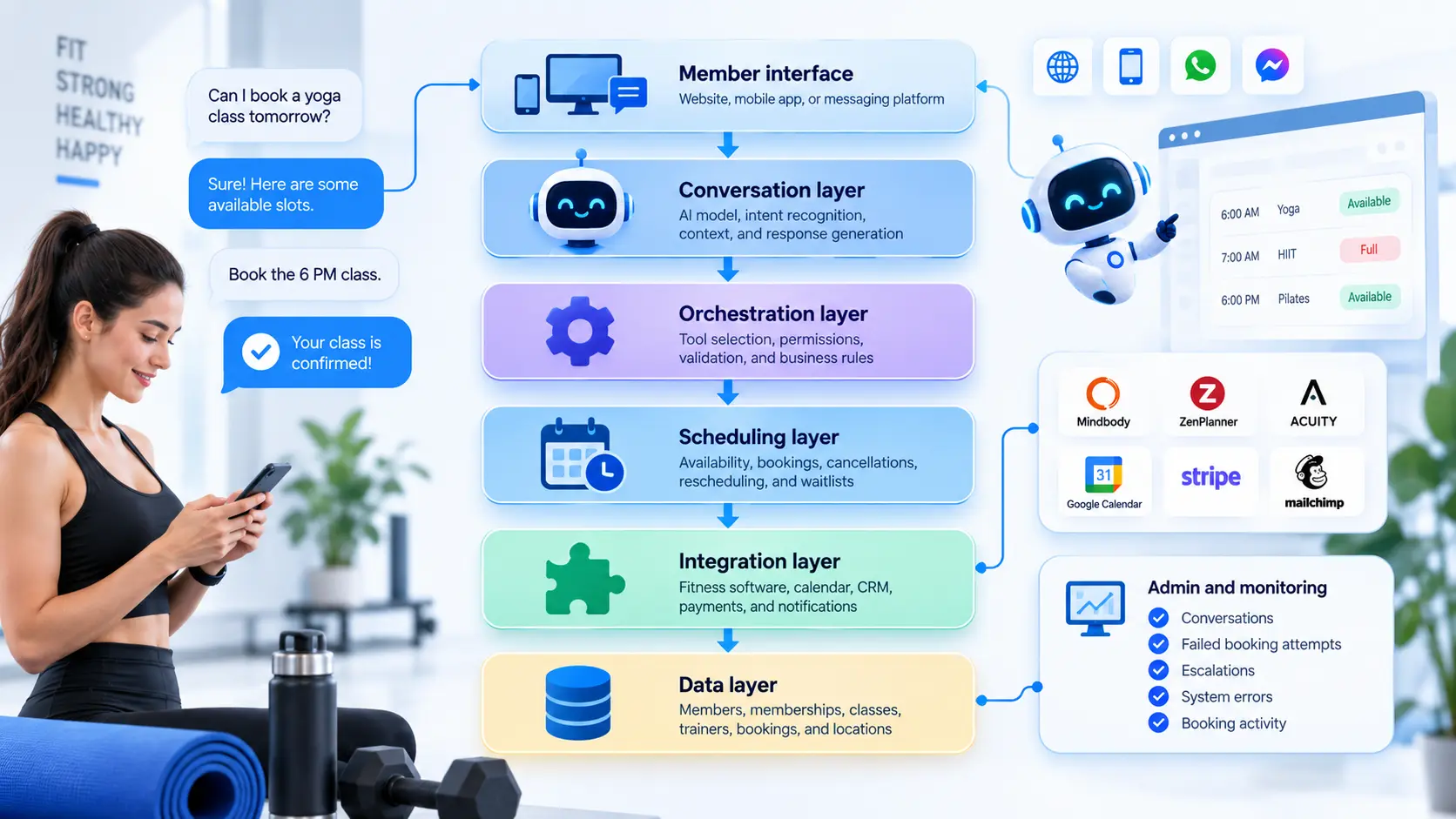
A practical architecture can be divided into several layers.
Member interface
Website, mobile app, or messaging platform
↓
Conversation layer
AI model, intent recognition, context, and response generation
↓
Orchestration layer
Tool selection, permissions, validation, and business rules
↓
Scheduling layer
Availability, bookings, cancellations, rescheduling, and waitlists
↓
Integration layer
Fitness software, calendar, CRM, payments, and notifications
↓
Data layer
Members, memberships, classes, trainers, bookings, and locations
Conversation and AI layer
The AI layer handles language.
It can identify the user's intent, extract relevant information, maintain conversation context, and decide which approved function needs to be called.
For example, the member says:
"Can you move my Thursday PT session to Saturday afternoon?"
The AI can identify that this is a rescheduling request and extract the existing appointment and preferred new time.
Business logic layer
The business logic determines whether the requested action is allowed.
For example:
A member may be allowed to cancel a class up to two hours before it begins. The chatbot can understand the request, but the application should check the actual cancellation rule before making the change.
This separation reduces the risk of the AI making decisions that belong to the booking system.
API and integration layer
The AI should interact with external systems through controlled functions or APIs.
Possible functions include:
find_classescheck_availabilityget_member_bookingcreate_bookingcancel_bookingreschedule_bookingjoin_waitlist
The model should not have unrestricted access to the underlying database.
Data layer
The system may work with information such as:
- Member profiles
- Membership plans
- Class schedules
- Trainer schedules
- Booking history
- Locations
- Preferences
Only the information required for the current task should be exposed to the relevant components.
Admin and monitoring layer
Staff should have visibility into:
- Conversations
- Failed booking attempts
- Escalations
- System errors
- Unanswered questions
- Booking activity
This gives the business a way to find problems that are difficult to spot from individual conversations.
Need a Custom AI Chatbot Architecture?
From scheduling APIs and member authentication to CRM, calendar, and notification integrations, the right architecture depends on how your fitness platform already works.
How to Build an AI Chatbot for Fitness Studio Scheduling
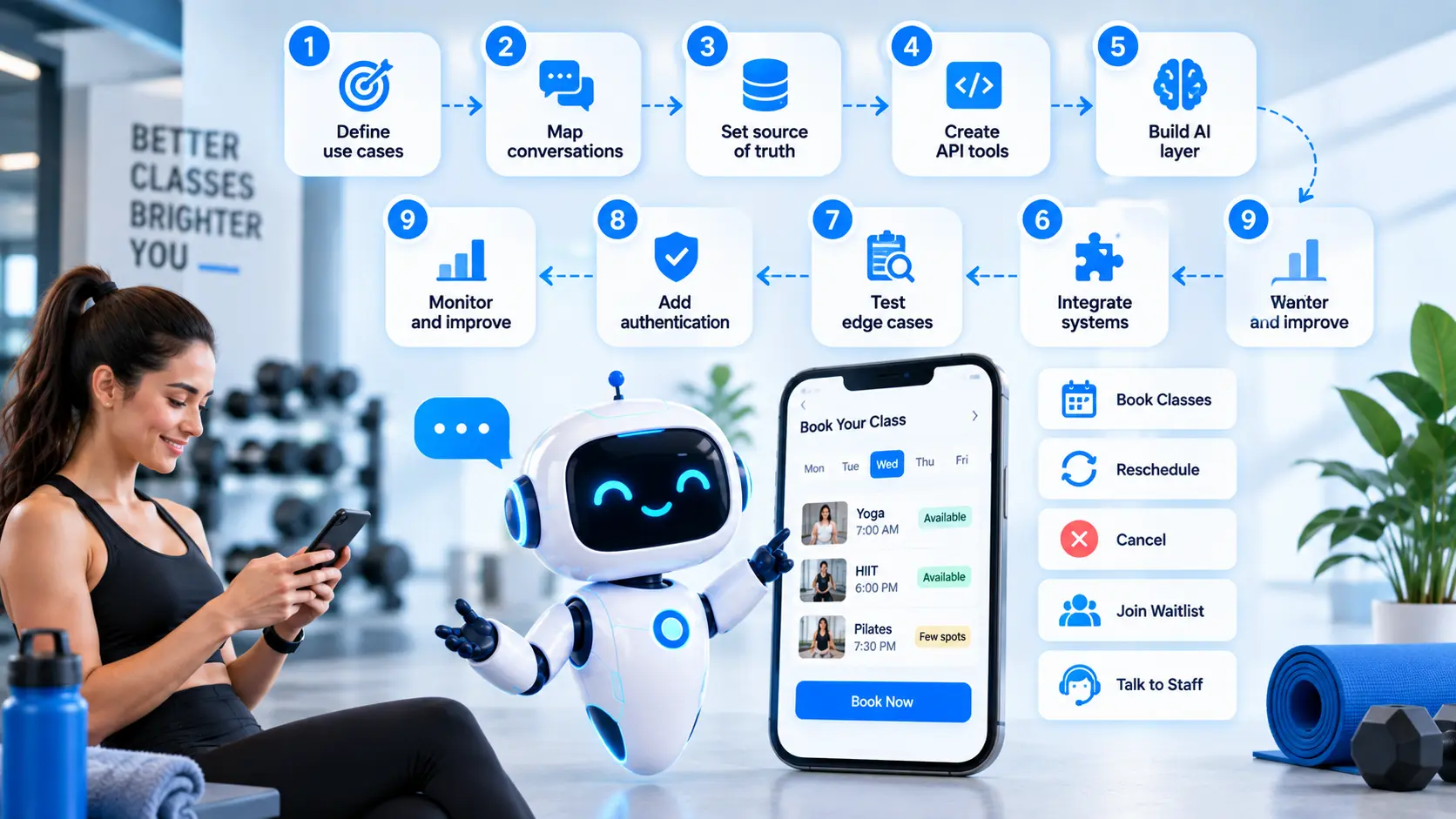
Building the chatbot should start with the scheduling workflow, not the language model.
Step 1: Define the scheduling use cases
Start by deciding exactly what the first release should handle.
A practical first version might support:
- Class availability
- New bookings
- Cancellations
- Rescheduling
- Basic FAQs
- Human handoff
A personal training studio may need trainer scheduling instead of group-class capacity. A multi-location gym may need location-aware searches from the beginning.
Step 2: Map the conversations
Write down the conversations before building the interface.
For each workflow, identify:
- What information the member provides
- What information is missing
- What the system needs to retrieve
- What rules apply
- What action the chatbot can take
- What happens if the action fails
- When a staff member takes over
This exposes gaps early.
Step 3: Define the source of truth
Decide which system owns each piece of information.
For example:
| Information | Source of truth |
| Class capacity | Booking system |
| Trainer availability | Scheduling system |
| Membership status | Membership system |
| Current booking | Booking system |
| Payment status | Payment system |
| Member conversation | Chatbot platform |
The AI should retrieve information from these systems rather than maintaining a separate version of operational data.
Step 4: Design controlled API tools
Create specific functions for the actions the chatbot is permitted to perform.
For example:
check_availability can read available slots.
create_booking can create a booking after the necessary validation.
cancel_booking can cancel an authenticated member's own appointment.
This approach gives developers more control over what the AI can do.
Step 5: Build the conversational AI layer
The AI layer can handle:
- Intent recognition
- Entity extraction
- Conversation context
- Tool selection
- Natural-language responses
- Clarifying questions
The model should receive clear instructions about what it can and cannot do.
Step 6: Connect the required systems
Connect the chatbot to the relevant:
- Fitness management platform
- Calendar
- CRM
- Notification provider
- Payment system
- Mobile application
The exact integrations depend on the studio's existing technology stack.
Step 7: Add authentication and permissions
A member should be able to access their own booking information without gaining access to someone else's data.
For example, a request such as:
"Show me all the bookings for tomorrow."
should not return a list of other members' appointments.
Authentication, authorization, and API permissions need to be handled at the application level.
Step 8: Test difficult scheduling situations
Successful bookings are only one part of testing.
Test situations such as:
- Class becomes full during booking
- Two people request the last space
- Membership has expired
- Trainer becomes unavailable
- Member tries to cancel too late
- Class is cancelled
- Requested date is ambiguous
- API temporarily fails
- Member sends duplicate requests
- Time zone differs from the studio location
- Payment is required before booking
These scenarios are where weak scheduling chatbots often fail.
Step 9: Monitor after launch
Track operational metrics such as:
- Successful bookings
- Failed bookings
- Abandoned conversations
- Human handoffs
- Unanswered questions
- API failures
- Rescheduling requests
- Cancellation requests
The goal is to identify where members still need help and where the workflow needs adjustment.
Security and Permissions Matter More Than the Chat Interface
A scheduling chatbot can be connected to systems that contain personal information and can perform actions that change real records.
That makes permissions part of the product design.
The OWASP Top 10 for LLM applications identifies risks including prompt injection, sensitive information disclosure, improper output handling, excessive agency, and misinformation. These risks are relevant to a scheduling assistant because the model may have access to tools that can read or change external systems.
Limit what the AI can access
A chatbot may need permission to:
- Read available classes
- Read the authenticated member's bookings
- Create a booking for that member
- Cancel that member's booking
- Reschedule that member's booking
It may not need permission to access the entire membership database.
Giving the model fewer permissions reduces the number of things that can go wrong.
Protect member information
Security controls should cover:
- Authentication
- Authorization
- API credentials
- Encryption
- Access logging
- Data retention
- Data minimization
Fitness businesses should also review the privacy and data requirements that apply to their target markets and the type of information their platform handles.
Validate actions before confirming them
A particularly important rule is simple:
The backend should confirm the action before the chatbot says it happened.
If a booking API returns an error, the chatbot should tell the member that the booking could not be completed and provide the next appropriate option.
It should never turn an attempted action into a false confirmation.
Start With an MVP Before Adding Advanced AI Features
A first release does not need to handle every fitness business workflow.
A sensible MVP could include:
- Website chatbot
- Class search
- Live availability
- Booking
- Cancellation
- Rescheduling
- Member authentication
- Calendar integration
- Confirmation notifications
- Staff handoff
Once these workflows work reliably, additional capabilities can be evaluated.
Advanced features can include
- Automated waitlists
- Multi-location booking
- Voice interaction
- WhatsApp integration
- Multilingual conversations
- CRM automation
- Personalised class recommendations
- Member re-engagement
- Advanced analytics
The right time to add these features depends on actual usage and business requirements.
A studio with two locations may need multi-location search early. A single personal-training business may get more value from trainer availability and appointment changes.
How Much Does It Cost to Build a Fitness Scheduling Chatbot?
A fitness scheduling chatbot can cost anywhere from $2,500 to $20,000+ for a custom build, depending on what the chatbot needs to do and which systems it must connect with. A simple scheduling assistant sits at the lower end, while a multi-location chatbot with CRM, payments, waitlists, multiple messaging channels, and advanced automation can move well beyond that range. Published 2026 development estimates also show a wide spread for custom AI chatbot projects, mainly because the word "chatbot" covers very different levels of functionality.
For a fitness studio, the main cost factors include:
- Number of booking and scheduling workflows
- AI model and API usage
- Scheduling-system integration
- CRM integration
- Calendar integration
- Payment integration
- Number of communication channels
- Mobile app integration
- Admin dashboard
- Authentication and permissions
- Voice functionality
- Multi-location support
- Testing and quality assurance
- Monitoring and maintenance
A useful planning range for a custom fitness scheduling chatbot is:
| AI chatbot type | Approximate development cost | Typical features |
| Basic Fitness AI Chatbot | $2,500–$5,000 | Website chat, FAQs, class information, basic AI responses, simple booking assistance |
| Custom Fitness Scheduling Chatbot | $5,000–$10,000 | Class availability, booking, cancellations, rescheduling, member authentication, selected integrations |
| Advanced Fitness AI Chatbot | $10,000–$20,000+ | Multiple integrations, waitlists, payments, voice, multilingual support, multi-location scheduling, advanced workflows |
| Enterprise Fitness AI Chatbot | $20,000+ | Complex scheduling systems, private member data, multiple platforms, advanced security, analytics, administration, custom workflows |
These are planning ranges, not fixed market prices. A studio with an existing booking platform and well-documented APIs may need less development work than a business whose scheduling data is spread across several systems.
Have a Fitness Chatbot Idea in Mind?
The cost depends on the workflows, integrations, channels, and level of automation you need. Define those requirements first, then build an estimate around the actual scope.
Common Mistakes When Building a Fitness Scheduling Chatbot
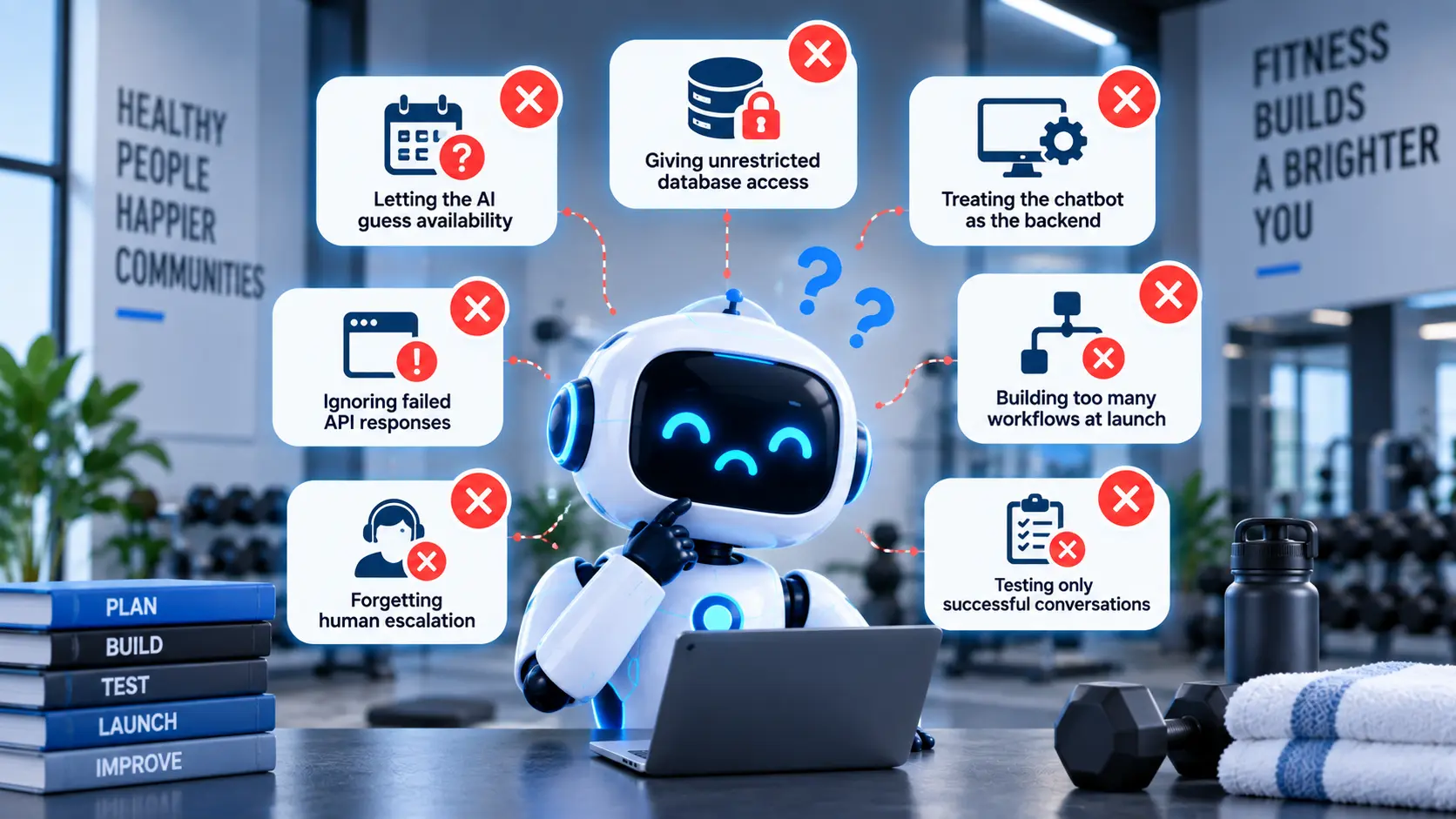
Letting the AI guess availability
A language model should not invent available classes. Live availability needs to come from the booking system.
Giving the model unrestricted database access
The chatbot rarely needs access to everything. Give it specific permissions for specific actions.
Treating the chatbot as the scheduling backend
The conversational interface should sit on top of the booking infrastructure. It should not become a second, conflicting scheduling system.
Ignoring failed API responses
External systems can be unavailable, slow, or return errors. The chatbot needs a clear fallback for these situations.
Building too many workflows at launch
Trying to automate memberships, payments, scheduling, complaints, sales, support, and every other process at once can make the first release difficult to test and maintain.
Forgetting human escalation
Some conversations need staff involvement. The chatbot should make the handoff clear instead of forcing an uncertain answer.
Testing only successful conversations
A scheduling assistant needs testing around full classes, expired memberships, duplicate bookings, cancelled sessions, invalid requests, API failures, and other edge cases.
What a Well-Built Fitness Scheduling Chatbot Looks Like in Practice
Consider an illustrative request from a member:
"Can I book Pilates at the downtown studio tomorrow after 5?"
The system first extracts:
- Activity: Pilates
- Location: Downtown
- Date: Tomorrow
- Time preference: After 5 PM
- Intent: Find and book a class
It then checks the scheduling system.
Suppose the system returns:
- 6:00 PM Pilates: 2 spaces available
- 7:15 PM Pilates: Full
The chatbot could respond:
"There are two Pilates classes after 5 PM tomorrow. The 6:00 PM class has two spaces available, while the 7:15 PM class is full. Would you like the 6:00 PM session?"
If the member confirms, the chatbot calls the booking function.
The backend validates the member, checks that the space is still available, creates the booking, and returns the booking confirmation.
Only then should the chatbot say:
"You're booked for Pilates tomorrow at 6:00 PM at the downtown studio."
That sequence is the difference between a chatbot that talks about scheduling and one that is actually connected to scheduling operations.
Build an AI Chatbot Around the Studio's Actual Scheduling Workflow
An effective fitness scheduling chatbot starts with the studio's existing booking rules, member workflows, and software systems. The AI handles the conversation, while the backend remains responsible for availability, permissions, bookings, cancellations, and other business rules.
For fitness businesses planning a custom system, Nyusoft can be considered for AI chatbot development when the project requires conversational AI, backend integrations, controlled workflows, and connections with existing business software.
If the wider product also includes member accounts, trainer management, subscriptions, workouts, or mobile scheduling, fitness app development can form part of the broader platform plan.
The practical starting point is to define the few scheduling tasks members ask for most often, connect those workflows to reliable backend systems, and then expand the chatbot based on real usage.
FAQs
1. What is an AI chatbot for fitness studio scheduling?
An AI chatbot for fitness studio scheduling is a conversational system that can understand member requests, check real-time class or trainer availability, and handle actions such as bookings, cancellations, and rescheduling. It connects the conversational AI layer with the studio's scheduling and membership systems.
2. Can an AI chatbot book fitness classes automatically?
Yes. When connected to a fitness booking system through APIs, an AI chatbot can check available classes, confirm the member's eligibility, reserve a selected slot, and return the booking confirmation. The backend should verify the booking before the chatbot tells the member that the reservation is complete.
3. Can a fitness chatbot handle cancellations and rescheduling?
Yes. The chatbot can retrieve an existing booking, check the studio's cancellation or rescheduling rules, find alternative available times, and update the appointment after the member confirms the change.
4. Can an AI scheduling chatbot manage fitness class waitlists?
Yes. A chatbot can allow members to join a waitlist when a class is full and connect with the scheduling system to notify eligible members when a place becomes available. The exact workflow depends on the capabilities of the underlying booking platform.
5. What integrations does a fitness scheduling chatbot need?
Common integrations include fitness or gym management software, scheduling and booking systems, calendars, CRM platforms, notification services, payment providers, and mobile applications. The required integrations depend on which tasks the chatbot needs to perform.
6. How much does it cost to build a fitness scheduling chatbot?
The cost depends on the chatbot's features, integrations, and level of automation. A basic fitness AI chatbot may cost around $2,500-$5,000, while a custom fitness scheduling chatbot can range from $5,000-$10,000. More advanced systems with multiple integrations, voice, payments, multilingual support, waitlists, and multi-location scheduling can cost $10,000-$20,000+, while enterprise-level platforms may start at $20,000+. These are approximate development ranges, and the final cost depends on the project's specific requirements.
7. How long does it take to develop a fitness scheduling chatbot?
A basic MVP may take around 8-12 weeks, while a more advanced scheduling chatbot can take several months. The timeline depends on the number of workflows, third-party integrations, authentication requirements, communication channels, testing, and whether existing APIs are available.
8. Can an AI chatbot work with multiple fitness studio locations?
Yes. A multi-location chatbot can identify the member's preferred location, search class and trainer availability across selected studios, and return suitable options. The backend needs to maintain accurate schedules, capacity limits, location information, and any location-specific booking rules.
9. Can an AI chatbot integrate with a fitness mobile app?
Yes. An AI scheduling assistant can be integrated into a fitness mobile app so members can search for classes, make bookings, reschedule appointments, cancel sessions, and receive confirmations without leaving the app. The chatbot can use the same backend scheduling system as the rest of the application.
10. What should be included in an MVP fitness scheduling chatbot?
A practical MVP can include natural-language class searches, real-time availability, booking, cancellation, rescheduling, member authentication, confirmation notifications, basic FAQs, and human handoff. More advanced capabilities such as voice, waitlist automation, multi-location scheduling, and personalised recommendations can be added after the core booking workflows are working reliably.
Build a Fitness Scheduling Chatbot Around Your Business
A fitness scheduling chatbot works best when the AI, booking system, member data, and business rules are designed to work together. If you're planning a custom solution for class bookings, personal training, multi-location scheduling, or member support, Nyusoft can help with the AI chatbot development and supporting integrations.